

To host your own URL shortener, you need a Linux server with 1 vCPU, 1 GB of RAM and 25 GB of disk, a database, a domain you control, and a TLS certificate. That handles roughly a million clicks a month. Hardware is the easy part. The database holds every link you have ever printed, so a nightly backup stored off the server is the requirement people skip and later regret.
TL;DR:
- A 1 vCPU, 1 GB RAM, 25 GB disk Linux VPS (usually $5 to $6 a month) covers about 1 million clicks a month. Disk growth, not CPU, forces an upgrade.
- Use 302 or 307 redirects for links you track or may edit. A 301 is cacheable by default under RFC 9110 and lets browsers skip your server, which hides clicks and freezes old destinations.
- Run the app behind a reverse proxy that handles TLS, and monitor certificate renewal. A lapsed certificate breaks every link at once.
- Back up the database nightly with a consistent dump, ship it off the server, and test a restore. Also export a plain slug-to-URL CSV hourly as a fallback.
- A Mac is fine for testing and wrong for production. Sleep, changing IP addresses and blocked inbound ports will break your links.
Table of Contents
- Host Your Own URL Shortener: Server Requirements by Traffic Tier
- Why the Average Load Misleads, and How Spikes Change the Plan
- The Stack Around the App: Proxy, Database, TLS and Monitoring
- Redirect Status Codes: Why 301 Can Quietly Break Your Analytics
- Where to Run It: VPS, Home Server or a Mac
- Back Up the Right Things, and Prove You Can Restore Them
- Security and Privacy Duties You Take On
- Run a Self-Hosted Shortener You Pay for Once
- Frequently Asked Questions
- Sources
Host Your Own URL Shortener: Server Requirements by Traffic Tier
A redirect is one of the cheapest things a web server does. It looks up a slug, writes a click record and returns a response with a Location header. The load is in the database writes, so size the server by how many clicks you log, then by how long you keep them.
If you are still deciding which software to run, the open source link shortener comparison covers that choice. This article assumes you have picked one and need to know what to put it on.
These starting points are my own estimates, not vendor specs. They assume about 0.5 KB per click event including indexes. Replace that figure with your own after a week of real traffic.
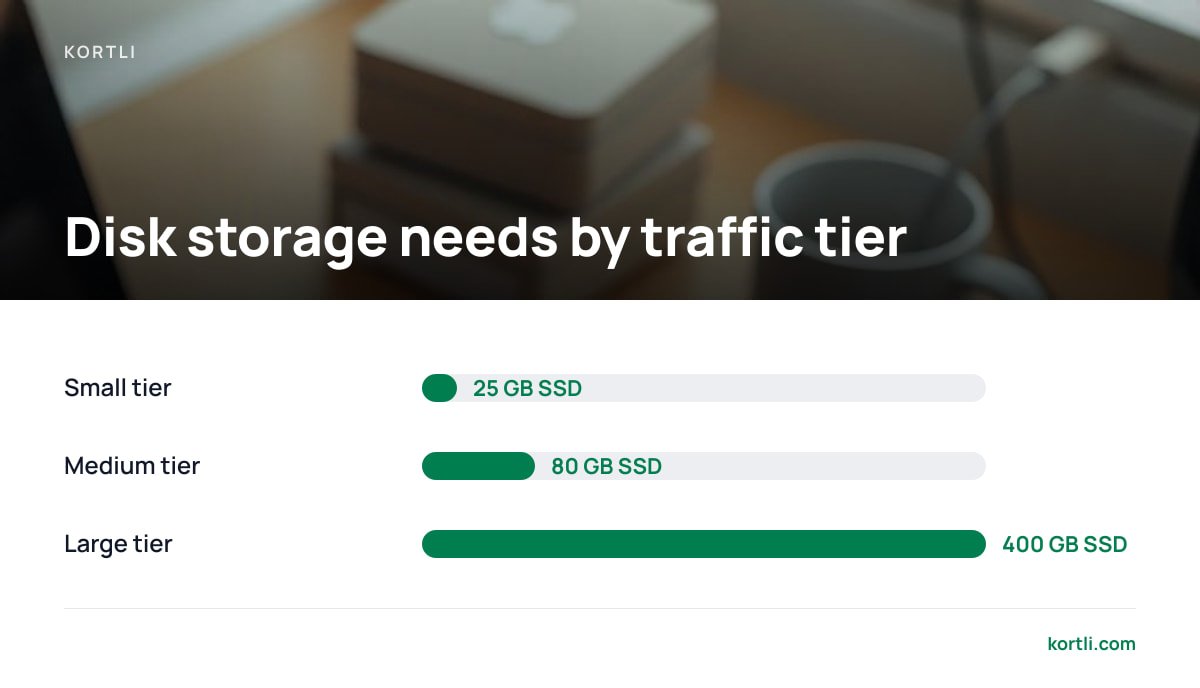
| Tier | Clicks per month | CPU | RAM | Disk | Notes |
|---|---|---|---|---|---|
| Small | Up to 1 million | 1 vCPU | 1 GB (add 1 GB swap) | 25 GB SSD | App, database and proxy on one box |
| Medium | 1 to 10 million | 2 vCPU | 2 to 4 GB | 80 GB SSD | Add a cache for slug lookups |
| Large | 10 to 50 million | 4 vCPU | 8 GB | 400 GB SSD | Move the database to its own volume or server |
At 0.5 KB per click, a million clicks a month adds roughly 6 GB of data a year. At 10 million a month it is about 60 GB a year. That is why the disk column grows faster than the CPU column. If you only need totals, you can aggregate old click rows into daily counts and cut that growth sharply.
One million clicks a month averages 0.39 requests per second (1,000,000 divided by the 2,592,000 seconds in 30 days).
Why the Average Load Misleads, and How Spikes Change the Plan
Averages hide the traffic that matters. A newsletter send, a TV mention or a launch-day post can push a week of clicks into a few minutes, so size for the burst you can imagine, not the monthly mean. A 1 vCPU server running a compiled or event-driven app can usually absorb tens of redirects per second. A heavier PHP stack with a cold database connection per request will fall over sooner.
Two cheap changes help. Keep slug lookups in memory (Redis, or the app's own cache) so a redirect skips the database read path. Write click events asynchronously, so a slow disk never delays the redirect. If your software supports both, the Small tier stretches a long way.
Printed material makes spikes worse and lifespans longer. A QR code on packaging can be scanned for years, long after you have forgotten the server. If you use logo-embedded codes, check minimum QR code size with a logo before printing, because a server upgrade cannot fix a bad print run.
The Stack Around the App: Proxy, Database, TLS and Monitoring
The shortener itself is one piece. Plan for these others from day one.
- Reverse proxy. Put nginx, Caddy or similar in front of the app. It terminates TLS, adds timeouts, and lets you swap or restart the app without dropping the public port.
- Database. Use whichever engine your software supports, and keep it on the same machine until you reach the Large tier. A local socket connection is faster and has less to fail than a network hop.
- TLS certificates. Let's Encrypt certificates last 90 days, so renewal must be automated. Most proxies do this for you, but you still need an alert if renewal fails.
- Firewall. Open 80 and 443 to the world, and SSH only to your own IP or through a VPN. Keep everything else closed, including the database port.
- Uptime monitoring. Check a real short link from outside your network every minute and alert by SMS or push, not only email. Test the redirect, not just the homepage.
- Time and updates. Turn on automatic security updates for the operating system, and set a calendar reminder to update the shortener on a schedule you choose.
Pro Tip: Monitor the certificate expiry date itself, not just whether the site loads. Set an alert at 14 days remaining. A renewal job can fail silently for weeks while the old certificate still works, and the first sign of trouble is every printed link showing a browser warning on the day it expires.
Redirect Status Codes: Why 301 Can Quietly Break Your Analytics
Most guides tell you to use a 301 because it is "permanent" and good for SEO. For a shortener that tracks clicks, that advice is wrong more often than it is right.
RFC 9110 defines 301 as a permanent move and marks it cacheable by default. Browsers and intermediaries can remember the destination and skip your server on the next click, so repeat visits never reach your analytics. If you later edit the destination, people with the cached redirect keep going to the old one.
RFC 9110 makes a 301 response cacheable by default, so a returning visitor's browser can skip your server entirely.
Use a 302 or 307 for links you track or might change. Use 301 or 308 only for links you will never edit and do not need to count, which for a business running campaigns is almost none of them. A 307 or 308 also forbids changing the request method, which matters only if you redirect form posts.
Where to Run It: VPS, Home Server or a Mac
The common forum advice is a small VPS, and it holds up. You get a static IP, a clean network path, snapshots and a provider who handles power and hardware. A 1 vCPU, 1 GB machine usually costs $5 to $6 a month from a mainstream provider, which is the price of a few coffees a year compared with a typical hosted plan. If you are weighing that trade directly, stop paying monthly for a link shortener walks through the order of operations.
A home server is possible but fragile. Many residential connections use a changing IP address or carrier-grade NAT, and some block inbound ports 80 and 443. Power cuts and router reboots become your uptime policy.
A Mac works for development. You can run a Linux container under Docker Desktop, point a test domain at it and see the whole workflow. For production it is a poor host, because macOS sleeps, restarts for updates and has no hands-off recovery after a power loss unless you configure it carefully. If a Mac mini is what you have, put it in a data center that offers Mac hosting, or use the Mac for staging and a Linux VPS for the real thing.
Your domain is also a dependency. If the registration lapses or the DNS provider has an outage, the best server in the world serves nothing. Turn on auto-renew, register for more than one year, and keep DNS TTL at 300 seconds so you can repoint to a new server within minutes.
Back Up the Right Things, and Prove You Can Restore Them

The server is replaceable in an afternoon. The data is not. Back up four things:
- The database. It holds slugs, destinations, passwords, A/B rules and click history.
- The configuration file. Environment variables, secrets, license key and proxy config.
- Uploaded assets. Logos used in QR codes and any custom files.
- A plain redirect export. One CSV of slug and destination URL (more on this below).
For the database, use a logical dump, not a copy of the files. The PostgreSQL documentation on backups explains that a file-system copy of a running database is only usable if the server is shut down, while a dump taken with pg_dump is consistent while the system runs. MySQL and MariaDB users get the same result from mysqldump --single-transaction on InnoDB tables.
A workable schedule:
- Dump the database nightly, compress it and encrypt it. Click data contains IP addresses, so treat the file as sensitive.
- Copy it to storage in a different provider or region. A provider snapshot in the same account is useful for fast rollback, but it is not an offsite copy.
- Keep 7 daily, 4 weekly and 3 monthly copies. That is 14 files, and they cost almost nothing.
- Once a quarter, restore into a blank server and time it. If it takes more than 30 minutes, fix your notes until it does not.
Pro Tip: Export a plain slug-to-destination CSV every hour, separate from the database backup. If the database is corrupted and your last dump is a day old, the CSV still has links created that morning. It can also be converted into a redirect map for nginx in minutes, which gets every printed link working again while you repair the real system.
Security and Privacy Duties You Take On
Self-hosting moves responsibilities onto you. Three of them need a decision before launch.
Open redirect abuse. A shortener that lets anyone create links is an open redirect by design, and spammers use those to launder phishing URLs through your domain. OWASP's guidance on unvalidated redirects describes the risk. Require a login to create links, and rate-limit the creation endpoint. Once your domain lands on a blocklist, recovering takes far longer than preventing it.
Click data is personal data. Under the GDPR, an IP address can count as personal data, and when you host your own analytics you are the controller. Decide how long raw click rows are kept, truncate or hash IPs if you do not need them, and delete them on schedule. Self-hosting keeps the data on a server you choose, but the obligation stays with you.
Password-protected links. If you use them, test the full flow after every update and restore. Mismatches after a restore are common when a secret in the config file was not backed up, and a password link that rejects the right password is usually a config or hashing issue you can fix in minutes if you know where to look.
Run a Self-Hosted Shortener You Pay for Once
You want your links on a server you control, without a recurring fee that decides whether they keep working. Kortli is a self-hosted link shortener you install on your own Linux server for a one-time license. It supports branded domains with no per-domain fee, password-protected links, A/B split tests, styled logo-embedded QR codes, and click analytics with geographic tracking that stays on your server. The current price is on the site.
Self-hosting means you own uptime, updates and backups, and no support plan replaces a tested restore. Check the spec sheet for the exact requirements of the version you install before you size a server, because the tiers above are general guidance and not Kortli's published minimums.
Frequently Asked Questions
What are the minimum server requirements to host your own URL shortener?
A Linux VPS with 1 vCPU, 1 GB of RAM (plus a little swap) and 25 GB of SSD storage is enough for around a million clicks a month. You also need a domain you control, a database, a reverse proxy and an automated TLS certificate. Check the software's own documentation, since requirements vary by stack.
Should I use a 301 or 302 redirect for a self-hosted shortener?
Use 302 or 307 for tracked links or any link whose destination you might change. RFC 9110 makes 301 cacheable by default, so browsers can skip your server on repeat visits, which undercounts clicks and keeps old destinations alive. Reserve 301 or 308 for links you will never edit or measure.
How often should I back up a self-hosted URL shortener?
Dump the database nightly, copy it to a different provider or region, and keep about 14 copies on a daily, weekly and monthly rotation. Add an hourly export of slugs and destinations as a fallback. Test a full restore at least once a quarter and time it.
Can I host a URL shortener on a Mac?
You can run one on a Mac for development or testing, usually through Docker. For production it is a poor fit, because macOS sleeps and restarts for updates, and home connections often have changing IPs or blocked inbound ports. A small Linux VPS is the safer choice.
How much disk space does click tracking use?
As a planning estimate, about 0.5 KB per click event including indexes, which works out to roughly 6 GB a year at one million clicks a month. Measure your real row size after a week and adjust. Aggregating old clicks into daily totals reduces growth significantly.
Sources
- RFC 9110: HTTP Semantics | IETF (RFC Editor)
- Why ninety-day lifetimes for certificates? | Let's Encrypt
- Backup and Restore | PostgreSQL Global Development Group
- Unvalidated Redirects and Forwards Cheat Sheet | OWASP
- Regulation (EU) 2016/679 (GDPR) | EUR-Lex, European Union
Leave a Reply