To stop Google indexing a password protected page, make the server check the password before it sends any content, and add a noindex header to the gate itself as a backup. Do not rely on robots.txt: it controls crawling, not listing. Chat apps build link previews from a separate fetch, so a page can be out of Google and still leak its title and image in Slack or WhatsApp.
TL;DR:
- A real server-side password gate keeps content out of Google. A robots.txt Disallow rule does not, because Google can still list a blocked URL it finds through links.
- Never combine Disallow with noindex on the same page. If Google cannot crawl the page, it never reads the noindex tag.
- Put noindex (meta tag or X-Robots-Tag header) on the gate page too, since a login screen that returns 200 can be indexed under a title like "Enter password".
- Link previews in chat apps are fetched by separate bots that ignore your index status. Give the gate generic title and image tags so nothing private appears in a card.
- If a locked page is already indexed, fix the cause first, then use the Search Console Removals tool, which hides a URL for roughly six months while the permanent fix is recrawled.
Table of Contents
- Can Google See a Password Protected Page? What Crawlers Actually Receive
- Why robots.txt Fails Here, and Is It Still Used?
- How to Stop Google Indexing a Password Protected Page, Step by Step
- Link Previews in Chat Apps: The Leak Google Settings Do Not Touch
- Four Ways a Locked Page Still Ends Up in Results
- Already Indexed? Remove It in This Order
- Why People Are Leaving Google, and What It Means for Hidden Pages
- Get Password-Protected Short Links That Do Not Leak Through Previews
- Frequently Asked Questions
- Sources
Can Google See a Password Protected Page? What Crawlers Actually Receive
Googlebot requests your URL the same way an anonymous visitor does. It has no password, so it sees whatever your server returns to someone who is not logged in. If the server returns the gated content anyway and hides it with JavaScript, the content is in the HTML and a crawler can read it. If the server returns a login form, Google sees a login form. If it returns a 401, Google sees nothing worth keeping.
That last case is the one you want. Google's documentation on HTTP status codes says Googlebot treats 4xx errors other than 429 as if the content does not exist, and URLs that already sat in the index get dropped. The 401 status is defined in RFC 9110 as "unauthorized", meaning the request lacks valid credentials. A correct server-side gate returning a 401 is the cleanest signal you can send.
Where the check happens matters. A script that hides content after the page loads protects nothing from a crawler, while a gate that runs on the server protects everything behind it. I cover how link-level gates are built in Password Protected Links: What They Lock and How to Build One, so here the focus stays on what search engines and preview bots can see around the lock.
Why robots.txt Fails Here, and Is It Still Used?
Yes, robots.txt is still used. The Robots Exclusion Protocol dates to 1994 and was published as an IETF standard, RFC 9309, in September 2022. Google, Bing and most well-behaved crawlers follow it.
It just does not do what people hope. Google's introduction to robots.txt states that the file manages crawler traffic and is not a way to keep a page out of Google. If other pages link to your URL, Google can index the bare address without ever visiting it. You then get a result with a URL and no description, which is arguably worse than nothing because it confirms the page exists.
If robots.txt blocks a page, Google never sees the noindex tag on it.
Two more problems make Disallow a poor choice for private pages:
- It is public. Anyone can open /robots.txt, so a line like
Disallow: /client-offer-2024/advertises the exact path you wanted hidden. - Noindex in robots.txt is dead. Google stopped honoring that unofficial directive on September 1, 2019, so old tutorials recommending it no longer work.
How to Stop Google Indexing a Password Protected Page, Step by Step
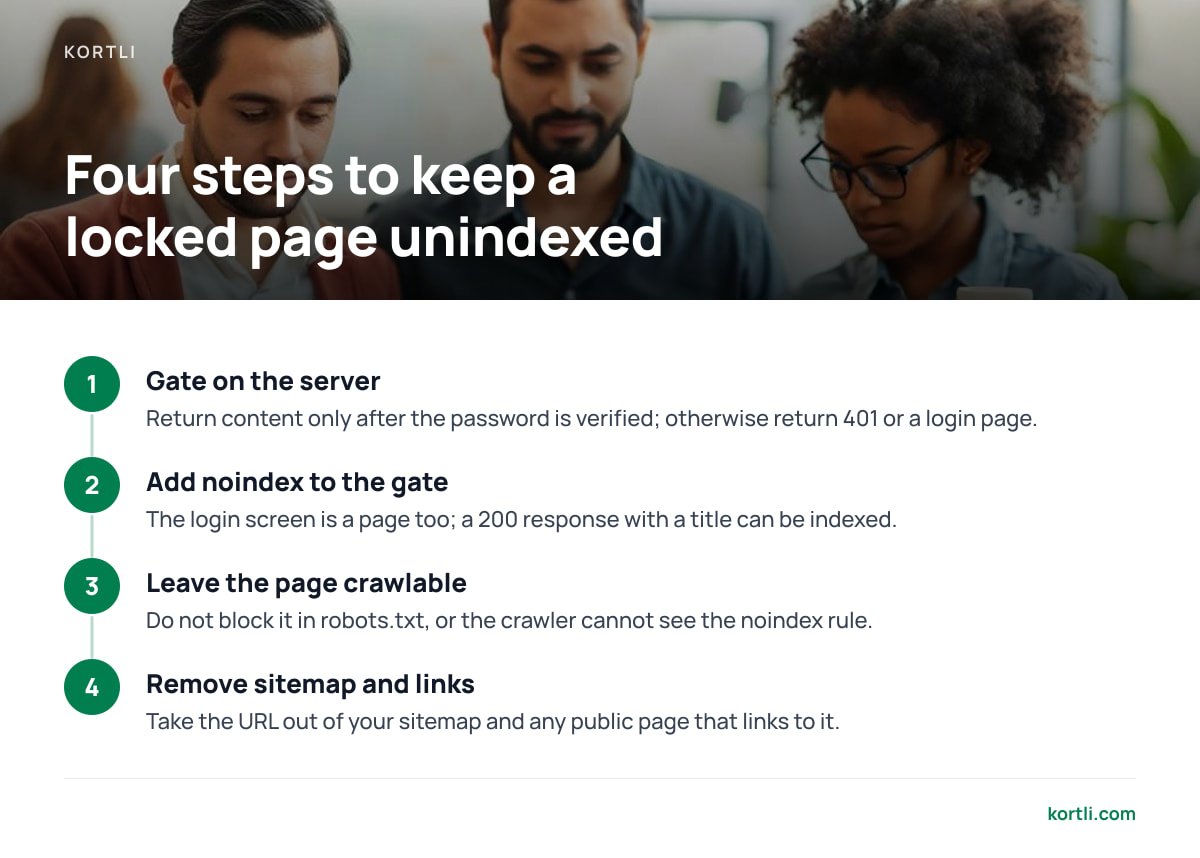
To keep Google from indexing a website or a single page, require authentication on the server and send a noindex signal on every response that crawlers can reach. Do both, in this order.
- Gate on the server. Return the content only after the password is verified, and return 401 or a login page otherwise. This is the only step that protects the content itself.
- Add noindex to the gate. The login screen is a page too. If it returns 200 with a title like "Password required", Google can index it, and you end up with dozens of identical junk results.
- Leave the page crawlable. Google's noindex guidance says the page must not be blocked by robots.txt, or the crawler cannot see the rule.
- Remove it from your sitemap and from any public page that links to it.
For an HTML page, the tag looks like this:
<meta name="robots" content="noindex, nofollow">
For PDFs, images or a whole directory, send a header instead. In nginx that is add_header X-Robots-Tag "noindex, nofollow" always;, and in Apache it is Header set X-Robots-Tag "noindex, nofollow". If you are on a hosted site builder where you cannot edit headers, use the platform's own visibility or viewer-restriction setting and then check the result in a private browser window.
| Method | Keeps content from Google? | Keeps it out of chat previews? | Locks the content? |
|---|---|---|---|
| robots.txt Disallow | No, URL can still be listed | Partly, depends on the bot | No |
| noindex meta tag or header | Yes, after a recrawl | No | No |
| Server-side password or 401 | Yes | Only shows the gate's metadata | Yes |
| Search Console Removals tool | Temporary, about six months | No | No |
| Generic Open Graph tags on the gate | Not relevant | Yes | No |
My pick is the third row plus noindex on the gate. Everything else is a supplement.
Link Previews in Chat Apps: The Leak Google Settings Do Not Touch

When you paste a URL into a chat app, the app's servers usually fetch it and build a card from the page's title, description and image. Those tags follow the Open Graph protocol. The fetch has nothing to do with Google's index, so a noindex tag does not stop it, and preview bots decide for themselves how to treat robots rules.
The bot receives the same anonymous response a crawler gets, which leaves two cases:
- The gate returns 401 or a bare form. The card shows the gate's title and image, or nothing. Nothing private leaks.
- The page serves full content, then covers it with a script. The bot reads your real title, description and og:image, and the card in the chat shows them to everyone in the channel.
The fix is simple. Give the gate its own generic tags, such as a title of "Protected link" and no og:image, and keep the real tags on the post-login page only. If your previews still show the private title, you are serving the content before the check. The same mistake sometimes causes the confusing symptoms covered in Password Link Rejects the Right Password, so check there if the gate itself misbehaves.
Pro Tip: Test as a stranger, not as yourself. Run curl -s https://yoursite.com/private-page | head -c 2000 from a terminal with no cookies and read the first 2 KB. Whatever title, description and og:image tags appear there are exactly what a crawler or chat bot sees. Do it again after every deploy, because a caching layer or a template change can quietly put the real tags back.
Four Ways a Locked Page Still Ends Up in Results
Most "my protected page got indexed" stories are leaks around the lock, not failures of it.
- The page was public first. If it was live for even a day before you added the gate, Google may already have it. Gating later does not erase the index entry.
- A public page links to it. Navigation menus, blog posts and sitemaps all hand the URL to crawlers. The gate stops the content, but the listing can persist until Google recrawls and gets a 401.
- The destination is unprotected. If you password protect a short link but the long URL behind it is public, anyone who learns the long URL skips the gate. The guide to URL password protection explains why the lock has to sit on the thing people actually load.
- Cached or archived copies. Shared screenshots, archive services and email forwards live outside your control. A password gate cannot recall content someone already copied.
Already Indexed? Remove It in This Order
The removal tools only paper over the problem if the cause is still live, so the order matters.
- Put the server-side gate in place and confirm with curl that an anonymous request gets 401 or a login page.
- Make sure robots.txt does not block the URL. Google must be able to recrawl it and see the 401 or noindex.
- Submit the URL in the Search Console Removals tool. Per Google's removals help, this hides the URL from results for roughly six months and does not delete anything by itself.
- Wait for the recrawl. When Google receives the 401 or the noindex, the permanent removal follows and the temporary hide no longer matters.
The Removals tool hides a URL for about six months. Only the gate or the noindex makes it permanent.
Why People Are Leaving Google, and What It Means for Hidden Pages
The question "why are people getting rid of Google" often appears next to this topic. People cite privacy, ad-heavy results pages, and AI-written answers replacing links. Some switch to other search engines, and some ask chat assistants instead.
None of that changes your job. Every major search engine and every AI crawler that respects standards starts from the same place: an unauthenticated request. A server-side gate works against all of them, while a robots.txt line depends on each crawler's good manners.
The related question, "what is the biggest enemy of Google," has a short answer for your purposes. Its business rivals are other search products and assistants, but the thing that stops Googlebot cold is a 401 response. The login wall is the strongest tool you have.
Get Password-Protected Short Links That Do Not Leak Through Previews
These problems come up constantly with hosted shorteners, where you cannot see or control what the gate page returns to a bot. Kortli is a self-hosted link shortener you install on your own Linux server, so you can read the response yourself, add headers at your web server, and check what a preview bot receives before you share a link. Password-protected links, branded domains and click analytics all run on your own machine, for a one-time payment instead of a monthly bill. If you are weighing the cost side, Stop Paying Monthly for a Link Shortener lays out the sequence.
A password on a short link protects the short link only. If the destination URL is public, anyone who has it can still open it and Google can still find it, so lock the destination as well. Check the gate's response and preview tags on your own install with the curl test above, and confirm the details in the current documentation before you send a private link to a client.
Frequently Asked Questions
How do you keep Google from indexing a website?
Require a login on the server so anonymous requests get a 401 or a login page, and add a noindex meta tag or X-Robots-Tag header to anything crawlers can reach. Do not rely on robots.txt alone, because Google can list a blocked URL it finds through links. Leave the page crawlable so Google can read the noindex rule.
Is robots.txt still used?
Yes. The Robots Exclusion Protocol became an IETF standard, RFC 9309, in September 2022, and major crawlers follow it. It manages crawling, not indexing, so it is the wrong tool for hiding a private page.
Why are people getting rid of Google?
Common reasons are privacy concerns, crowded ad placements, and AI-generated answers that replace clicking through to pages. It does not change how you protect a page, because a server-side password gate works against every crawler and AI bot that makes an anonymous request.
What is the biggest enemy of Google?
Commercially, it is competing search engines and AI assistants. For a private page, the thing that stops Googlebot is a 401 response from a real server-side password check, since Google drops 4xx pages other than 429 from its index.
Can a chat app show a preview of a password protected page?
Yes, if your server returns the real title, description and image to anonymous requests. Preview bots fetch the URL separately from Google and see whatever an unauthenticated visitor sees, so give the gate page generic tags.
How long does it take Google to drop a page after I add a password?
It depends on when Google recrawls the URL, and Google does not publish a fixed timeline. To hide it in the meantime, use the Search Console Removals tool, which suppresses the URL for roughly six months while the recrawl catches up.
Sources
- Block Search indexing with noindex | Google Search Central
- Introduction to robots.txt | Google Search Central
- RFC 9309: Robots Exclusion Protocol | IETF
- How HTTP status codes, and network and DNS errors affect Google Search | Google Search Central
- RFC 9110: HTTP Semantics | IETF
- The Open Graph protocol | ogp.me
Leave a Reply