
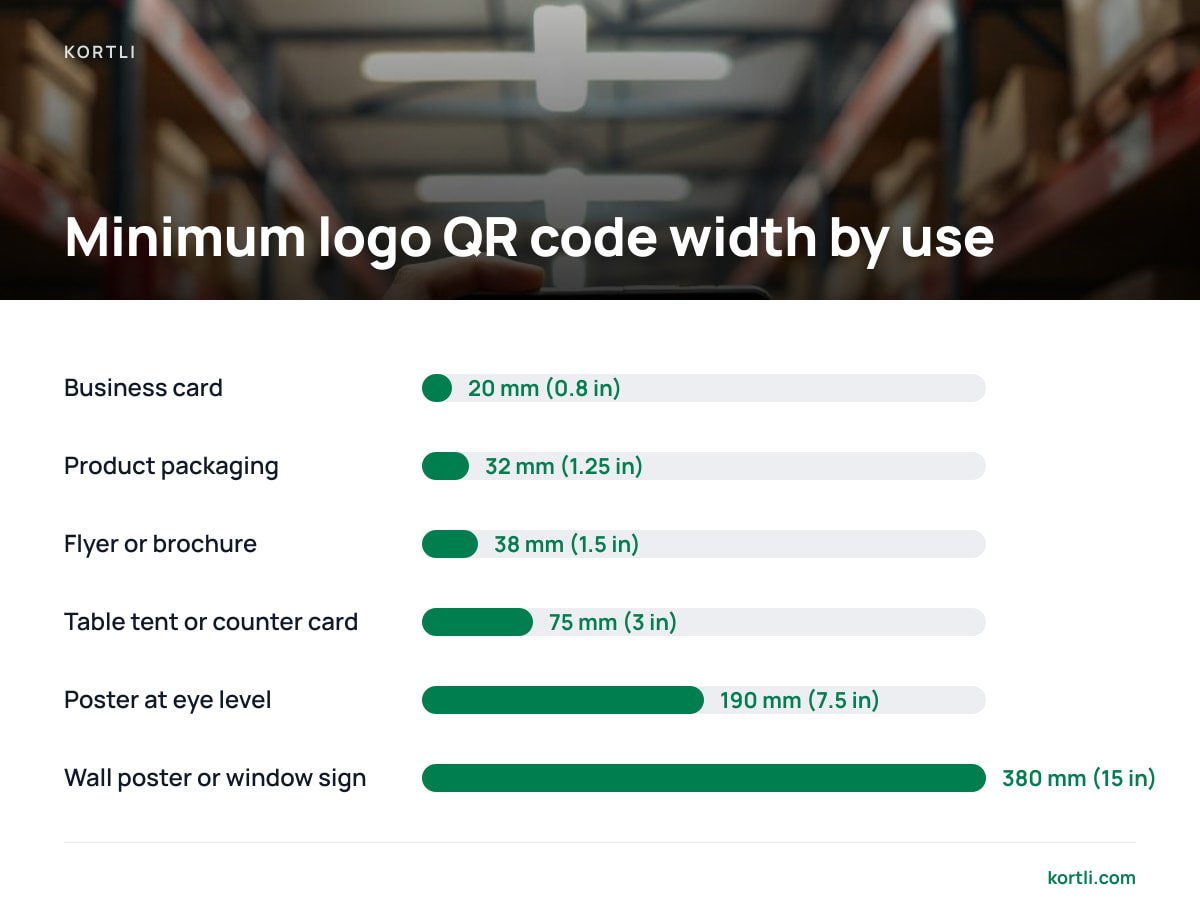
The minimum QR code size with a logo is about 20 mm (0.8 in) square on a business card, 32 mm on packaging, and roughly your scan distance divided by 8 for anything read from farther away. Module count sets that floor. A logo forces high error correction, high error correction adds modules, and your printer has to resolve every one of them. Plan for a code a quarter to a third wider than the same code without a logo.
TL;DR:
- Divide your real scan distance by 8 to get the minimum width of a logo QR code. Without a logo, divide by 10.
- A logo needs error correction level H, which adds modules. A 25-character URL goes from 25×25 modules at level M to 33×33 at level H, so every module shrinks 24% at the same printed width.
- Keep the logo, including its white padding, under 30% of the code's width (9% of its area) and never cover the three corner squares.
- A shorter URL is the cheapest way to shrink a code. A 120-character link at level H needs about 61×61 modules, and a 20 mm code of that size has modules of only 0.33 mm.
- Print a test at actual size on the actual stock, then scan it at 1.5 times the intended distance on your oldest phone before you approve a run.
Table of Contents
- Minimum QR Code Size With a Logo, by Print Use
- Why a Logo Makes the Code Bigger: Module Count Sets the Floor
- How Much of a QR Code Needs to Be Visible
- Business Cards, Packaging and Posters: What Changes on Each
- Pixels, DPI and iPhones: Sizing the File and Testing the Scan
- Do QR Codes Have to Be Square? Micro, Rectangular and Shaped Codes
- Get a Logo QR Code Built Around a Short Link You Own
- Frequently Asked Questions
- Sources
Minimum QR Code Size With a Logo, by Print Use
The table gives the width of the dark pattern only. It assumes a short URL (about 25 characters), error correction level H, a flat matte surface and a logo no wider than 30% of the code. Add the quiet zone, the blank margin around the code, on top. The formula behind it is scan distance divided by 8. The familiar no-logo rule of thumb is distance divided by 10, and the logo costs roughly another quarter. If you are still choosing a tool, our comparison of free QR generators with logo support covers that. This page covers size only.
| Use | Typical scan distance | Minimum code width | Comfortable width |
|---|---|---|---|
| Business card | 15 cm (6 in) | 20 mm (0.8 in) | 25 mm (1 in) |
| Flyer or brochure | 30 cm (12 in) | 38 mm (1.5 in) | 45 mm (1.75 in) |
| Product packaging | 25 cm (10 in) | 32 mm (1.25 in) | 40 mm (1.6 in) |
| Table tent or counter card | 60 cm (24 in) | 75 mm (3 in) | 90 mm (3.5 in) |
| Poster at eye level | 1.5 m (5 ft) | 190 mm (7.5 in) | 240 mm (9.5 in) |
| Wall poster or window sign | 3 m (10 ft) | 380 mm (15 in) | 450 mm (18 in) |
Treat the middle column as a floor. If the layout can spare 50% more room, use it. A bigger code scans faster, survives scuffs better and leaves your logo more space.
Why a Logo Makes the Code Bigger: Module Count Sets the Floor
A logo does not change how small a module can print. It changes how many modules you need. To survive a logo covering part of the pattern, you set error correction to level H, which Denso Wave, the inventor of the QR code, says restores up to 30% of the data. Level H also stores the least data per version, so the same URL needs a larger grid.
Take a 25-character URL. At levels L and M it fits in version 2, a 25×25 grid. At Q it needs version 3 (29×29). At H it needs version 4 (33×33), according to the byte capacities in Denso Wave's version table. Grid size is 17 plus 4 times the version number, on each side.
The same 25-character URL needs 25×25 modules at level M and 33×33 at level H, so at identical printed width every module in the logo version is 24% smaller.
Module size is what your printer has to hold. We use 0.5 mm as a comfortable working number for office, digital and offset printing, and we would not go below 0.4 mm without a test print. A 20 mm code with 33 modules gives 0.61 mm modules, which is comfortable. A 16 mm code at level M with 25 modules gives 0.64 mm, so on a business card the logo costs you about 4 mm of width.
URL length is the other lever, and most people ignore it. A URL with several tracking parameters, around 120 characters, pushes level H to version 11 or higher, which is 61×61 modules. Squeeze that into 20 mm and each module is 0.33 mm. A 25-character short link in the same space gives 0.61 mm modules, nearly twice as large. If you can only fix one thing, shorten the link before you shrink the logo.
How Much Text a QR Code Can Hold
The ceiling, at version 40 and level L, is 7,089 numeric digits, 4,296 alphanumeric characters or 2,953 bytes of binary data. At level H, version 40 holds about 1,273 bytes. That grid is 177×177 modules, so reaching 0.5 mm modules would take an 88 mm code, wider than a business card. For anything you print, store a short link and keep the text on the web page.
How Much of a QR Code Needs to Be Visible
At level H, the code can lose up to 30% of its data and still decode. That figure is a ceiling for damage of every kind, so your logo cannot claim all of it. Creases, ink scuffs, glare and a curved bottle all draw from the same budget, so spend little of it on design.
We cap logos at 30% of the code's width, which covers 9% of its area. Twenty to 25% of the width is safer. Measure the logo with its white padding, because the clear box behind a logo counts as covered modules. A tight 25%-wide logo with a thick white halo can easily behave like a 35%-wide one.
Some parts of the code cannot be covered at all:
- Finder patterns. The three large squares in the corners tell the scanner where the code is and which way it faces. Cover any part of one and many scanners fail.
- Timing and alignment patterns. These alternating lines and the small squares in larger versions keep the grid straight. A centered logo normally sits over only one alignment square, but keep it away from the timing lines.
- Format information. Strips of modules beside the finder patterns tell the scanner the correction level and mask. Keep the logo in the middle of the symbol.
- The quiet zone. The specification, ISO/IEC 18004, calls for a margin 4 modules wide on all sides. A 33-module code therefore needs a 41-module-wide area, which is 24.8 mm for a 20 mm code. Printing inside a colored box or against a busy photo edge breaks this.
For design purposes, aim to keep 90% of the data area visible, even though the correction math would let you drop to 70%. If you restyle the modules as dots or rounded shapes, read how to style a QR code without breaking the scan first, since stylized modules eat into the same budget.
Business Cards, Packaging and Posters: What Changes on Each

Business cards
A US card is 3.5 × 2 in (89 × 51 mm). A 20 mm code with its 4-module quiet zone occupies about 25 mm, which fits the card's height with 13 mm to spare for a name and a number. Without a logo and with a 25-character link at level M, a code can shrink to 16 mm. Below that you are guessing. Many pages say a 2 cm minimum applies to every code. That is wrong in both directions: with a 120-character URL, 2 cm is too small, and with a short link and no logo, 2 cm is larger than you need.
On uncoated cotton stock ink spreads and fills in gaps between modules, so test there first. Keep foil, spot UV and embossing off the code. Soft-touch laminate lowers contrast, which hurts more than a few millimeters of size.
Packaging
Packaging is where the obvious answer fails most often. A 32 mm code on a flat carton is fine. The same code on a tight bottle curve, a glossy film or a shrink sleeve will distort or reflect. We add 25% to the base size on curved surfaces and keep the code on the flattest panel. Flexographic printing on film spreads ink more than offset or digital, so ask your printer for their smallest reliable feature and make each module at least twice that.
If the code must also scan at a checkout or in a warehouse, follow GS1 Digital Link guidance, which has its own symbol-quality and sizing rules, and use this table only for consumer scans. When the pack is too small for 25 mm, drop the logo and go to level M. A plain code that scans beats a branded one that does not.
Posters and signs
Measure where people stand, not how big the poster is. A transit shelter poster read from 3 m needs 38 cm. The same poster in a corridor, read from 1 m, needs 13 cm. Place the code between waist and eye height, away from glass if you can, and add 25% if viewers will be angled to it. Print variable codes for different locations separately, and use scan analytics that show which placements actually get scanned to tell you if a poster is too small in the real world.
Pixels, DPI and iPhones: Sizing the File and Testing the Scan
For print, work from module count. A version 4 code is 33 modules wide, so export it at a multiple of 33 pixels: 8 pixels per module gives 264 pixels. Place that at 20 mm and you get about 335 dpi. A random size like 250 pixels forces the software to resample, which blurs module edges. For screens, use at least 4 pixels per module with a logo (6 is safer), so a 41-module code with its quiet zone needs about 164 to 246 pixels.
Pro Tip: Request SVG or PDF for anything printed. Vector files keep every module edge sharp at any size, while a PNG scaled up even 20% softens edges, and the softness lands on the smallest modules first.
An iPhone reads QR codes straight from the Camera app, as Apple's own instructions describe, so there is no separate size requirement for iPhone beyond ordinary scanning physics. The practical limit is focus. Hold a phone too close to a small code and the lens cannot focus, so test a business-card code at the distance a hand holds a card, about 15 cm.
Before approving a print run, scan the proof at 1.5 times the intended distance, at a 30 degree angle, in dim light, on the oldest phone you can find. If it passes, you have real margin.
A test printed on the final stock beats any calculator, including ours. If you have branded colors, how to create a branded QR code that won't break covers the contrast thresholds worth checking at the same time.
Do QR Codes Have to Be Square? Micro, Rectangular and Shaped Codes
A standard QR code is a square grid, and the three corner finder patterns assume it. You can wrap the code in a circle, a bubble or a branded frame, but the module grid inside stays square and the quiet zone stays intact.
Two other symbol types change the shape. Micro QR has one finder pattern and grids from 11×11 to 17×17, but its largest version holds only 35 digits or 15 bytes, so a URL does not fit. It also stops at correction level Q, so it cannot carry a logo safely. Rectangular Micro QR (rMQR), also from Denso Wave, is a long, thin format for narrow labels. Check whether your audience's phones read it before you print thousands. For consumer print, use a standard square code.
Get a Logo QR Code Built Around a Short Link You Own
The method is short: keep the URL short, keep the grid at the lowest version that works at level H, and size the print from module size. Kortli is a self-hosted link shortener you install on your own Linux server. Its styled, logo-embedded QR codes point at a short link on your own domain, so a 25-character link keeps a business-card code at 33 modules instead of 61. Because the code stores the short link, you can change the destination later without reprinting a single card, and no subscription exists to lapse and kill the link.
Kortli is a one-time license with no monthly fee; the current price is on the site. You need to be comfortable running a Linux server. The physics in this article apply to our codes as much as anyone's, so no generator can make a 120-character link scan at 15 mm. Check the spec sheet for the error correction levels and export formats your print job needs, and run the test print before the order goes out.
Frequently Asked Questions
How small can a QR code be on a business card?
With a short link (about 25 characters) and no logo, a QR code at level M can be as small as 16 mm, which gives modules of about 0.64 mm. With a logo at level H, plan for 20 mm. Going smaller is only safe if you test on your actual card stock.
Do QR codes have to be square?
Standard QR codes are a square grid, and the three corner finder patterns depend on it. You can put a code inside a round or branded frame as long as the grid and its 4-module quiet zone stay intact. Micro QR and rectangular Micro QR exist as other shapes, but neither suits a logo code with a URL.
How much of a QR code needs to be visible?
At level H a code can lose up to 30% of its data, so in theory 70% must be readable. For design, keep 90% of the data area visible, because scuffs, glare and curvature use the same budget. The three corner squares and the quiet zone must always stay clear.
How much text can a QR code hold?
The maximum is 7,089 numeric digits, 4,296 alphanumeric characters or 2,953 bytes at version 40 with level L. With level H for a logo, version 40 holds about 1,273 bytes. In print, a short link is far more practical than long text.
What is the minimum QR code size with a logo in pixels?
Count the modules, then use at least 4 pixels per module on screen, with 6 safer. A 33-module code exported at 8 pixels per module is 264 pixels square, which prints sharply at 20 mm. For print, send SVG or PDF instead of a bitmap when you can.
Sources
- QR Code Version and Capacity | Denso Wave
- Error Correction Feature of QR Code | Denso Wave
- Micro QR Code | Denso Wave
- rMQR Code | Denso Wave
- GS1 Digital Link | GS1
- Scan a QR code with your iPhone camera | Apple Support
Leave a Reply