

The real choice for a URL shortener in 2024 is who controls the redirect, not who makes the shortest link. Every shortener sends clicks to the right page. What differs is whether those links keep working when a subscription lapses, a vendor changes plans, or a service shuts down. If you print links on packaging or QR codes, choose a setup where you own both the domain and the server that answers it.
TL;DR:
- A short link is only as durable as the domain and server behind it. If you own both, no vendor can switch your links off.
- In 2024 Google announced that its retired goo.gl links would stop redirecting. That made link ownership a practical risk instead of a theoretical one.
- Use 302 or 307 redirects for links you track or might retarget. Browsers cache 301s, which can quietly undercount repeat clicks.
- Under GDPR, click logs containing IP addresses can count as personal data. Where that data is stored and how long you keep it matter legally.
- For most technically comfortable teams, a self-hosted shortener on a branded domain is the best balance of control, cost, and privacy.
Table of Contents
- What Changed for URL Shorteners in 2024, and Why Ownership Became the Question
- Hosted vs. Self-Hosted vs. Open Source: Three Ways to Run a Link Shortener
- The Redirect Code Matters More Than the Short Code
- Click Data Is Personal Data: The Privacy Rules You Can't Ignore
- QR Codes Are Where Broken Links Do the Most Damage
- What Self-Hosting Actually Costs You, and What Can Go Wrong
- Features Worth Paying For, and the Ones That Are Just Marketing
- Own Every Short Link You Print, for One Payment
- Frequently Asked Questions
- Sources
What Changed for URL Shorteners in 2024, and Why Ownership Became the Question
For years, the main risk with a hosted shortener was price creep. In 2024 the bigger risk became visible: links can simply stop working.
Google stopped accepting new goo.gl links in 2019 but kept existing ones redirecting. Then, in July 2024, the Google for Developers Blog announced that goo.gl links would stop responding in August 2025. Google later narrowed that cutoff to links with no recent activity. Even so, millions of links printed in books, slide decks, and old campaigns were exposed to a decision their creators had no say in.
A short link has two owners: whoever controls the domain, and whoever runs the server that answers it. If either one is not you, your link has an expiry date you don't set.
The same logic applies to every hosted service. If your links live on the vendor's domain, cancelling the plan can break them. If they live on your branded domain but resolve through the vendor's servers, you still depend on that vendor's export tools and goodwill. It's worth reading what a hosted subscription actually buys you before you put another thousand links on someone else's infrastructure.
Hosted vs. Self-Hosted vs. Open Source: Three Ways to Run a Link Shortener

You have three realistic options in 2024. They trade convenience against control in different ways.
| Factor | Hosted (subscription) | Open source, self-hosted | Commercial self-hosted (one-time license) |
|---|---|---|---|
| Who runs the server | The vendor | You | You |
| Ongoing software cost | Monthly or annual fee | Free | One payment |
| Links survive if you stop paying | Usually not, or only partly | Yes | Yes |
| Where click data lives | Vendor's infrastructure | Your server | Your server |
| Custom domains | Often capped by plan tier | Unlimited | Unlimited |
| Setup effort | Minutes | Hours to days, varies by project | Typically an hour or two |
| Support when it breaks | Vendor support | Community forums, your own time | Vendor support |
| Feature depth (QR, A/B tests, password links) | Usually strong on paid tiers | Varies widely | Usually strong |
Our view: hosted makes sense for a one-off campaign you'll never revisit. Free open source tools suit developers who enjoy maintaining software and don't mind patching. For a business that prints links and needs them to work in 2029, self-hosting on your own domain wins. The breakdown of open source alternatives and what "free" really costs covers the maintenance side in detail.
The Redirect Code Matters More Than the Short Code
Most shortener comparisons skip the HTTP status code your links return. That code affects your analytics, your SEO, and whether you can safely change a destination later.
RFC 9110, the IETF's current HTTP Semantics standard, defines the codes that matter here:
- 301 Moved Permanently. This tells browsers and search engines the move is permanent. Browsers may cache it, so a repeat visitor can skip your server entirely.
- 302 Found. This is a temporary redirect. Browsers normally re-request it each time, so every click reaches your server and gets counted.
- 307 Temporary Redirect and 308 Permanent Redirect. These work like 302 and 301, but they forbid the browser from changing the request method. That matters mostly for form submissions and API calls.
Google Search Central's guidance on redirects treats permanent server-side redirects as a strong signal that the target is the canonical page. Google also says it follows temporary redirects. For a marketing short link, that SEO difference rarely matters. The short URL isn't the page you want ranked; the destination is.
Pro Tip: Default to 302 for any link you track or might retarget, and save 301 for links you are certain will never change. A cached 301 means a returning visitor's browser can send them straight to the old destination without contacting your server. That breaks click counts and, worse, ignores any later edit to the destination. You cannot clear a cache on someone else's laptop.
Click Data Is Personal Data: The Privacy Rules You Can't Ignore

Every click your shortener logs usually captures an IP address, a timestamp, a user agent, and often a referrer. In Europe, that is not neutral telemetry.
The EU General Data Protection Regulation (Regulation 2016/679) explicitly lists online identifiers as personal data. In the 2016 Breyer ruling (case C-582/14), the Court of Justice of the EU held that even dynamic IP addresses can count as personal data when the site operator has lawful means of identifying the person behind them. GDPR applies to anyone processing data about people in the EU, wherever the business is based.
What this means in practice:
- With a hosted shortener, you rely on the vendor's processing terms. Your click logs sit on their infrastructure, under their retention schedule and their sub-processors. You need a data processing agreement and a clear answer on where the data is stored.
- With a self-hosted shortener, you remove a third party. You remain the controller, and the logs stay on a server you chose, in a region you chose.
- Self-hosting doesn't make you compliant by itself. You still need a retention limit, a privacy notice, and ideally IP truncation, meaning you store a shortened version such as 203.0.113.0 instead of the full address. Geographic tracking at country level works fine with truncated IPs.
Our take: if you market to European customers, keeping click analytics on your own server is the simplest way to answer a regulator's first question, which is "where does this data go?"
QR Codes Are Where Broken Links Do the Most Damage
A broken short link in an email is annoying. A broken short link on 50,000 printed labels is a reprint.
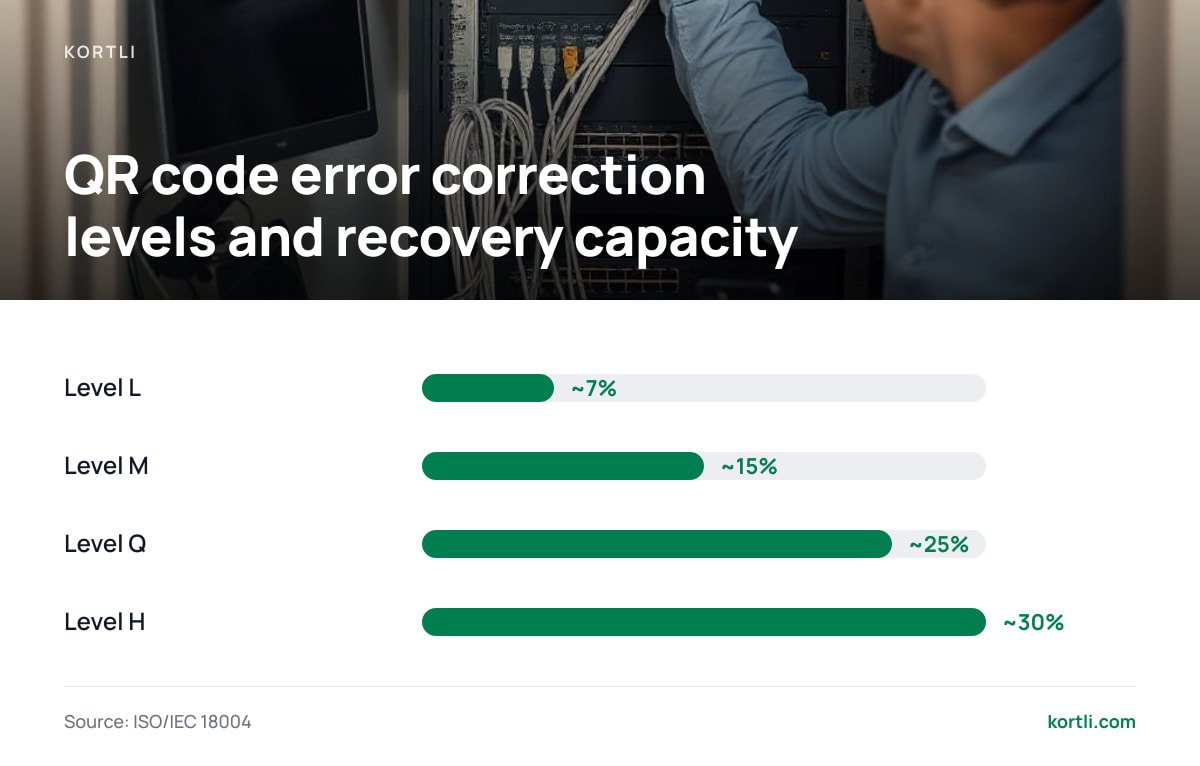
QR codes are defined by ISO/IEC 18004, which specifies four error correction levels:
- L recovers about 7% of the code
- M recovers about 15%
- Q recovers about 25%
- H recovers about 30%
That recovery margin is what lets a logo sit in the middle of the code without making it unreadable.
Embed a logo in a QR code and you are spending its error correction budget. At level H, roughly 30% of the code can be lost or covered and it still scans; at level L, only about 7% can.
The bigger lesson is about what you encode. A static QR code that points straight at a long product URL can never be changed. A QR code that encodes your own short link, on your own domain, can be retargeted forever: when the product page moves, you update one redirect instead of reprinting. The guide to creating a branded QR code that won't break walks through logo sizing, contrast, and quiet-zone rules.
What Self-Hosting Actually Costs You, and What Can Go Wrong

Self-hosting isn't free just because there's no monthly invoice. Be honest with yourself about the work involved.
The real running costs
- A small Linux server. A basic VPS in the $5 to $10 a month range handles a typical business's redirect traffic comfortably, because a redirect is one of the cheapest responses a web server can send.
- Your short domain. Expect a normal annual registration fee, which varies by extension. Let this renewal lapse and every link you've printed dies with it.
- Your time. Plan for operating system updates, TLS certificate renewals (usually automated), and the occasional software upgrade.
The risks people underestimate
- Abuse. If you let anyone create links, spammers will find you, and your domain can land on blocklists. Keep link creation behind a login, and consider checking destinations against Google Safe Browsing.
- Backups. Your link table is the asset. Back it up off-server, on a schedule, and test a restore at least once.
- Single point of failure. If the server goes down, every link goes down. Uptime monitoring with an alert to your phone covers most of that risk.
Pro Tip: Put short links on a separate domain or subdomain from the one you send email from. If abuse ever gets the short domain blocklisted, your email deliverability on the main domain stays intact.
For a fuller walkthrough of setup, server sizing, and failure modes, see how to run your own URL shortener.
Features Worth Paying For, and the Ones That Are Just Marketing
Feature lists in this category are long and repetitive. These are the ones that hold up.
- Unlimited custom domains. This is worth it, because it's the feature that makes ownership real. Plans that charge per branded domain are charging rent on something you already own.
- Editable destinations. These are essential, and every link you print depends on them.
- Password-protected links. These are useful for sharing internal documents, price sheets, or pre-release assets without a full access-control system.
- A/B split testing. This is worth it if you run paid campaigns. Sending 50% of clicks to each of two landing pages behind one printed link is something you can't do once the code is on paper.
- Country-level click analytics. Useful. City-level precision from IP data is often unreliable, so don't pay a premium for it.
- "AI link insights" and engagement scores. Mostly marketing. Raw clicks by date, source, and country answer nearly every real question.
Own Every Short Link You Print, for One Payment
Everything above comes down to one move: keep your links on your domain, answered by your server. Kortli is a self-hosted link shortener you install on your own Linux server and pay for once. It includes branded domains with no per-domain fee, editable destinations, password-protected links, and A/B split testing. You also get styled QR codes with your logo built in, plus click and geographic analytics that are stored on your server rather than ours.
The honest caveat is that you're the one running the server. Kortli removes the subscription, but it can't remove the need for backups, OS updates, and a domain you renew on time. If you'd rather never touch a terminal, hosted is the easier path. Check the current license price and the server requirements on the spec sheet before you buy, and confirm your host meets them.
Frequently Asked Questions
What is the best URL shortener in 2024?
For one-off campaigns, a hosted shortener is the fastest option. For links you'll print or rely on for years, a self-hosted shortener on your own branded domain is the safer pick, because no vendor can switch your links off. Open source tools suit developers who are happy to maintain the software themselves.
Do short links stop working if I cancel my subscription?
Often they do, at least in part. Links on a vendor's domain usually depend on an active account, and links on your branded domain still resolve through the vendor's servers until you move them. Owning both the domain and the server is the only way to make links independent of any subscription.
Should my short links use a 301 or 302 redirect?
Use 302 or 307 for links you track or might change, because browsers can cache 301 redirects and skip your server on repeat visits. Reserve 301 for destinations that will never change. For marketing short links, the SEO difference between the two is rarely significant.
Is click tracking on short links covered by GDPR?
It can be. GDPR treats online identifiers as personal data, and the EU Court of Justice has held that even dynamic IP addresses can qualify. Set a retention limit, update your privacy notice, and consider truncating IP addresses before storing them.
How much does it cost to self-host a URL shortener?
Expect a small Linux VPS, typically $5 to $10 a month, plus an annual domain registration fee. Add your time for updates and backups. Software cost ranges from free for open source projects to a one-time license for commercial self-hosted tools.
Sources
- RFC 9110: HTTP Semantics | RFC Editor (IETF)
- Redirects and Google Search | Google Search Central
- Regulation (EU) 2016/679 (General Data Protection Regulation) | EUR-Lex
- ISO/IEC 18004: QR Code bar code symbology specification | ISO
- Google for Developers Blog (Google URL Shortener announcements) | Google
- Google Safe Browsing | Google
Leave a Reply