

Several open source alternatives to Bitly are mature enough to run a business on. You install one on your own server, point a domain at it, and pay nothing in license fees. The real choice is not which one to use. It is who owns the domain and the click data, because that decides whether your links survive. An open source shortener on a domain you control beats any hosted plan. A free hosted plan on someone else's domain can disappear with your links.
TL;DR:
- Open source shorteners cost $0 to license but roughly $70–$100 a year to run once you add a small server and a domain.
- Your links stay portable only if they live on a domain you own. The software is replaceable and the domain is not.
- Free hosted tiers suit one-off links. Nothing guarantees they stay free, so don't print them on anything permanent.
- Use 302 redirects if you care about accurate click counts, because browsers cache 301s and skip your server on repeat visits.
- Click logs with IP addresses can count as personal data under GDPR, which favors self-hosting for privacy-sensitive teams.
Table of Contents
- Open Source Bitly Alternatives: What You're Actually Choosing Between
- Is There a Free Alternative to Bitly? Yes, and It Comes in Three Kinds
- Is the Oldest Free Shortener Free Forever, and Is It Better?
- What "Free" Costs When You Self-Host: The Real Numbers
- How to Judge an Open Source Shortener on GitHub Before You Install It
- The Redirect Detail That Quietly Skews Your Click Counts
- Privacy and Data Ownership: Why Your Click Logs Count as Personal Data
- The Best Free URL Shortener in 2026 Depends on One Question
- Own Every Link You've Ever Printed, Without the Monthly Bill
- Frequently Asked Questions
- Sources
Open Source Bitly Alternatives: What You're Actually Choosing Between
When you search for a Bitly alternative that is open source, most results hand you a list of GitHub repositories and stop there. That skips the decision that matters. Every link shortener does the same core job: it stores a short path, looks up a long URL, and returns an HTTP redirect. The software is close to a commodity. What differs is who controls the three things your links depend on: the domain, the database, and the server that answers the request.
With a hosted shortener, the vendor controls all three unless you pay extra for a custom domain. With an open source shortener you install yourself, you control all three, but you also maintain them. With a paid self-hosted shortener, you still control all three, and someone else maintains the code.
If you want the mechanics of how redirects and short paths work, our URL shortener link guide covers them. This article is about the money, the risk, and which route makes sense for you.
Is There a Free Alternative to Bitly? Yes, and It Comes in Three Kinds
Yes, there are free alternatives, and they fall into three groups with very different trade-offs.
| Option | License cost | Running cost per year | Who owns the domain | Who holds click data | Main risk |
|---|---|---|---|---|---|
| Free hosted tier | $0 | $0 | The vendor | The vendor | Plan limits change or the service shuts down |
| Open source, self-hosted | $0 | ~$70–$100 (server + domain) | You | You | You handle updates, backups, and security |
| Paid self-hosted (one-time license) | One-time fee | ~$70–$100 (server + domain) | You | You | You still run the server |
| Paid hosted subscription | Recurring | Often hundreds per year | You, if you add a custom domain | The vendor | Cancel and your redirects stop |
Free hosted tiers. These are the fastest to start with. They usually cap monthly links, hide analytics behind a paywall, and generate links on the vendor's domain. That last point is the one that hurts later.
Open source, self-hosted. The software is free under a license approved by the Open Source Initiative, which means you can run, study, and modify it. You supply the server, the domain, and the evenings spent on upgrades.
Paid self-hosted. You pay once for the software and run it on your own server. You get the ownership benefits of open source without having to vet and maintain a community project yourself.
If you'd rather compare hosted services side by side, see our roundup of sites like Bitly.
Is the Oldest Free Shortener Free Forever, and Is It Better?
The long-running free shortener that most people try first still offers free links. Even so, "free forever" is not something any hosted service can promise you in a way that binds them. Free tiers exist at the vendor's discretion. Limits, ads, link expiry rules, and analytics access have all changed across the industry over the years, and the terms of service almost always reserve the right to change them again.
Is it better than the big branded-link platform? It depends on the job.
For a one-off link you'll share once, yes. It is faster, requires no account for basic use, and has no setup.
For anything branded or measured, no. Generic links on someone else's domain get you weaker analytics and less trust from people deciding whether to click. If the service changes course, you have nothing to fall back on.
The history here is not reassuring. The volunteer archivists at Archive Team run a project called URLTeam specifically because URL shorteners shut down and take millions of redirects with them.
A short link is only as permanent as the domain it lives on. Change the software all you like, but if you don't own the domain, you don't own the link.
What "Free" Costs When You Self-Host: The Real Numbers

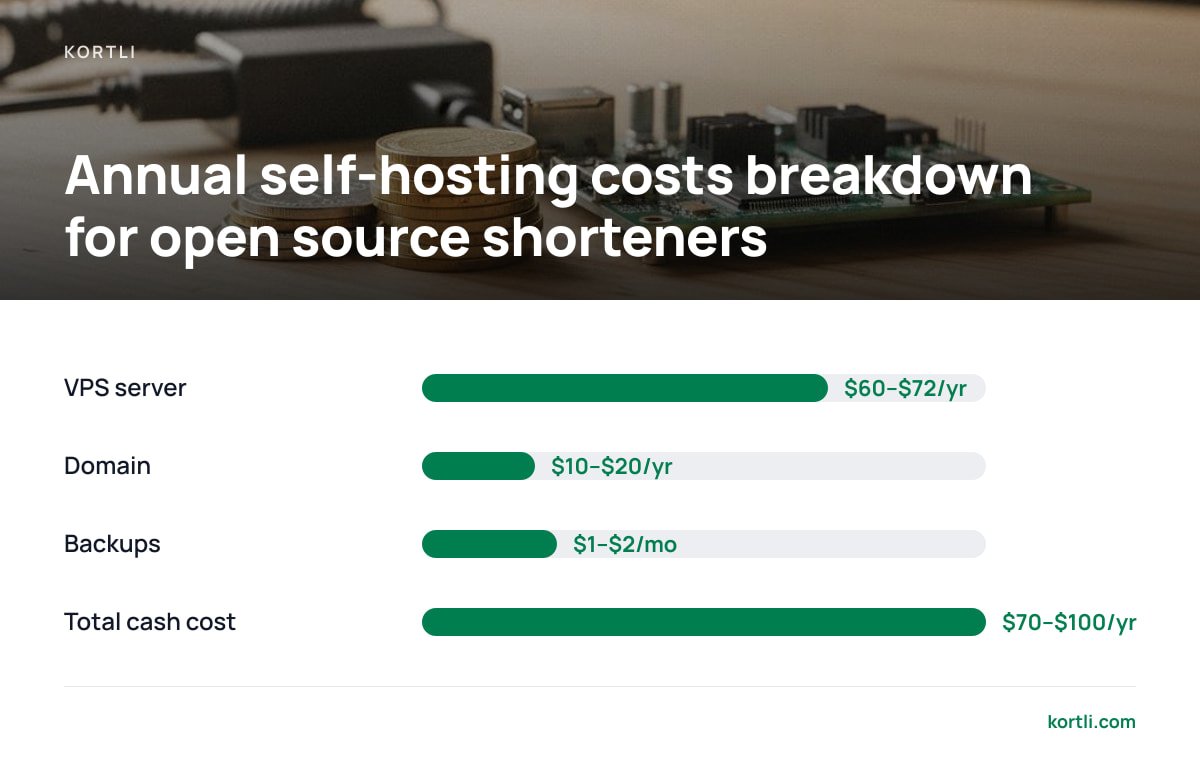
Open source means the license is free. It does not mean running the shortener is free. Here is a realistic first-year budget for a small business setup.
A small VPS: about $5–$6 a month. A single-core server with 1 GB of RAM handles a typical shortener comfortably. Redirects are tiny requests. That works out to roughly $60–$72 a year.
A short domain: about $10–$20 a year. Common extensions sit in that range. Short, premium, or vanity domains can cost far more.
Backups: often $1–$2 a month. Most hosts sell automated snapshots. Skip them and a single disk failure wipes every link you've made.
Your time: budget about an hour a month. That covers OS security updates, application upgrades, checking that backups actually restore, and watching for abuse if your shortener is public.
So the cash cost is roughly $70–$100 a year. Compare that with a hosted subscription at, say, $35 a month, which comes to $420 a year. That money stops buying you anything the day you cancel. Self-hosting usually pays off within the first few months. The hidden cost is the hour a month, and that hour is the one people underestimate.
At $35 a month, a hosted plan costs $1,260 over three years. The same three years self-hosted costs about $250 in server and domain fees.
How to Judge an Open Source Shortener on GitHub Before You Install It
Reddit threads and curated GitHub lists will give you a dozen candidates. Most of them work on day one. The question is whether they'll still be maintained on day 700. Check these before you commit.
Recent commits and releases. If the last meaningful release is more than a year old and the open issues are piling up, the project may be drifting. You inherit any unpatched vulnerabilities.
The license. Most projects use permissive licenses like MIT. Some use the GNU Affero General Public License. The AGPL requires you to offer your modified source code to users who interact with the software over a network. That's fine for internal use, but read it before you customize the code and expose it to the public.
The stack you'd be maintaining. A PHP and MySQL project, a Node.js project, and a Go binary in a container all need different skills to patch. Pick the one your team can actually debug at 11 p.m.
Analytics depth. Some projects only count total clicks. Others log referrer, country, and device. Some need a plugin for anything beyond a raw count.
Bot filtering. Link previews in chat apps and email security scanners click your links automatically. Without filtering, your numbers can be inflated noticeably.
Features you'll need in six months. Password protection, QR codes, link expiry, A/B splitting, and a usable API are often missing or bolted on. If you'll need QR codes, read what to know before building a self-hosted QR code generator first.
The Redirect Detail That Quietly Skews Your Click Counts
Most shorteners default to a 301 redirect, which tells browsers the move is permanent. RFC 9110, the HTTP Semantics standard, allows 301 responses to be cached, and browsers do cache them. When someone clicks the same short link a second time, their browser may go straight to the destination without contacting your server, so that click is never logged.
A 302 or 307 redirect is temporary, so the browser checks with your server every time. You get an accurate count.
The SEO trade-off is smaller than people assume. Google Search Central explains that permanent redirects signal the target should be shown in search results, while temporary ones signal the original URL should be. For marketing short links that you never expect to rank, that difference rarely matters.
Pro Tip: Use 302 redirects for campaign links where click accuracy matters, and 301 only for links you treat as permanent aliases. If your open source shortener has no per-link redirect setting, check whether it's a global config option before you deploy. Changing it after thousands of links have been cached in browsers won't recover the clicks you already missed.
Privacy and Data Ownership: Why Your Click Logs Count as Personal Data

Every click on a short link records something about a person: an IP address, a user agent, a rough location, a time. Under the EU's GDPR, Recital 30 names online identifiers such as IP addresses as data that can identify people when combined with other information.
With a hosted shortener, that data sits on the vendor's servers under the vendor's policies. If you run campaigns aimed at EU residents, you have to account for that vendor as a data processor. Self-hosting doesn't remove your obligations. It does shorten the chain: you choose where the server sits, how long logs are kept, and whether IPs are truncated before storage.
The same logic applies to sensitive links. If a short link points to a private document, putting a password gate on infrastructure you control is cleaner than trusting a third party. Our guide on how to password protect a URL covers what actually holds up.
The Best Free URL Shortener in 2026 Depends on One Question

There is no single best free URL shortener in 2026. The right answer depends on one question: will this link still need to work in three years?
If no, use a free hosted tier. For a link in a group chat or a one-time post, it's the fastest option, and losing the link later doesn't matter.
If yes, and you have someone comfortable with Linux, go self-hosted. A maintained open source project on your own domain costs under $100 a year and keeps every link under your control.
If yes, but nobody wants to babysit a GitHub project, pay once for self-hosted software. You keep the ownership and skip the vetting, patching, and plugin hunting.
My pick for most small businesses that print links on packaging, flyers, or business cards is self-hosted on a domain you own, every time. A hosted plan is fine for experiments. It should never hold the links on anything you can't reprint.
Own Every Link You've Ever Printed, Without the Monthly Bill
Kortli is a self-hosted link shortener you install on your own Linux server for a one-time payment. It solves the exact problems above. Your links live on your domains, with no per-domain fee. Click analytics and geographic tracking are stored on your server, not someone else's. Password-protected links, A/B split testing, and styled, logo-embedded QR codes are built in, so you don't have to piece them together from plugins.
The honest caveat: Kortli removes the subscription, not the server. You still pay your host roughly $5–$6 a month, and you're still responsible for OS updates and backups. If nobody on your team is comfortable with a Linux command line, factor that in. Check the current license price and system requirements on the site before you buy, and compare our spec sheet against whatever you're running today.
Frequently Asked Questions
Is there a free alternative to Bitly?
Yes. You can use a free hosted tier, which is the quickest option but runs on the vendor's domain, or install an open source shortener on your own server, which has no license fee. Self-hosting still costs roughly $70–$100 a year for a small server and a domain.
What is the best free URL shortener in 2026?
It depends on how long the link needs to last. For throwaway links, a free hosted tier is fine. For anything printed or branded, a self-hosted shortener on a domain you own is the better choice because your links survive any vendor change.
Are free hosted URL shorteners free forever?
No hosted service can bind itself to staying free forever, because free tiers exist at the vendor's discretion and the terms usually allow changes. Treat free hosted links as temporary and avoid putting them on anything you can't easily replace.
Is an open source URL shortener secure enough for business use?
It can be, as long as the project is actively maintained and you apply updates promptly. Check the date of the last release and the number of open issues before installing, and keep the server's operating system patched.
Will my analytics be accurate on a self-hosted shortener?
Only if you use the right redirect type and filter bots. Browsers cache 301 redirects, so repeat clicks can bypass your server, while 302 redirects log every visit. Link preview bots and email scanners can also inflate counts unless your software filters them.
Sources
- The Open Source Definition | Open Source Initiative
- GNU Affero General Public License v3 | Free Software Foundation
- RFC 9110: HTTP Semantics | RFC Editor / IETF
- Redirects and Google Search | Google Search Central
- GDPR Recital 30: Online Identifiers | gdpr-info.eu
- URLTeam | Archive Team
Leave a Reply