

A good Shlink alternative solves the problem that made you look, and that problem is usually workflow, not hosting. Shlink is a capable, API-first, open-source shortener. Its admin web client is a separate piece, geolocation depends on a third-party license key, and features like password-protected links or A/B splits aren't built into the core. If you want to own your links and also have those features out of the box, you need a different self-hosted tool, not a hosted subscription.
TL;DR:
- Shlink is strong for developers who want an API. Teams that need a full admin interface, password links, or split tests usually outgrow it.
- Don't trade a self-hosted shortener for a hosted subscription. You'd give back the link ownership you already have.
- The short domain is what keeps your links alive, not the software. Keep control of DNS, and every printed QR code survives the switch.
- Before you migrate, confirm redirect status codes, slug import, and visit history export in the new tool.
- Click logs with IP addresses can count as personal data under GDPR. Self-hosting keeps that data on infrastructure you control.
Table of Contents
- What Shlink Actually Gives You, and What It Leaves to You
- The Real Reasons People Look for a Shlink Alternative
- Shlink Alternative Options Compared: Three Paths, Not Thirty Products
- What Your Replacement Must Do Before You Migrate
- Migrating Without Breaking a Single Printed Link
- Click Data and Privacy: Where Self-Hosting Actually Earns Its Keep
- Which One We'd Pick, and Why
- Get Password Links, Split Tests, and Logo QR Codes on Your Own Server
- Frequently Asked Questions
- Sources
What Shlink Actually Gives You, and What It Leaves to You
Shlink is a PHP application released under the MIT license. You can run it, modify it, and redistribute it without paying anyone. It ships as a Docker image, supports several SQL databases, and exposes almost everything through a REST API and a command-line tool. As a link engine it is genuinely good. It handles multiple short domains, tags, visit tracking, QR code generation, and configurable redirects.
What it doesn't hand you is a finished product for non-developers. The browser-based admin panel is a separate project that you deploy and connect yourself. Geolocated click data depends on MaxMind's GeoLite2 database, and MaxMind requires a free account and license key before you can download it. Skip that step and your "where did clicks come from" report stays empty.
None of that is a flaw. It's a design choice: Shlink is a backend first. The question is whether that choice still fits the people on your team who create links every day.
The Real Reasons People Look for a Shlink Alternative

Most teams that switch aren't unhappy with Shlink's reliability. They're unhappy with how much work sits around it.
- The marketer can't use it alone. If creating a campaign link means asking a developer or learning an API call, links get made in spreadsheets and pasted in later. That defeats the point of a shortener.
- Missing link-level controls. Password-protected links and A/B split testing across two destinations are not core features. You can approximate some of this with redirect rules or code you write yourself, but now you maintain that code.
- QR codes that look like 2009. Plain generated QR codes work. Marketing teams want logos, brand colors, and frames, which means a separate tool and another place where links can drift out of sync.
- Upgrade friction. Each major version can change configuration, the API, or the database schema. If one person set it up and that person left, upgrades stall.
- Geolocation housekeeping. The GeoLite2 key, its update schedule, and the license terms are one more thing to remember.
If none of these bother you, stay where you are. Shlink is free, and "free and working" is a high bar for any replacement to clear.
Shlink Alternative Options Compared: Three Paths, Not Thirty Products
There are dozens of shorteners. For someone leaving a self-hosted tool, there are really only four directions you can go.
| Option | Who owns the links | Recurring cost | Admin UI for non-developers | Password links / A/B splits | Main risk |
|---|---|---|---|---|---|
| Stay on Shlink, add the web client | You | Server only | Separate install | Not in core | Maintenance falls on one person |
| Another open-source self-hosted shortener | You | Server only | Varies widely | Varies, often plugins | Project goes quiet, plugins break |
| Hosted subscription shortener | The vendor, effectively | Monthly or annual, per seat or per domain | Yes | Usually on higher tiers | Cancel and your links can stop resolving |
| Commercial self-hosted, one-time license | You | Server only after purchase | Yes | Typically built in | Vendor support quality, update cadence |
The row to avoid is the third one. You already have something most hosted customers are paying to escape: links that live on your own server. Moving to a subscription trades that away for convenience. We cover the long-term cost of that trade in our breakdown of what free actually costs when you self-host, and the short version is that convenience compounds into lock-in.
Your links survive a software change only if you control the short domain's DNS. The shortener is replaceable; the domain is not.
What Your Replacement Must Do Before You Migrate
Treat these as pass/fail checks. A tool that fails any of them will cost you more in cleanup than it saves in features.
Matching redirect behavior
Check which HTTP status codes the new tool sends. A 301 tells browsers and search engines the move is permanent, and browsers cache it hard. A 302 or 307 is temporary and lets you change the destination later. If your existing links send 302s and the new tool forces 301s, any destination you edit later may keep landing returning visitors on the old page.
Slug import, not just URL import
You need to import the exact short code, so go.yourbrand.com/spring24 stays spring24. A tool that only imports long URLs and generates new slugs is useless for migration. Every printed link would break.
Custom domains without per-domain pricing
If you run separate short domains for brands or regions, confirm that adding one doesn't add a fee. Our guide to running a shortener on your own custom domain explains why the domain is the asset that matters.
QR codes with real error correction
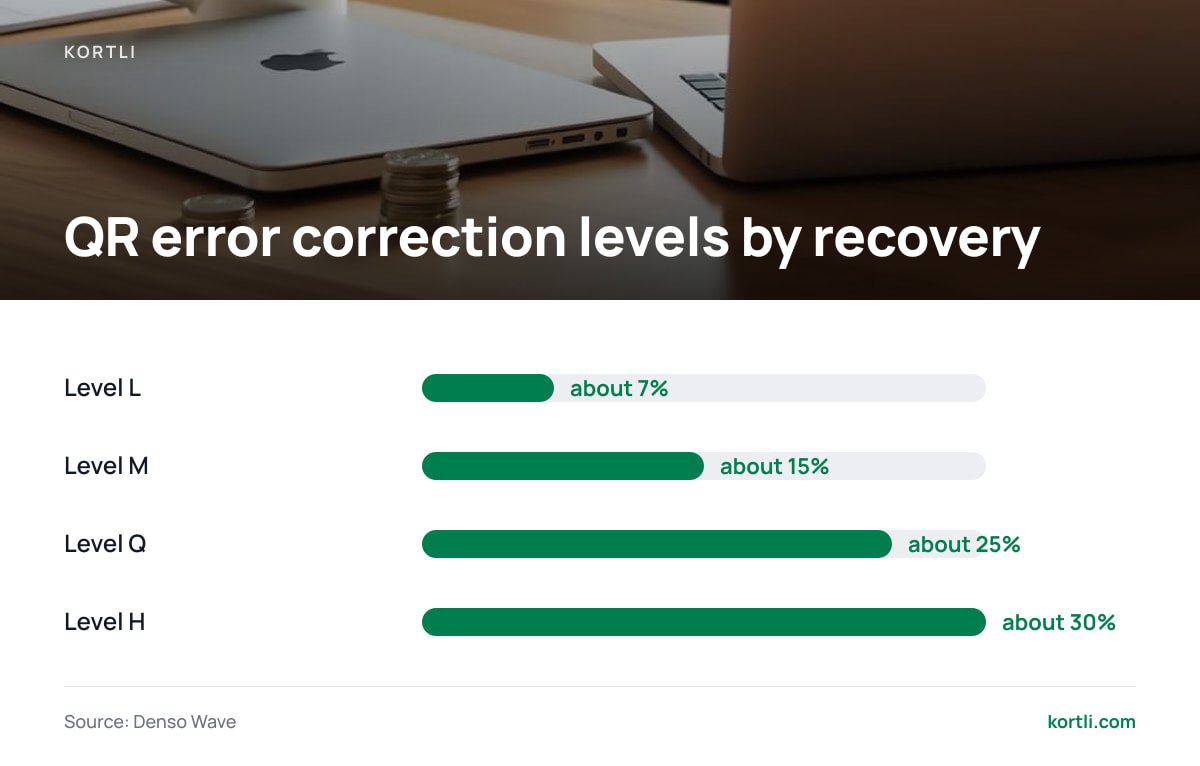
Logo-embedded QR codes only scan reliably if the generator uses high error correction. Denso Wave, which invented the QR code, specifies four levels: L recovers about 7% of damaged data, M about 15%, Q about 25%, and H about 30%. A logo covering the center of the code is "damage" from the scanner's point of view.
Level H error correction restores roughly 30% of a QR code's data. That margin is what lets a centered logo sit on the code without breaking the scan.
Visit history you can keep
Decide up front whether old click data comes with you. If the new tool can't import it, export it from your current database as CSV before you switch, and archive it.
Migrating Without Breaking a Single Printed Link

The migration itself is mostly a DNS exercise. Here is the order that keeps live links working.
- Inventory every short domain and slug. Export the full list from your database, not from the UI, so nothing paginates out of view.
- Stand up the new shortener on a temporary hostname and import slugs and destinations.
- Test a sample of at least 50 links with
curl -Iagainst the temporary host. Confirm both the status code and theLocationheader. - Lower the DNS TTL on the production short domain well before cutover.
- Point the domain at the new server, issue the TLS certificate, and re-test the same sample over HTTPS.
- Keep the old server running read-only for a week in case you need to compare logs or recover a missed slug.
Pro Tip: Drop your short domain's DNS TTL to 300 seconds at least 48 hours before cutover. Resolvers cache records for the old TTL, so if it was set to a day and you lower it an hour before switching, some visitors keep hitting the old server for up to a day. Also, issue the TLS certificate on the new server before you flip DNS, using DNS-based validation. Otherwise you get a window where every QR scan lands on a certificate warning.
If your printed materials include QR codes, scan five of them from real print, not screen previews, after cutover. Our walkthrough on making a branded QR code that won't break covers why print tests catch problems screens don't.
Click Data and Privacy: Where Self-Hosting Actually Earns Its Keep

Click logs usually store IP addresses, user agents, and referrers. Under the EU's General Data Protection Regulation, Article 4(1) lists "online identifiers" as personal data. The EU Court of Justice held in the 2016 Breyer case that even dynamic IP addresses can be personal data when the holder has a lawful way to link them to a person.
That has two practical consequences for your choice of shortener:
- Where the data sits matters. With a hosted shortener, the vendor processes your visitors' data, so you need a processing agreement and you inherit their sub-processors. With a self-hosted tool, the data stays on your server, under your retention rules.
- Anonymization should be a setting, not a project. Look for options to truncate or hash IPs and to purge visits after a set number of days. If you have to write a cron job to delete old visits, you probably won't.
This is the strongest argument for staying self-hosted, whichever tool you choose. Leaving Shlink for a hosted service can quietly move your visitor data into someone else's jurisdiction.
Which One We'd Pick, and Why
If you're a solo developer who lives in the terminal, keep Shlink. It's free, it's solid, and its API-first design suits you. Adding the web client is an afternoon's work.
If links are made by marketers, sales staff, or anyone who doesn't want to touch an API, pick a self-hosted tool that puts the admin interface, password links, split tests, and styled QR codes in one install. Don't pick a hosted subscription. You'd be paying every month to give up the ownership you already have. For the full comparison of renting versus owning, see our piece on white-label shorteners: rent the brand or own it outright.
The deciding question is simple. Count the hours per month someone spends maintaining glue code around your shortener. If that number is above two, the free tool has stopped being free.
Get Password Links, Split Tests, and Logo QR Codes on Your Own Server
Kortli is a self-hosted link shortener you install on your own Linux server for a one-time payment. It covers the gaps that send people looking for a Shlink alternative. The admin interface is built in. Password-protected links and A/B split testing come standard. Styled, logo-embedded QR codes are generated in the same place you create the link. You can add custom domains with no per-domain fee, and click analytics with geographic tracking stay on your server, not ours. Check kortli.com for the current license price; it is paid once, not monthly.
The honest limit: you still run a server. Updates, backups, and TLS renewal are your job, just as they are with Shlink. Before you buy, confirm that your server meets the published requirements. Then run the 50-link slug-import test from this article against your own export.
Frequently Asked Questions
Is Shlink still a good choice for link shortening?
Yes, for developers who want a free, API-first shortener they can script against. It's reliable and actively maintained under the MIT license. It's a weaker fit when non-technical staff create most links or you need password links and split tests built in.
Will my existing short links break if I switch away from Shlink?
Not if you keep control of the short domain and import the exact slugs into the new tool. Links break when the domain changes or when the new tool generates fresh short codes. Test a sample with curl before and after you change DNS.
Does Shlink support password-protected links?
Password protection isn't a core link feature in Shlink. You'd need custom code, a proxy layer, or a different shortener. Check the current documentation, because feature sets change between major versions.
Why does my self-hosted shortener show no country data for clicks?
Most self-hosted shorteners rely on a geolocation database such as MaxMind's GeoLite2, which requires a free account and license key to download. If the key is missing or expired, visits are recorded without location. Add the key and confirm the database is updating on schedule.
Should I move from a self-hosted shortener to a hosted one for convenience?
Usually not. A hosted subscription means recurring fees and a vendor holding your visitor data, and some services stop redirecting links after you cancel. If maintenance is the pain, a self-hosted tool with a full admin interface solves it without giving up ownership.
Sources
- The MIT License | Open Source Initiative
- GeoLite2 Free Geolocation Data | MaxMind
- Error Correction Feature | Denso Wave (QRcode.com)
- Regulation (EU) 2016/679 (General Data Protection Regulation) | EUR-Lex, Publications Office of the European Union
Leave a Reply