

Link click tracking happens in one of two places: at a redirect you control, or on the page where the visitor lands. A short-link redirect counts every click on links you post anywhere, including email, social, and print, but it sees nothing after the hop. Google Analytics shows what happens on your site, but it cannot count a click that never arrives. Most teams need both, and the redirect half is the one worth owning.
TL;DR:
- Redirect-based tracking, which is what a URL shortener does, is the only method that counts clicks on links you post on platforms you don't control.
- Google Analytics is free and strong for on-site behavior, but it misses visitors who block scripts or decline consent, and it can't see the click itself.
- Use 302 or 307 redirects for tracked links. A 301 can be cached by the browser, so repeat clicks may never reach your counter.
- Raw click counts usually run high because of link-preview bots and email security scanners, while referrer data usually runs thin because of browser defaults.
- Click logs contain IP addresses, which GDPR treats as potential personal data. Where that data lives and who processes it is a real decision, not a footnote.
Table of Contents
- Three Ways to Track Link Clicks, and What Each One Actually Sees
- Link Click Tracking With Google Analytics: Free, but Only on Your Own Pages
- Link Click Tracking With a URL Shortener: The Redirect Is the Counter
- Why Your Click Counts Are Wrong, and in Which Direction
- Free Link Click Tracking: What "Free" Actually Costs You
- Click Data Is Personal Data: The Privacy Side Most Guides Skip
- Which Link Click Tracking Setup We'd Pick, and When
- Own Every Click Record and Every Short Link, on Your Own Server
- Frequently Asked Questions
- Sources
Three Ways to Track Link Clicks, and What Each One Actually Sees

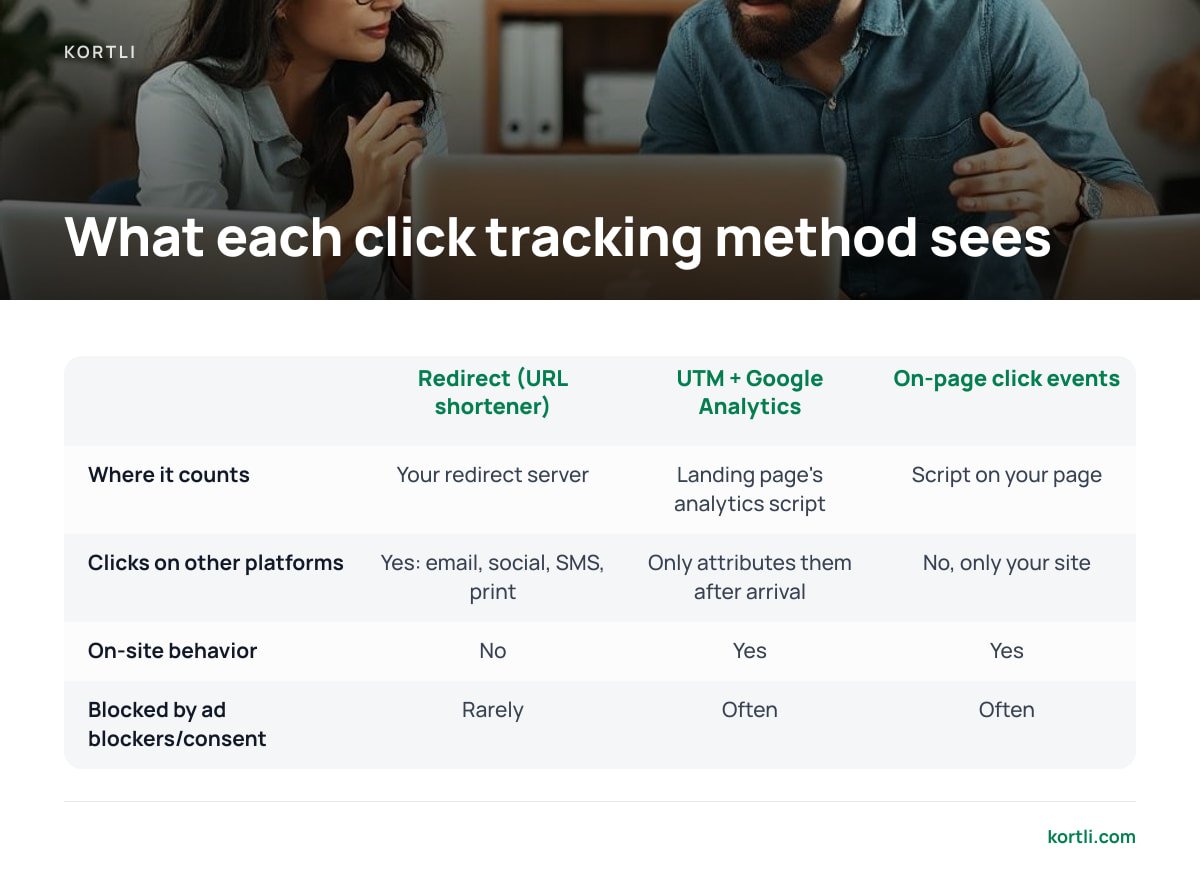
Most guides treat link click tracking as one thing. It is really three different mechanisms, and each one sees a different slice of the visitor's path. If you pick the wrong one for a given link, your report will be blank or misleading, and the dashboard won't tell you which.
| Method | Where it counts | Sees clicks on other platforms? | Sees on-site behavior? | Blocked by ad blockers / consent? |
|---|---|---|---|---|
| Redirect (URL shortener) | Your redirect server, before the visitor lands | Yes: email, social, SMS, print QR codes | No | Rarely. It's a plain HTTP request |
| UTM parameters + Google Analytics | The landing page's analytics script | Only attributes them after arrival | Yes | Often |
| On-page outbound click events | A script on your own page | No, only links on your own site | Yes | Often |
| Email platform tracking | The email tool's own redirect | Only inside that tool's emails | No | Rarely, but scanners inflate it |
The short version: if the link lives on a page you own, on-page events work. If the link lives anywhere else, such as a social bio, a PDF, a podcast description, or a printed flyer, only a redirect can count the click itself.
Link Click Tracking With Google Analytics: Free, but Only on Your Own Pages
Google Analytics is the default answer to "free link click tracking," and for on-site behavior it is a good answer. Google's documentation on GA4 enhanced measurement describes an automatic outbound click event. When a visitor clicks a link that leads off your domain, GA4 records a click event with the destination URL, with no extra code required.
For inbound traffic, Google Analytics relies on UTM parameters. These are the tags (utm_source, utm_medium, utm_campaign, utm_term, utm_content) that you append to a URL so the session gets attributed correctly when it arrives. Google's Campaign URL Builder generates them for you.
Google Analytics has three limits that most tutorials skip.
- It counts sessions, not clicks. If someone clicks your link and closes the tab before the page loads, or if the analytics script is blocked, the click doesn't exist as far as GA is concerned.
- Consent banners cut the data. In regions where you need consent before setting analytics cookies, visitors who decline drop out of your reports. The gap between "clicks" and "GA sessions" can be large, and it varies by audience.
- UTM links are long and fragile. A 140-character tagged URL gets truncated in SMS, mangled in print, and edited by people who copy-paste. This is the main reason marketers wrap UTM links in a short link in the first place.
Our position: use GA for what happens after arrival, and don't treat it as your click counter.
Link Click Tracking With a URL Shortener: The Redirect Is the Counter
A URL shortener tracks clicks the bluntest way possible. The visitor's browser requests your short link, your server logs the request, and then it answers with a redirect to the real destination. The count happens before any page loads, any script runs, or any consent banner appears. That is why redirect counts are almost always higher than analytics sessions for the same link.
What a redirect can record
- Timestamp. You get the exact moment of the click, which lets you separate the burst after a newsletter send from steady background traffic.
- Approximate location. Your server looks up the requesting IP address against a geolocation database. Country-level accuracy is generally good. City-level accuracy is shakier, especially on mobile networks.
- Device and browser. These come from the user-agent string. They are useful for broad splits like mobile versus desktop, but less reliable for fine detail as browsers reduce what they expose.
- Referrer, when one is sent. This is the page the click came from, which is less often available than you'd expect (see below).
What a redirect can't record
The redirect sees nothing after the hop. It can't tell you whether the visitor scrolled, bought, or bounced. That half belongs to your site analytics. This is why the strongest setup puts UTM parameters on the destination URL behind the short link. The redirect counts the click, and GA attributes the session.
Why Your Click Counts Are Wrong, and in Which Direction
Every click tracking report has errors. The useful question is which way each error pushes your numbers.
Undercounting: 301 redirects. Under RFC 9110, the IETF's HTTP semantics standard, a 301 "Moved Permanently" response is cacheable by default. A browser that has already followed your 301 is allowed to skip your server next time and go straight to the destination. Your counter never fires for that repeat click. A 302 or 307 isn't cached unless you explicitly tell the browser to cache it, so every click comes back through you.
A 301 is cacheable by default under RFC 9110. That means a returning visitor's browser can skip your server entirely, and you'll never count the click.
Overcounting: bots that "click" first. When you paste a link into a chat app, the app fetches it to build a preview. Corporate email security scanners open every link in an incoming message to check for malware, often within seconds of delivery. Search crawlers and uptime monitors add more noise. A B2B newsletter can show a burst of "clicks" in the first minute after sending that no human made. Look for clicks that arrive almost instantly, come from data-center IP ranges, or show unusual user agents, and filter them out.
Mislabeling: missing referrers. MDN's documentation on Referrer-Policy explains that when a site sets no policy, browsers default to strict-origin-when-cross-origin. Under that default, cross-site requests send only the domain and never the full page path. Requests from HTTPS to HTTP send nothing at all. Native mobile apps often send no referrer either. The result is a large "direct / unknown" bucket that is really social, email, and messaging traffic in disguise.
Pro Tip: Stop trying to recover the source from the referrer. Create one short link per placement instead: one for the Instagram bio, one for the March newsletter, one for each printed QR batch. The link's identity tells you the source with 100% reliability, no matter what the browser strips. A self-hosted shortener with no per-link pricing makes this habit free. Hosted plans with link caps quietly push you toward reusing links, which destroys your attribution.
Free Link Click Tracking: What "Free" Actually Costs You
Free link click tracking exists in three forms: Google Analytics, free tiers of hosted shorteners, and the built-in tracking in email and social tools. The first is genuinely free, with the limits described above. The other two come with costs you only see later.
- Caps that shape your behavior. Monthly limits on links, or analytics history that only goes back a set number of days, push you to reuse links and throw away data you'll want next year.
- Click data you can't take with you. If a vendor's export is partial, you can't rebuild two years of campaign history somewhere else.
- Links you don't really own. This is the big one. If your short links run on the vendor's domain and you stop paying, those links may stop working, along with every printed QR code that points to them. We break down how this plays out in what a Bitly subscription actually buys you.
Printed links make this risk concrete. A QR code on 10,000 product boxes can't be updated once it ships. If the redirect behind it disappears, every box becomes a dead end. That's why we argue in our guide to branded QR codes that won't break that the redirect domain should belong to you, not to your vendor.
Click Data Is Personal Data: The Privacy Side Most Guides Skip

Every click log contains an IP address, and that matters legally. Recital 30 of the General Data Protection Regulation names "internet protocol addresses" among the online identifiers that can be used to profile and identify people. In its 2016 Breyer ruling, the Court of Justice of the EU held that even dynamic IP addresses can be personal data.
GDPR Recital 30 names IP addresses as online identifiers. Every click log you keep is a log of potential personal data.
This changes how you should think about a hosted tracking tool. When a third party runs your redirects, it receives every clicker's IP address and becomes a processor of that data. That means you need a data processing agreement, you have to account for where its servers sit, and you add one more name to your privacy notice. When the redirect runs on your own server, that processor relationship disappears and you set the rules yourself.
Whichever route you choose, a few practices reduce your exposure:
- Resolve location, then truncate the IP. If country-level geography is all you report on, you don't need to store the full address after the lookup.
- Set a retention period. Raw click logs older than your longest reporting window are liability with no analytical value.
- Keep identifiers out of URLs. Email addresses or customer IDs in query strings end up in logs, browser histories, and other people's referrer data.
Self-hosting doesn't make you exempt from GDPR. You are still the controller. It does make the data flow shorter and easier to explain.
Which Link Click Tracking Setup We'd Pick, and When
Here is how we'd decide, by situation.
- You only care about links on your own website. Use GA4 enhanced measurement. It's free and automatic, and you don't need a shortener.
- You post links on social, in email, in SMS, or in print. Use a shortener with 302 redirects, wrapping UTM-tagged destinations. That's the redirect for the count and GA for the outcome.
- You print QR codes or links that will live for years. Use a shortener on your own domain that you control end to end. A hosted plan is a reasonable choice for a two-week campaign. It's a bad choice for a label that ships in 2025 and gets scanned in 2029. We go deeper on that time horizon in picking a URL shortener you'll still control in five years.
- You're in a regulated sector or handle EU traffic at volume. Self-host, so click data never leaves infrastructure you're already accountable for.
For most businesses that manage more than a handful of branded links, our pick is a self-hosted redirect plus Google Analytics. Hosted shorteners have earned their popularity on convenience. But for long-lived links, convenience is the wrong thing to optimize. If you want to understand the operational side before committing, read what running your own URL shortener really involves.
Own Every Click Record and Every Short Link, on Your Own Server

Kortli is a self-hosted link shortener you install on your own Linux server for a one-time license payment instead of a monthly subscription. It handles the redirect side of link click tracking: click counts and geographic data stored on your server, not someone else's. You get branded short domains with no per-domain fee, so you can create one link per placement without watching a cap. It also includes A/B split testing on links, password-protected links, and styled QR codes with your logo, so a printed code keeps working for as long as you keep the server running.
The honest caveat: you're the operator. Kortli doesn't patch your server, back up your database, or keep your domain renewed. If those lapse, your links fail just as surely as a cancelled subscription would. Click analytics also stop at the redirect, so you'll still want site analytics for what happens after the hop. Check the current license price and server requirements on the site before you buy.
Frequently Asked Questions
What is link click tracking?
Link click tracking means recording when someone clicks a specific link, along with details such as time, approximate location, device, and source. It is usually done with a redirect server, like a URL shortener, or with an analytics script on the landing page. Each method sees different parts of the visitor's journey.
Can I track link clicks for free?
Yes. Google Analytics can track outbound clicks on your own site and attribute inbound traffic through UTM parameters at no cost. Free tiers of hosted shorteners also track clicks, but they often cap links or history, and your links may depend on staying with that vendor.
Why does my shortener show more clicks than Google Analytics?
The shortener counts the click at the redirect, before the page loads, so it includes visitors who left early, blocked scripts, or declined analytics consent. It also counts link-preview bots and email security scanners unless you filter them. A gap between the two numbers is normal and expected.
Should tracked short links use 301 or 302 redirects?
Use 302 or 307 redirects for tracked links. A 301 is cacheable by default under the HTTP standard, so a browser may skip your server on repeat visits, and those clicks go uncounted. Save 301s for permanent site moves where you don't need per-click data.
Is click tracking data covered by GDPR?
Usually, yes, because click logs typically contain IP addresses, which GDPR Recital 30 lists as online identifiers. That means you need a lawful basis, a retention policy, and a data processing agreement with any vendor that handles the data for you. Truncating IPs after the location lookup reduces your exposure.
Can I track clicks on links I post on social media?
Not with an on-page script, because you don't control the social platform's pages. The reliable method is to post a short link you control, so every click passes through your redirect server and gets counted before the visitor reaches the destination.
Sources
- [GA4] Enhanced measurement events | Google Analytics Help
- Campaign URL Builder | Google Analytics
- RFC 9110: HTTP Semantics | IETF / RFC Editor
- Referrer-Policy | MDN Web Docs
- Regulation (EU) 2016/679 (General Data Protection Regulation) | EUR-Lex
Leave a Reply