

To export click data from a link shortener, download the raw click events (one row per click) as CSV from the dashboard or API, and export every short code with its destination URL. The events preserve your history. The link list keeps your printed links and QR codes working after the move. Do both before you cancel, because export access can end when the subscription does.
TL;DR:
- Export two separate things: the click events (your history) and the link list (short code plus destination). Losing either one costs you something different.
- Summary totals are not an export. You need one row per click, with timestamp, referrer, country and device, or you cannot rebuild a report elsewhere.
- Export in small date ranges and compare row counts against the dashboard totals, because large exports are sometimes cut off without warning.
- Keep the short domain in your own registrar account and keep redirecting old codes with a permanent redirect so printed QR codes and published links do not break.
- Check your contract and data processing terms before you delete anything. Under GDPR, a processor must delete or return personal data at your choice when the service ends.
Table of Contents
- Export Click Data From a Link Shortener Before You Cancel: The Order That Works
- What a Click Export Contains, and What It Leaves Out
- Four Ways to Get Your Click History Out, Ranked
- Clean the Export So It Survives the Move
- Keep Old Short Links Working While the History Moves
- Privacy and Contract Checks Before You Delete Anything
- Where the History Goes Next: Archive, Import or Start Fresh
- Keep Your Click Data on Your Own Server, Paid Once
- Frequently Asked Questions
- Sources
Export Click Data From a Link Shortener Before You Cancel: The Order That Works
Do the export first and the cancellation last. Most people reverse this, then discover that the dashboard went read-only or the account was archived the day billing stopped.
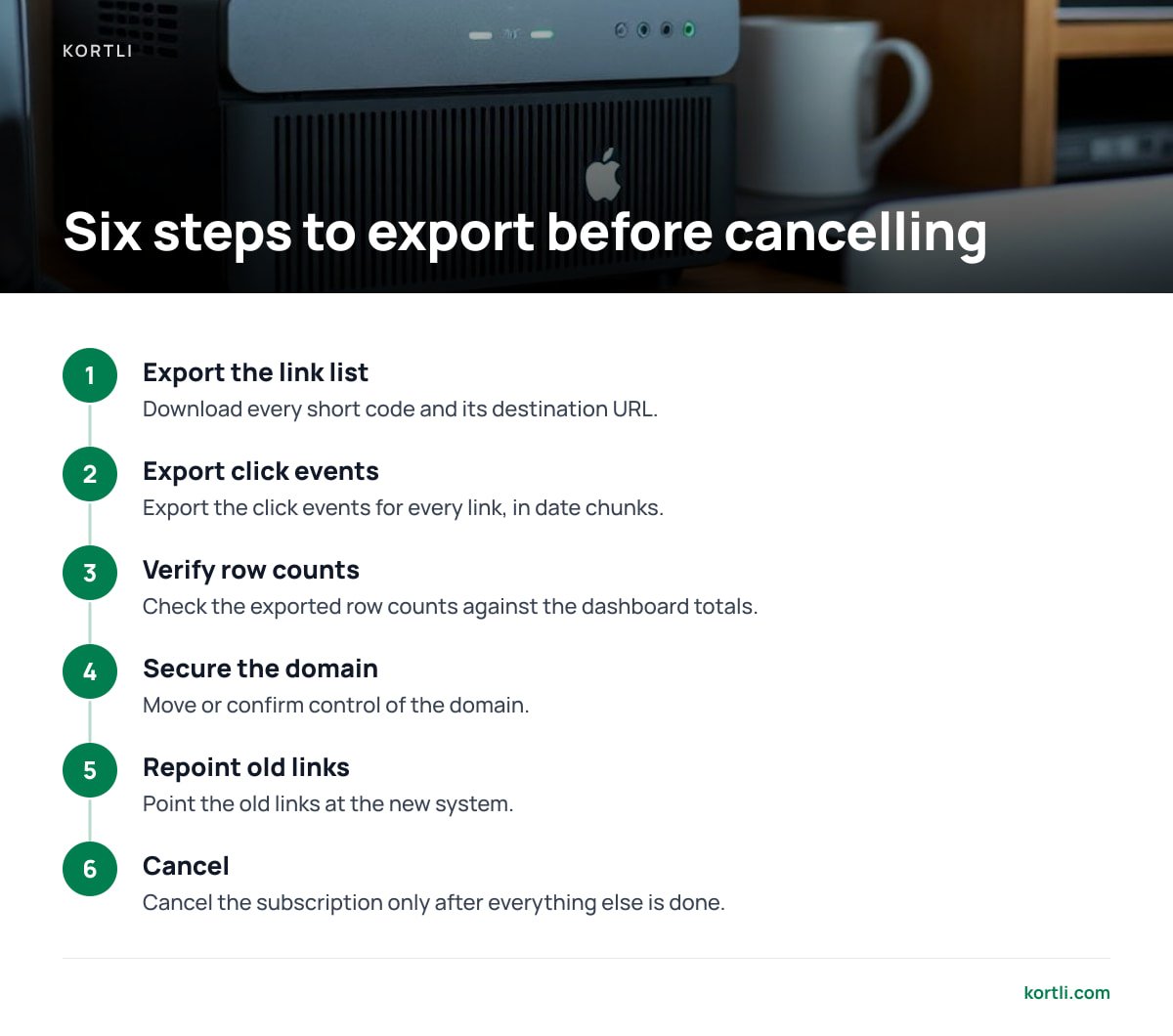
The sequence that protects you is short:
- Export the link list (every short code and its destination).
- Export the click events for every link, in date chunks.
- Verify the row counts against the dashboard.
- Move or confirm control of the domain.
- Point the old links at the new system.
- Cancel.
Step 4 is where the domain matters. If your short links sit on a domain you registered yourself, you can carry them anywhere. If they sit on the vendor's shared domain, you cannot, and no export fixes that. The options for avoiding that trap are laid out in Shorten a URL With Your Own Domain: The Real Options.
What a Click Export Contains, and What It Leaves Out
A shortener holds three kinds of data, and vendors rarely export all three equally well. Know which one you are asking for.
| Data type | What it is | Can you rebuild reports from it? | What usually goes wrong |
|---|---|---|---|
| Link list | Short code, destination URL, creation date, tags, expiry | Not clicks, but it keeps links alive | Tags and folders are dropped from the file |
| Raw click events | One row per click: timestamp, referrer, country, device, browser | Yes, any report you want | Row caps, date limits, IP addresses removed |
| Aggregates | Daily or monthly totals per link | Only the same totals | Cannot be re-sliced by country or source |
Aggregates are the easiest thing to download and the least useful. A monthly total cannot answer "which referrer drove the spike in March." If the only export button on your plan gives totals, tell support and ask for event-level data in writing.
Expect some fields to be missing even from a full event export. Full IP addresses are often removed for privacy reasons, and "unique visitor" counts depend on the vendor's own deduplication logic, so they will not match anything you compute from raw rows. Record unique counts once and archive them, since you cannot regenerate them.
Four Ways to Get Your Click History Out, Ranked
1. The API, if your plan includes it
This is the best route. An API call returns structured events and lets you page through history in small windows. If you can run a script, use it. You can log the response, retry failures and checksum the output.
2. The dashboard CSV, month by month
This is the realistic route for most people. Set the date range yourself and export one month at a time. A single "all time" export is where silent truncation happens.
3. A written data request to support
Ask for a full export of event-level data, naming the fields you want. Under GDPR Article 28(3)(g), a processor must, at the controller's choice, delete or return all personal data after the services end. If your clicks include data on EU or UK visitors and you are the controller, that clause is your leverage. It gives you no right to a particular file format, so ask for CSV or JSON explicitly.
4. Screenshots and PDF reports
This is a last resort. It preserves the numbers for your records but gives you nothing you can import or query. We would use it only to document totals, never as the export itself.
My pick is the API where available, and the monthly CSV routine for everyone else. Ask support only when plan limits block the first two.
Clean the Export So It Survives the Move
A CSV that opens in a spreadsheet can still be a broken file. Referrer URLs contain commas, and UTM parameters contain quotes and ampersands. RFC 4180, the common CSV format description, says fields containing commas, double quotes or line breaks should be enclosed in double quotes, and a quote inside a field is escaped by doubling it.
Fields containing commas, line breaks or double quotes should be wrapped in double quotes. A referrer URL with a comma in it will shift every column to its right if the export does not follow that rule.
Run through this checklist on every file before you trust it:
- Timestamps. Confirm the time zone. If the file does not say, assume the account setting and write it down. Convert to UTC in ISO 8601 format (2025-03-14T09:30:00Z) so months do not shift when you load them somewhere else.
- Column count. Every row should have the same number of fields. A row with extra columns usually means an unquoted comma.
- Encoding. Open the file as UTF-8. City names and campaign tags with accents turn into garbage otherwise.
- Bot traffic. Find out whether the vendor filtered bots before export. If it did, you cannot recover the filtered rows. If it did not, your totals will exceed the dashboard.
- Short code consistency. Codes are case-sensitive in many systems. Do not let a spreadsheet lowercase them.
Pro Tip: Before you cancel, write down the lifetime click total shown in the dashboard for your ten highest-traffic links. After exporting, count rows for those same links. If the file has fewer rows, the export was capped or filtered, and you still have time to re-export in smaller windows. If it has more, bots were included. Either answer is useful, and neither is discoverable once the account is closed.
Keep Old Short Links Working While the History Moves
Click history is the part people worry about. Dead links are the part that costs money. A printed menu, a packaging insert or a conference banner with a QR code cannot be edited, so every code you ever issued has to keep resolving. If your codes sit on a QR code with a logo, the size and error-correction choices are already fixed in print (see Minimum QR Code Size With Logo: Exact Sizes for Print), so leave the encoded URL alone and move the redirect behind it.
On the new setup, recreate each short code with the same destination. Then check what kind of redirect it sends. RFC 9110 defines 301 as a permanent move and 302 as a temporary one, with 308 and 307 as their method-preserving equivalents. Google Search Central says permanent redirects signal that the target should be the canonical URL, while temporary ones suggest the source should stay indexed.
Use 301 for links you will never change. Use 302 for links you might retarget, since a permanent redirect can be cached by browsers and is hard to take back.
A 301 on a link you later want to A/B test or retarget can stick in browser caches, so some visitors keep going to the old destination. Decide per link, not per account.
Privacy and Contract Checks Before You Delete Anything
Export files full of visitor data are personal data in most jurisdictions that matter. Treat them that way.
- Where the file lives. A CSV on a laptop desktop and a copy in a shared drive are two copies. Choose one storage location, encrypt it, and delete the rest.
- Retention. Decide how long you will keep raw rows. If you only need country and referrer trends, aggregate and delete the events after a set period.
- Vendor deletion. After a successful export, ask the vendor in writing to delete your account data and confirm it. The GDPR clause mentioned above gives the controller that choice, but only if you ask.
- IP addresses. If your export includes them, they are personal data under GDPR. Drop the column unless you have a defined reason to keep it.
None of this is legal advice. If your clicks include data from regulated sectors or from countries with their own rules, check with whoever handles compliance for you.
Where the History Goes Next: Archive, Import or Start Fresh
You have three choices, and the right one depends on what you will do with the data.
- Archive only. Store the files, compressed and dated, with a README listing the date range, time zone and fields. Good if you only need proof and the occasional lookup.
- Load into a database or spreadsheet. Good for year-over-year comparisons. Add a source column ("old-vendor") so you can separate the periods.
- Import into the new shortener. Only worthwhile if the tool has an import path. Most do not, so assume you will not be able to merge old and new history in one dashboard.
Our recommendation is to archive plus a queryable copy, and to start the new dashboard fresh with a clear cutover date. Forcing old events into a new system tends to produce mismatched time zones and inflated counts.
If you are moving to your own server, plan for where the new click data will live and how it is backed up. Host Your Own URL Shortener: Server Requirements and Backups covers sizing and backup. If you use password-protected links, Track Who Opened a Password Protected Link: What You Can See explains which click details you can still capture on those.
Keep Your Click Data on Your Own Server, Paid Once
The export scramble in this article exists because your history sits on someone else's server, behind a subscription. Kortli is a self-hosted link shortener you install on your own Linux server for a one-time payment. Click analytics and geographic tracking are stored in your own database, so "export" becomes a backup you run yourself, and canceling a subscription can no longer cut off your links. Custom domains carry no per-domain fee, and password-protected links, A/B split testing and styled QR codes with an embedded logo come with it.
There are limits. You need a Linux server and you are responsible for backups, updates and uptime. Check the spec sheet for what import formats Kortli accepts before you count on loading an old vendor's history into the dashboard, and keep your exported files as a separate archive either way. Current pricing is on the site.
Frequently Asked Questions
How do I export click data from a link shortener if my plan has no export button?
Ask support in writing for event-level data in CSV or JSON, naming the fields you need. If the clicks include data on EU or UK visitors and you are the controller, GDPR Article 28(3)(g) gives you the right to choose return of personal data when the service ends. A short upgrade for one billing month to get the export is sometimes cheaper than losing the history.
Will my short links stop working if I cancel my link shortener?
On a hosted service, usually yes, because the redirects live on the vendor's servers. If the short domain is yours, you can point it at a new system and recreate each code with the same destination. If the domain belongs to the vendor, those links end when the account does.
What fields should a click export include?
At minimum: timestamp with time zone, short code, referrer, country, device type and browser. City, operating system and campaign parameters are useful extras. Full IP addresses are often removed by vendors, and unique visitor counts rarely survive export in a reusable form.
Can I import old click history into a new link shortener?
Only if the new tool has an import function, and many do not. Even when it does, time zone and bot-filter differences can distort the totals. Archive the old data separately and start the new dashboard from a clear cutover date.
Is exported click data personal data?
It can be. Referrers, device details and especially IP addresses can identify individuals under GDPR. Store the files in one encrypted location, drop columns you do not need and set a retention period.
Sources
- RFC 4180: Common Format and MIME Type for CSV Files | IETF (RFC Editor)
- RFC 9110: HTTP Semantics | IETF (RFC Editor)
- Redirects and Google Search | Google Search Central
- Regulation (EU) 2016/679 (General Data Protection Regulation) | EUR-Lex, European Union
- ISO 8601 Date and time format | International Organization for Standardization
Leave a Reply