
Link analytics is the record your short link's server keeps every time someone requests it: a timestamp, an IP address (turned into a location), a device string, and sometimes a referrer. The part most people miss is that it counts requests, not people. A Slack preview, an email security scanner, or a bot all register as clicks. The second part they miss is that whoever runs the server owns that log, so it may not be you.
TL;DR:
- Link analytics logs server requests to your short link: time, IP-derived location, device, and referrer when one is sent.
- Raw click counts are inflated by bots, chat link previews, and email security scanners. Filter them out before you trust any number.
- Modern browsers usually send only the referring domain, and many apps send nothing, so "direct/unknown" is often your biggest traffic source.
- Under EU law an IP address can be personal data, so a click log is a privacy record, and whoever hosts it controls it.
- Use link analytics for the click and website analytics for what happens after it. You need both, joined by UTM tags.
Table of Contents
- What Link Analytics Records on Every Click, and What It Can't See
- What a Tracking Link Means, and Why a Short Link Isn't Automatically One
- Clicks Aren't People: The Bots, Previews, and Scanners Padding Your Numbers
- Reading a Link Analytics Dashboard, Metric by Metric
- Link Analytics vs. Website Analytics: How to Track Both Without Double-Counting
- Link-in-Bio Pages and Their Analytics: What You Actually Get
- Who Owns the Click Log? Privacy Law and the "Link Analytics Login" Problem
- The Best Tool to Shorten URLs Depends on One Question
- Own Your Links and Your Click Data for One Payment, Not a Monthly Bill
- Frequently Asked Questions
- Sources
What Link Analytics Records on Every Click, and What It Can't See
When someone taps a short link, their browser asks your shortener's server for that address. The server logs the request and sends back a redirect to the real destination. That one log line holds everything link analytics will ever know about the click.
A typical entry contains:
- Timestamp. The exact second the request arrived. This drives your clicks-over-time chart.
- IP address. Looked up against a geolocation database to estimate country, region, and city.
- User-agent string. The browser and operating system announcing themselves, which becomes your device and browser breakdown.
- Referrer. The page the click came from, but only if the browser chose to send it.
- The link itself. Which short code was hit and which destination it resolved to.
It does not record what the visitor did after the redirect. It doesn't know whether they bought, bounced, or scrolled. It also has no reliable way to tell one person clicking twice from two people clicking once, unless it sets a cookie or fingerprints the device, and both of those carry privacy consequences covered below.
A click is a GET request, not a person. Every number on a link analytics dashboard starts from that fact.
What a Tracking Link Means, and Why a Short Link Isn't Automatically One
A tracking link is any URL built so that visiting it leaves a measurable record. It works in one of two ways, and they are often confused.
- Redirect tracking. The link points at a server you control (or rent). That server logs the click, then forwards the visitor. Short links work this way, and so do QR codes that encode a short URL.
- Parameter tracking. The link goes straight to your site with tags attached, such as
?utm_source=newsletter&utm_campaign=spring. Nothing is logged in transit. Your website analytics reads the tags when the page loads.
A short link only counts as a tracking link if the shortener actually logs requests and lets you see them. Some free shorteners log everything and show you almost nothing. And a UTM-tagged long URL is a tracking link even though no shortener is involved. The strongest setup combines the two: a short link that redirects to a UTM-tagged destination. That way you get the click record and the on-site behavior from a single URL. For the mechanics of counting clicks reliably, see our guide to link click tracking.
One technical detail affects your numbers directly. If your shortener issues a 301 (permanent) redirect, browsers may cache it and skip your server on repeat visits, so those clicks are never counted. A 302 or 307 (temporary) redirect forces a fresh request each time. If you care about analytics, temporary redirects are the honest choice.
Clicks Aren't People: The Bots, Previews, and Scanners Padding Your Numbers

Raw click totals are almost always too high. The inflation comes from three predictable sources:
- Link previews. Paste a link into a chat app, a social post, or a messaging thread, and the platform's server fetches it to build a preview card. That fetch can register as a click before any human sees the message.
- Email security scanners. Corporate mail gateways often open every link in an incoming message to check for malware. A campaign sent to a B2B list can show a burst of "clicks" within seconds of delivery from addresses that never opened the email.
- General bot traffic. Crawlers, uptime monitors, and scrapers request URLs constantly. Imperva's annual Bad Bot Report has found that automated traffic makes up roughly half of all internet traffic. Your short links are not exempt.
A good shortener filters known bot user-agents and flags suspicious bursts. But no filter catches everything, because sophisticated bots imitate real browsers.
Pro Tip: Build a canary link. Create a short link, put it in an email sent only to a handful of internal seed addresses that you never click, or post it in a private channel nobody opens. Every click it records is machine traffic. Compare its count against your real campaign links from the same channel and you have a measured bot baseline for that channel, not a guess. Re-run it quarterly, because scanners change.
Reading a Link Analytics Dashboard, Metric by Metric
Every dashboard shows roughly the same panels. Here is what each one actually measures and how it misleads you.
| Metric | What it really measures | How it misleads | What to do |
|---|---|---|---|
| Total clicks | Every logged request to the link | Includes previews, scanners, bots | Filter bots; compare against a canary link |
| Unique clicks | Requests deduplicated by IP, cookie, or both | Office networks share one IP; phones switch IPs on mobile data | Treat as an estimate, not a headcount |
| Country | IP looked up in a geolocation database | VPNs and corporate proxies relocate users | Reliable at country level for most traffic |
| City | Same lookup, finer grain | Often points to the carrier's or ISP's hub, not the user | Use for rough regional patterns only |
| Referrer | The Referer header, if sent |
Usually just the domain, often blank | Use UTM tags instead of relying on it |
| Device / OS | User-agent string | Bots spoof it; in-app browsers muddy it | Good for mobile vs. desktop splits |
The referrer row surprises most people. MDN's documentation on Referrer-Policy explains that modern browsers default to strict-origin-when-cross-origin. When a visitor moves from one site to another, the browser sends only the origin, such as https://example.com/, and not the specific page or post. Many native apps and email clients send no referrer at all. That is why "direct" or "unknown" is so often the largest slice of your pie chart. It doesn't mean people typed your short link by hand. It means the source was hidden.
The fix is simple. Never rely on referrer data to attribute a channel. Give each channel its own short link, or its own UTM tags, and the attribution happens in the link instead of in a header you don't control. The same logic applies to printed material: each placement gets its own code, and our breakdown of QR code generators with analytics covers what scan data can and can't tell you.
Link Analytics vs. Website Analytics: How to Track Both Without Double-Counting
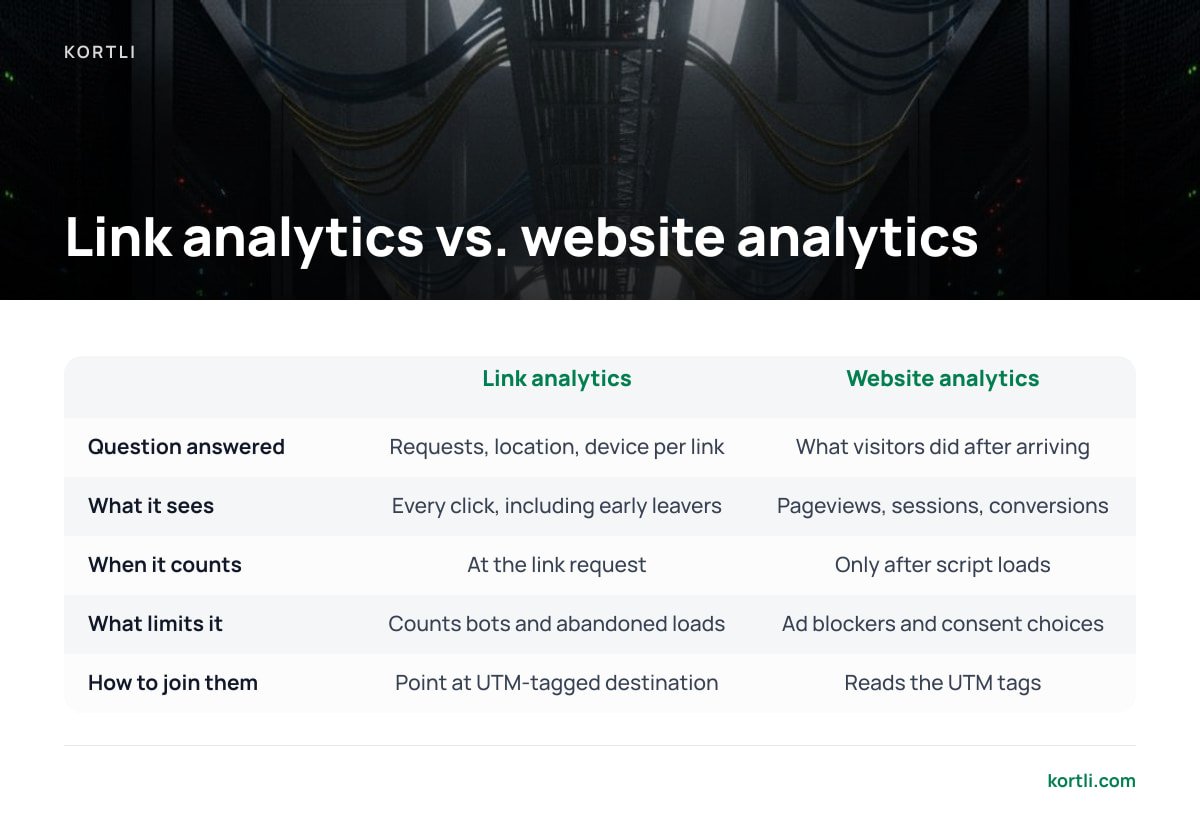
If you are asking how to track analytics on a website, the short answer is that you install a website analytics script on your pages and tag your inbound links so it knows where visitors came from. Link analytics and website analytics answer different questions, and you need both.
- Link analytics answers "how many requests did this link get, from where, on what device?" It sees every click, including clicks from people who leave before your page finishes loading.
- Website analytics answers "what did visitors do once they arrived?" It sees pageviews, sessions, and conversions, but only after its script has loaded, and only if the visitor's ad blocker or consent choice allows it.
The two numbers will never match, and you shouldn't expect them to. Link clicks run higher because they include bots, abandoned loads, and visitors who decline tracking. A gap of 10–30% between short-link clicks and landing-page sessions is common. A gap far larger than that usually points to a slow landing page or a broken redirect.
To join the two, point your short link at a UTM-tagged destination. Google's Analytics Help documentation on campaign URLs lists the standard parameters. In practice three of them carry most of the weight: utm_source (where), utm_medium (what kind of channel), and utm_campaign (which push). Keep them lowercase and consistent. Newsletter and newsletter show up as two separate sources.
Link-in-Bio Pages and Their Analytics: What You Actually Get
Yes, the major link-in-bio services offer analytics, including the best-known one. Free tiers typically show page views and total clicks per button. Deeper data, such as referrers, locations, and longer history, usually sits behind a paid plan.
The limitation is structural, not a matter of features. A link-in-bio page is a hosted page on someone else's domain. Every click on it is logged on their infrastructure, under their retention policy, and you see what their dashboard chooses to expose. If you stop paying, the history may shrink to whatever the free tier keeps. And the URL in your bio carries their brand, not yours.
If you already use short links on your own domain, you can build the same thing yourself: a single page on your site with one short link per button. Each button gets its own click log, and the page URL is one you'll still control in five years.
Who Owns the Click Log? Privacy Law and the "Link Analytics Login" Problem

People who search for "link analytics login" are usually looking for a vendor dashboard. That search exposes the real question: your click data lives behind someone else's login.
That matters legally as well as practically. In the 2016 Breyer case (C-582/14), the Court of Justice of the European Union held that a dynamic IP address can be personal data in the hands of a website operator who has legal means to identify the person behind it. Short-link logs store IP addresses by default. Under the General Data Protection Regulation, that makes your click log a record of personal data. You need a lawful basis to collect it, a retention limit, and a processor agreement with any vendor that stores it for you. Fines for serious violations reach €20 million or 4% of global annual turnover, whichever is higher.
Under the CJEU's Breyer ruling, an IP address can be personal data, which turns every short-link click log into a GDPR record.
The US picture points the same way. The California Consumer Privacy Act explicitly lists IP addresses among the identifiers that count as personal information.
Hosted shorteners create three practical problems on top of the legal ones:
- Your data leaves your control. The vendor holds the logs, sets retention, and may use aggregate data under its own terms.
- Cancellation can break links. If the short links sit on the vendor's domain, or the vendor stops resolving your custom domain when you stop paying, every printed QR code and old post points nowhere.
- Export is partial. Many dashboards export summaries rather than raw request logs, so you can't rerun your own bot filtering later.
Self-hosting solves all three, and it lets you minimize data properly. You can truncate the last octet of each IP after geolocation, which keeps country-level data while cutting identifiability.
The Best Tool to Shorten URLs Depends on One Question
There is no single best URL shortener. There is a best fit for how long you need your links to work and who should hold the data.
- Throwaway links you'll never print. Any free hosted shortener is fine. Expect thin analytics and accept that the link may not outlive the service.
- Branded links in campaigns, print, and packaging. Use your own domain, always. A link on your domain can be repointed to new infrastructure. A link on someone else's domain cannot.
- Regulated industries or EU audiences. Prefer self-hosting, where the click log never leaves a server you control and your data map has one fewer processor.
Our position: if anyone on your team can run a Linux server, self-hosting on your own domain is the right default for anything that gets printed or lives longer than a quarter. The recurring fee for a hosted shortener buys convenience. Over years, you pay it again and again for links you don't own. If you're weighing options, our guide to choosing a URL shortener you'll still control in five years walks through the checklist, and if you plan to test destinations, read what to demand from a split testing tool first.
Own Your Links and Your Click Data for One Payment, Not a Monthly Bill

Kortli is a self-hosted link shortener you install on your own Linux server for a one-time license fee. Click analytics and geographic tracking run on your machine, so the IP logs described above never pass through a third party. You set the retention, you can truncate IPs, and you can export raw data whenever you like. Custom branded domains carry no per-domain fee. Your links keep resolving whether or not you ever pay anyone again. It also includes password-protected links, A/B split testing, and styled QR codes with your logo embedded.
The honest caveat: self-hosting means the server is your job. Updates, backups, uptime, and keeping the geolocation database current all fall to you. Bot filtering is only as good as your rules, so run the canary-link test above on Kortli too. Check the current license price and server requirements on the site before you migrate.
Frequently Asked Questions
What does a tracking link mean?
A tracking link is a URL built so that visiting it leaves a measurable record. It does this either by redirecting through a server that logs the click, as short links do, or by carrying tags such as UTM parameters that your website analytics reads on arrival. The most useful setup combines both in one link.
Why do my link analytics show more clicks than my website analytics shows visits?
Link analytics counts every request to the short link, including bots, chat link previews, email security scanners, and visitors who leave before the page loads. Website analytics only counts visitors whose browser runs its script and allows tracking. A gap of 10–30% is common, and a much larger gap usually means a slow page or a broken redirect.
How accurate is the location data in link analytics?
Location comes from looking up the visitor's IP address in a geolocation database. It is generally dependable at the country level. City-level results often point to an internet provider's hub rather than the user, and VPNs or corporate proxies can relocate visitors entirely, so treat city data as a rough regional signal.
Should my short links use 301 or 302 redirects?
Use 302 or 307 temporary redirects if you care about analytics. Browsers can cache a 301 permanent redirect and skip your server on repeat visits, so those clicks never get counted. Temporary redirects make the browser ask the server each time.
What happens to my links and data if I cancel a hosted link shortener?
That depends on the vendor's terms. Links on the vendor's own domain may stop working, and custom domains may stop resolving once your plan lapses. Click history is often reduced to whatever the free tier keeps. Using your own domain, ideally on infrastructure you control, is the only reliable protection.
Is an IP address in a click log personal data?
In the EU it can be. The Court of Justice of the European Union held in the 2016 Breyer case that a dynamic IP address can be personal data, which brings click logs under the GDPR. California's CCPA also lists IP addresses as identifiers within personal information.
Sources
- Regulation (EU) 2016/679 (General Data Protection Regulation) | EUR-Lex
- Referrer-Policy header | MDN Web Docs
- [GA4] URL builders: Collect campaign data with custom URLs | Google Analytics Help
- California Consumer Privacy Act (CCPA) | State of California Department of Justice
- Case C-582/14 Breyer v Bundesrepublik Deutschland | Court of Justice of the European Union
- Bad Bot Report | Imperva
Leave a Reply