

A URL shortener with a custom domain lets you publish short links on a domain you own, like go.yourbrand.com/sale, instead of the shortener's domain. What matters most is who runs the server behind that domain. On a hosted plan, your links stop redirecting the day you cancel unless you export them and rehost them. On a self-hosted shortener, you own both the domain and the redirect database.
TL;DR:
- A "custom name" on a free shortener usually means a custom ending on someone else's domain. A custom domain means the whole link is yours.
- Owning the domain does not mean owning the links. The list that maps each short code to its destination lives on whatever server answers for that domain.
- Use a subdomain like go.yourbrand.com. DNS rules forbid a CNAME record at the bare domain, which makes setup there more awkward.
- For links you might edit later, use a temporary (302 or 307) redirect. Browsers cache a 301 and skip your server, so your click counts go wrong.
- Self-hosting wins once you have printed QR codes or hundreds of live links and someone who can patch a Linux server. Without that person, pay for hosting and test the export first.
Table of Contents
- Custom Name vs. Custom Domain: Free Tools Mostly Give You the First
- What Happens to Your Links When You Stop Paying
- Three Ways to Run a URL Shortener With a Custom Domain
- Picking the Domain: Subdomain or Separate Short Domain
- Setting It Up: DNS, HTTPS, and the Redirect Code That Matters
- Click Data Is Personal Data: Where Your Analytics Live
- The Cost Math Over Five Years, and When Hosted Still Wins
- Keep Every Short Link Working, Even After You Stop Paying Anyone
- Frequently Asked Questions
- Sources
Custom Name vs. Custom Domain: Free Tools Mostly Give You the First
When a free shortener says "custom name," it almost always means a custom back-half. You get to choose the part after the slash, as in shortener.com/spring-sale, but the domain still belongs to the shortener. That is useful for readability. It does nothing for brand recognition, and it does nothing for control.
A custom domain changes the part before the slash. Your link becomes go.yourbrand.com/spring-sale or yrbrnd.co/spring. People see your name before they click, which matters in email, SMS and social posts, where an unknown domain looks like phishing. Most hosted shorteners keep this feature off their free plans and charge for it on a paid tier, often with a fee or a cap for each extra domain.
There is a second, less obvious benefit: reputation. A public shortener domain is shared by everyone who uses it, spammers included. Your messages inherit whatever reputation that shared domain has with spam filters and corporate link scanners. A domain only you use carries only your history. If you are new to how short links work at all, our URL shortener link guide covers the basics of free versus owned links.
What Happens to Your Links When You Stop Paying
Here is the problem most comparison pages skip. When you connect your domain to a hosted shortener, you point its DNS at the vendor's servers. The domain is yours. The table that says "/spring-sale goes to this landing page" lives in the vendor's database.
Cancel the plan and the vendor stops answering for your domain. Every short link you have published, printed or emailed now leads nowhere. You still own go.yourbrand.com, but it points at nothing until you stand up a new server that knows all the old codes.
Hosted services do not even have to belong to a small vendor to disappear. In 2018, the Google Developers Blog announced the turndown of the Google URL Shortener, stopped new link creation in 2019, and pointed developers to Firebase Dynamic Links.
Google retired goo.gl and told developers to move to Firebase Dynamic Links. Firebase Dynamic Links was itself shut down in August 2025.
The real escape hatch is a full export: every short code, its destination, and ideally its redirect type. With that file and your own domain, you can rebuild the links on a new server and point DNS at it. No existing link breaks. Without the file, you are recreating links by hand from old campaigns, and you will miss some.
Pro Tip: Before you commit to any hosted shortener, run a real export on day one, not on the day you want to leave. Open the file and confirm it contains the custom domain's short codes, not just the destination URLs. Some exports list your links without the exact codes you published, and the codes are the part you cannot recover.
Three Ways to Run a URL Shortener With a Custom Domain

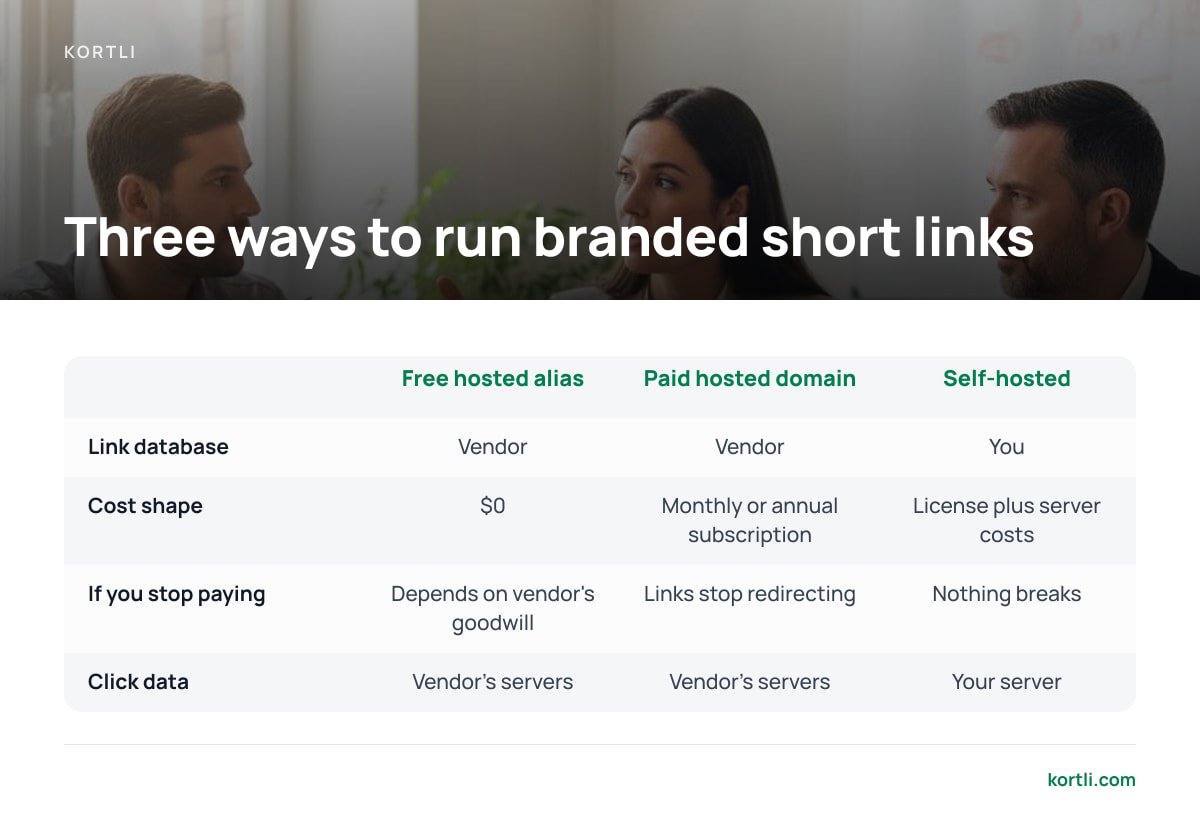
You have three practical setups. A fourth, plain redirect rules in your web server's config, works for a dozen links but falls apart once you want analytics or need someone other than a developer to create links.
| Setup | Who holds the link database | Cost shape | If you stop paying | Where click data lives |
|---|---|---|---|---|
| Free hosted shortener with custom alias | Vendor | $0 | Links depend on the vendor's goodwill and terms | Vendor's servers |
| Paid hosted shortener with custom domain | Vendor | Monthly or annual subscription | Links stop redirecting unless you export and rehost them | Vendor's servers |
| Self-hosted shortener on your own server | You | License plus server costs | Nothing breaks. There is no one to stop paying | Your server |
Free hosted with a custom alias
This is fine for one-off links you share in a chat and forget. Do not print these links on anything physical, and do not build a campaign on them. You do not control the domain's reputation or its future.
Paid hosted with a custom domain
This is the easiest path to branded links, and it is a reasonable choice if nobody on your team can maintain a server. The trade is permanent rent. The longer you stay, the more links you have in circulation and the harder it gets to leave. If you are weighing vendors, our roundup of sites like Bitly compares the options.
Self-hosted
You install the shortener on a Linux server you control and point your short domain at it. You handle updates, backups and HTTPS. In return, the links outlive any vendor relationship, and the click logs never leave your infrastructure.
Picking the Domain: Subdomain or Separate Short Domain
You have two good choices. Pick deliberately, because you are stuck with the decision once links are printed.
- A subdomain of your main site (go.yourbrand.com). You need no new purchase, and the brand is obvious. Setup is a single CNAME or A record. It is the right default for most businesses.
- A separate short domain (yrbrnd.co). It is shorter, which helps on SMS and in small print. It also keeps your link activity off your main domain. The costs are another renewal date to track and a name customers may not recognize.
- Avoid the bare apex of your main domain. DNS does not allow a CNAME at the bare domain. RFC 1912 from the IETF states that a CNAME record cannot coexist with any other data, and the apex already holds SOA and NS records. Some DNS providers work around this with proprietary "flattening" records. You avoid the whole issue with a subdomain.
- Watch HTTPS-only extensions. The .app and .dev domain extensions are on browsers' HSTS preload list, so browsers will refuse to load them over plain HTTP. That is fine if you have working HTTPS from the start. It is a hard failure if you planned to add HTTPS later.
Count characters before you buy. A domain like go.yourbrand.com is 16 characters before the slash. A five-letter short domain with a two-letter extension is 8. On a business card or a 160-character SMS, that difference shows.
Setting It Up: DNS, HTTPS, and the Redirect Code That Matters

Setup has three parts, and most failures happen in the second and third.
- DNS. Point the short domain or subdomain at the shortener. On a hosted service, that usually means a CNAME to a hostname the vendor gives you. On a self-hosted install, it means an A or AAAA record pointing to your server's IP address. Allow time for the change to spread, based on your record's TTL (time to live).
- HTTPS. Every short link needs a valid certificate, or browsers will show warnings before the redirect even happens. Let's Encrypt issues free certificates with short lifetimes, so renewal must be automated. A shortener whose certificate lapses on a holiday weekend breaks every link at once.
- Redirect status code. This is the part that silently skews your data, and it gets its own section below.
Why the Redirect Code Changes Your Click Counts
The HTTP standard, RFC 9110, defines 301 and 308 as permanent redirects and 302 and 307 as temporary ones. Browsers are allowed to cache a permanent redirect. A visitor who clicks your 301 link twice may skip your server entirely the second time. That click never shows up in your analytics. And if you later change where the link points, that visitor's browser keeps sending them to the old page.
For SEO, Google Search Central's redirect documentation explains that permanent redirects are a strong signal for which page to show in search results, while temporary redirects are a weak one. That matters for site migrations. It rarely matters for marketing short links, which are not pages you want ranked.
Use 302 or 307 for any short link you might edit or want counted accurately. Save 301 for links you are certain will never change.
Click Data Is Personal Data: Where Your Analytics Live
Every click on a short link sends an IP address, a user agent, a referrer and a timestamp to whatever server answers for the domain. Geographic click maps are built from that IP address. Under the EU's General Data Protection Regulation, Recital 30 specifically names IP addresses as online identifiers that can be used to profile people.
With a hosted shortener, that data sits on a third party's servers. You need to cover that in your privacy notice, check it against your vendor agreements, and ask where it is stored. With a self-hosted shortener, the logs sit on a server you choose, in a region you choose, under a retention policy you set. That does not remove your obligations, but it makes them yours to control rather than yours to audit.
Private destinations raise the stakes further. A short link to an internal document or a client proposal is guessable if its code is short. If you put sensitive pages behind short links, read how to password protect a URL before you send one.
The Cost Math Over Five Years, and When Hosted Still Wins

Take an illustrative hosted plan with custom domains at $29 a month. That is $348 a year and $1,740 over five years, before any per-domain or click-volume add-ons. Your price will differ, so plug in your own number. The shape of the curve is what matters: it never flattens.
A self-hosted setup costs a license, plus a small Linux server. A basic cloud instance at roughly $5 to $10 a month handles redirect traffic easily for most businesses, because each redirect is a tiny response. Over five years, server costs land somewhere between $300 and $600.
The honest counterweight is your time. Someone has to apply security updates, check backups and notice when something breaks. If nobody on your team can do that, the hosted subscription is buying you more than links. It is buying you an on-call engineer.
Here is where we land:
- Self-host if you have printed QR codes or packaging in circulation, more than a couple hundred active links, or click data you do not want on a third party's servers, and someone can maintain a Linux box.
- Stay hosted if you have a small number of short-lived campaign links and no technical help. Test the export anyway.
- Never put a free-tier link on anything printed. You cannot reprint a brochure when the free tier changes its terms.
Printed QR codes are the strongest single argument for owning the redirect server. A code on 10,000 brochures points at whatever answers for its domain, forever. If you are designing those codes, our guide to styled QR codes covers how to add a logo without breaking the scan.
Keep Every Short Link Working, Even After You Stop Paying Anyone
Kortli is a self-hosted link shortener you install on your own Linux server and pay for once. There is no subscription, so there is no subscription to lapse. You can attach as many custom domains as you want with no per-domain fee. The link database, the click analytics and the geographic tracking all live on your server, not ours. It also includes password-protected links, A/B split testing, and styled QR codes with your logo embedded, so you do not need a second tool for printed codes.
The caveat is the one this article has repeated: you run the server. That means OS updates, backups and keeping HTTPS renewal automated are your job. If no one on your team is comfortable at a Linux command line, a hosted plan is the safer choice. If someone is, check the current one-time price and the system requirements on the Kortli site before you install. Read our spec sheet the way you would read anyone else's.
Frequently Asked Questions
Can I use a custom domain with a free URL shortener?
Rarely. Most free plans only let you customize the part after the slash on the shortener's own domain. Custom domains are usually a paid feature on hosted services, while self-hosted shorteners support them by default because you control the server.
What happens to my branded short links if I cancel a hosted shortener?
They stop redirecting, because your domain's DNS still points at the vendor's servers, which no longer serve your links. You can recover only if you exported the full list of short codes and destinations, set up a new shortener, and pointed your domain's DNS at it.
Should I use a subdomain or a separate domain for short links?
A subdomain like go.yourbrand.com is the best default, because it is free, clearly yours, and easy to set up with one DNS record. A separate short domain saves characters for SMS and print but adds another renewal to track. Avoid using the bare apex of your main domain, because DNS rules do not allow a CNAME record there.
Should my short links use a 301 or 302 redirect?
Use 302 or 307 for links you might edit or want counted accurately. Browsers can cache a 301 redirect and skip your server on repeat visits, which undercounts clicks and keeps sending people to an old destination after you change it.
Is click data from short links covered by privacy law?
Often, yes. Each click sends an IP address to the shortener's server, and the EU's GDPR names IP addresses as online identifiers. Know where that data is stored, how long it is kept, and who can access it, whether your shortener is hosted or self-hosted.
Sources
- RFC 1912: Common DNS Operational and Configuration Errors | IETF RFC Editor
- RFC 9110: HTTP Semantics | IETF RFC Editor
- Redirects and Google Search | Google Search Central
- Transitioning Google URL Shortener to Firebase Dynamic Links | Google Developers Blog
- Regulation (EU) 2016/679 (General Data Protection Regulation) | EUR-Lex
- Frequently Asked Questions | Let's Encrypt
Leave a Reply