
Bitly pricing plans explained in one line: there are five tiers (Free, Core, Growth, Premium and Enterprise), with list prices running from roughly $10 a month to custom quotes, and every tier caps links, QR codes or custom domains. The monthly number matters less than the rule behind it. You rent the links, so cancelling can break everything you already printed or published.
TL;DR:
- Bitly sells Free, Core, Growth, Premium and Enterprise plans. Paid list prices start around $10 a month and climb into the hundreds, so confirm current numbers on the pricing page.
- The free plan is real but capped. Expect a single-digit monthly allowance of new links and QR codes, plus short analytics history.
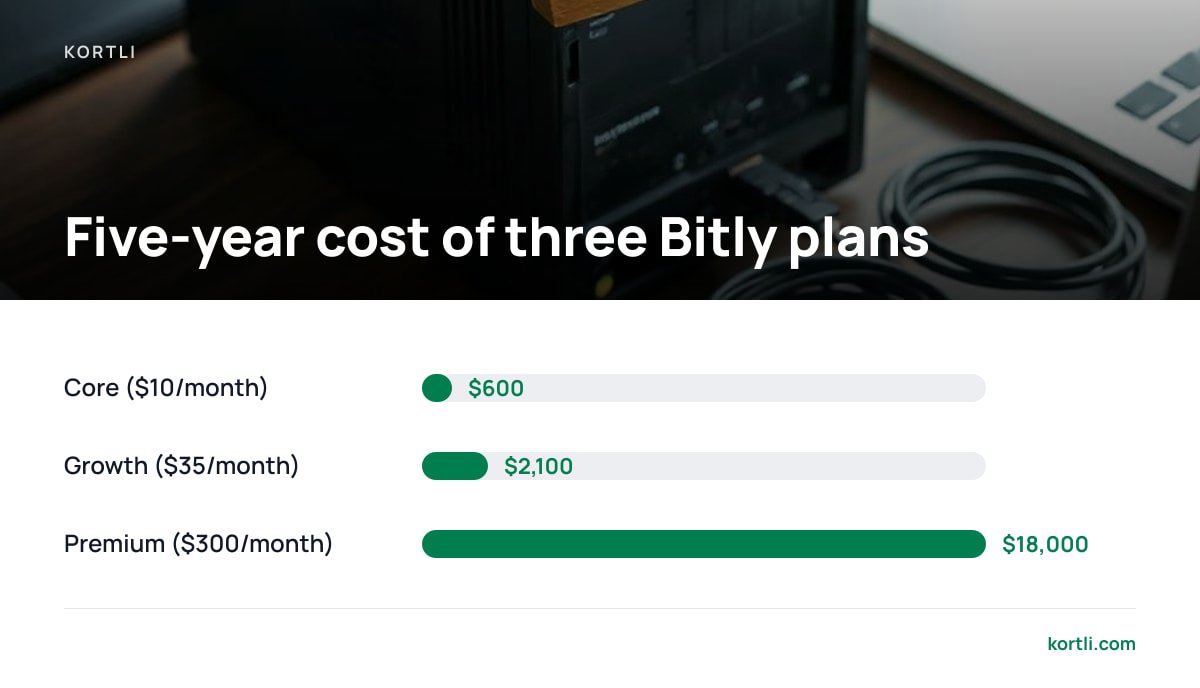
- Over five years, a $10 plan costs about $600, a $35 plan about $2,100 and a $300 plan about $18,000.
- Bitly records every click by design. Whether that is a privacy problem depends on who you are legally responsible to.
- If you only need a few dozen links, stay on a hosted plan. If you manage branded links and printed QR codes at volume, owning the infrastructure is cheaper and safer.
Table of Contents
- The Five Bitly Plans, and What Each One Costs
- Is Bitly Free? What the Free Plan Gives You and What It Withholds
- Bitly Pricing Plans Compared Over Five Years
- Is Bitly a Tracker? What Every Click Reveals
- Is Bitly a Safe Site? Where the Risk Actually Sits
- How to Get Rid of Bitly Without Breaking Your Links
- Which Plan to Pick, and When to Stop Renting
- Get Branded Links, QR Codes and Click Data on a Server You Own
- Frequently Asked Questions
- Sources
The Five Bitly Plans, and What Each One Costs
Bitly sells five tiers, and the official Bitly pricing page is the only place to confirm today's numbers, because list prices and caps get adjusted. The table below uses round figures so you can see the shape of the ladder. Treat the dollar amounts as approximate monthly prices on annual billing.
| Plan | Approx. price | Built for | The catch |
|---|---|---|---|
| Free | $0 | Occasional personal links | Small monthly allowance of links and QR codes, short analytics history |
| Core | About $10/month | Solo marketers, small shops | Low link cap, limited custom domain use |
| Growth | About $35/month | Small teams | Higher caps, but advanced features are still gated |
| Premium | About $300/month | Agencies, larger marketing teams | Price jumps roughly ninefold from Growth |
| Enterprise | Custom quote | Large organizations | You negotiate, and you cannot see the price before the sales call |
The jump from Growth to Premium is the steepest on the page, and it is where most mid-sized teams discover they are paying for volume they use only in bursts. Also, every tier meters something: new links per month, QR codes per month, custom domains, or how far back your click history goes. When you compare plans, compare the meters, not the headline price. For a tier-by-tier look at the caps, see our Bitly pricing breakdown.
Is Bitly Free? What the Free Plan Gives You and What It Withholds
Yes, Bitly links are free to create on the Free plan. You can shorten URLs, generate a small number of QR codes, and see basic click counts without paying anything.
The word "free" covers a narrow band, though. Free accounts get a single-digit monthly cap on new links and QR codes, short click history, and no meaningful branded-domain support. That last point is the one that bites. A free link lives on Bitly's own domain, so every link you share advertises Bitly and depends on its continued goodwill. For a business, a link on someone else's domain is closer to a loan than an asset.
The free plan works well for a one-off, such as a link in an email signature or a URL you will read aloud once on a podcast. It works badly for anything you will print, because a printed link cannot be edited after the ink dries.
Bitly Pricing Plans Compared Over Five Years
Monthly prices hide the real cost of a tool you will still be using in 2030. Here is the same ladder multiplied out, using round monthly figures.
| Plan (approx. monthly price) | 1 year | 3 years | 5 years |
|---|---|---|---|
| Core ($10) | $120 | $360 | $600 |
| Growth ($35) | $420 | $1,260 | $2,100 |
| Premium ($300) | $3,600 | $10,800 | $18,000 |
Five years of a $35 plan is $2,100. Five years of a $300 plan is $18,000. A one-time license costs the same in year five as in year one.
The cheap plan is not always the smart one. Core is cheap because it is small. The moment you need several branded domains, team seats or deeper analytics, you move up a tier, and the five-year line moves with you. Your cost follows your growth, which is the opposite of how infrastructure you own behaves. Our piece on what a Bitly subscription gets you and what you never own walks through that ownership gap in more detail.
Is Bitly a Tracker? What Every Click Reveals
Yes. Click tracking is the product. When someone follows a short link, the service sees the request and logs it: timestamp, approximate location, device and browser type, and the referring page where one exists. That data feeds the analytics dashboard you pay to access.
For you as the link owner, this is useful. For the person clicking, it is a third party observing a visit they thought was going straight to your site. The legal weight depends on where your audience lives. Under the EU's General Data Protection Regulation, IP addresses can count as personal data, so a business sending European traffic through a hosted shortener has to treat that vendor as a data processor and cover it in its privacy documentation.
If you are not subject to those rules, tracking is a trade: you get analytics, they get a copy of your audience's behavior. If you are, keeping click data on a server you control removes one disclosure from your paperwork.
Is Bitly a Safe Site? Where the Risk Actually Sits
The service is legitimate, widely used and not a scam. The risk sits in what short links can hide. A shortened URL gives no clue about its destination, and attackers use every popular shortener to disguise phishing pages. The OWASP guidance on unvalidated redirects explains why: redirects borrow the trust of the domain they start from.
Practical rules for the person on the receiving end:
- Expand before you click. Run unfamiliar short links through a link expander that shows the destination without loading it.
- Check the destination. Paste the expanded URL into Google Safe Browsing's site status checker to see if it is flagged for malware or phishing.
- Distrust urgency. A short link in an unexpected text about a package or a bank account is suspicious regardless of which shortener it uses.
For the person sending links, your audience's trust in your link is only as good as the domain it sits on. Customers are more willing to tap a link on your own domain than a generic one.
How to Get Rid of Bitly Without Breaking Your Links
"Getting rid of Bitly" means one of two things, and the answers differ.
If you want to cancel your plan
Cancel from the billing section of your account settings, then read what the Bitly terms of service say about links and custom domains once an account is downgraded or closed. Do that reading before you click cancel. The exposure is branded domains and anything created beyond the free allowance, since those are the features the paid plan was holding up.
If you want to stop using Bitly links across your own content
Moving off Bitly means every link you ever published has to keep working. This order avoids dead links:
- Export everything first. Pull a full list of short links with their destinations and back-halves.
- Recreate them on infrastructure you control. Keep the same back-halves where your domain allows it.
- Repoint DNS, then test. If your branded domain pointed at Bitly, change the record to your new server and open ten old links in a private window.
- Keep the old account alive until traffic confirms the cutover. Check your logs for a week.
Links on the shared bit.ly domain are the hard case, because you cannot repoint a domain you do not own. Those either stay with the old service or get replaced in the places you can still edit. Walk through the mechanics in How to Host Your Own Bitly.
Pro Tip: Lower the TTL on your branded domain's DNS record to about 300 seconds a week before you switch. A default TTL of several hours means visitors keep hitting the old destination long after you flip the record, and you will not see the failures in a test, because your own machine may already have refreshed.
Which Plan to Pick, and When to Stop Renting
My position: the Free plan is fine for personal use, Core is the only paid tier that makes sense for a one-person operation, and Premium is hard to justify unless a team of people sits in the dashboard every day. At about $300 a month, you pay $3,600 a year mostly for volume and seats.
Leaving hosted plans makes the most sense when three things are true at once: you use branded domains, you print QR codes or links on physical goods, and you expect to be doing this in five years. A QR code is a picture of a URL. The code itself never changes, so with a shortener in the middle, only the redirect behind it can. The QR code standard published by its inventors, Denso Wave, describes a format anyone can generate for free. The only thing worth paying for is the redirect layer, and you can run that yourself. Our guide to running a URL shortener on your own server covers the maintenance honestly, including the parts that are tedious.
If you manage a few dozen links and no printed material, ignore this section and keep the cheapest plan that covers your caps.
Get Branded Links, QR Codes and Click Data on a Server You Own
If your annual Bitly bill grows with your link count and your printed QR codes depend on a subscription staying active, Kortli is built for that case. It is a self-hosted link shortener you install on your own Linux server for a one-time payment. Branded domains carry no per-domain fee, and links can be password-protected or split-tested. QR codes can be styled with an embedded logo, and click analytics with geographic data stay in your own database. There is no subscription to cancel, and your links keep working as long as your server does.
The caveat is that you become the operator. You need a Linux box, a reverse proxy, TLS certificates and backups, and uptime is your job. If that sounds like a weekend of work you would rather skip, a hosted plan is the better fit. If it sounds routine, check the current license price on the site and compare it against your five-year number from the table above. Start with the Linux install guide to see what the setup involves before you buy.
Frequently Asked Questions
Is Bitly links free?
Yes, the Free plan lets you create short links and a few QR codes at no cost, but with small monthly caps and limited analytics history. Branded domains and larger volumes require a paid plan. Check the current allowance on Bitly's pricing page before relying on it.
How much does Bitly cost per month?
Paid plans start at roughly $10 a month for Core and rise to around $35 for Growth and around $300 for Premium, with Enterprise on custom quotes. List prices change, so confirm the figures on the official pricing page.
How to get rid of Bitly?
To cancel, use the billing section of your account settings and read the terms on what happens to links and custom domains afterward. To stop depending on it, export your links, recreate them on infrastructure you control, then repoint your branded domain's DNS and test old links in a private window.
Is Bitly a tracker?
Yes. Bitly logs each click, including time, approximate location, device and referrer, and shows that data in its analytics. If your audience is covered by GDPR, treat the service as a data processor in your privacy documentation.
Is Bitly a safe site?
The service is legitimate, but short links hide their destinations, and attackers use all popular shorteners to mask phishing pages. Expand unfamiliar links before clicking and check the destination with Google Safe Browsing.
Sources
- Bitly Terms of Service | Bitly
- General Data Protection Regulation (EU) 2016/679 | EUR-Lex, European Union
- Unvalidated Redirects and Forwards Cheat Sheet | OWASP
- Google Safe Browsing Site Status | Google Transparency Report
- QR Code Development Story and Specification | Denso Wave
Leave a Reply