

To run a URL shortener on your own server, you need a Linux machine with root access, a domain you control the DNS for, a TLS certificate that renews itself, and shortener software writing to a database on your own disk. The install takes an afternoon. What decides whether it survives the year is redirect type, backup discipline, and whether you accept the privacy obligations that come with keeping click data in-house.
TL;DR:
- A Linux VPS with root access, a domain, and automated TLS renewal is the entire prerequisite list.
- Default to 302 redirects. Browsers cache 301s indefinitely and your server cannot undo that.
- Budget $5 to $7 per month for the server and $10 to $15 per year for the domain.
- Certificate expiry checks and tested database restores are the two chores that keep it alive.
- Moving click data onto your own disk moves GDPR obligations onto you as well.
Table of Contents
- What Running a URL Shortener on Your Own Server Actually Requires
- Choosing Where It Runs: VPS, Container, or Bare Metal
- How to Run a URL Shortener on Your Own Server: The Install Sequence
- Redirect Types Decide Whether You Can Ever Change a Link
- The Domain, the Certificate, and the 90-Day Clock
- Keeping Click Data Private, and What the Rules Require
- What It Costs, Line by Line
- Get a Link Shortener You Install Once and Own Forever
- Frequently Asked Questions
- Sources
What Running a URL Shortener on Your Own Server Actually Requires
Five things have to be in place before the software matters: a Linux machine you have root on, a domain whose DNS you control, ports 80 and 443 open to the internet, a database engine, and a certificate renewal process that runs without you. Miss the last one and every short link you have ever published eventually serves a browser warning in place of a redirect.
The certificate step trips people up because it fails silently for the first 80 days. Let's Encrypt issues certificates valid for 90 days, and their documentation builds the whole workflow around ACME clients rather than hand-issued certs. Install one manually, forget the renewal, and the outage arrives on a Tuesday morning with no warning at all.
Minimum hardware, by component
- CPU. One vCPU handles thousands of redirects per minute. A redirect is a lookup, a status line, and a log write.
- RAM. 1 GB is comfortable for the shortener plus a reverse proxy and the database. 512 MB works if you tune the database down.
- Disk. 20 GB covers the OS, the application, and years of click logs. Analytics rows grow faster than people expect.
- Database. PostgreSQL or MySQL/MariaDB. Choose the one you already know how to dump and restore.
- Network. A public IPv4 address, or IPv6 with a reverse proxy in front.
Choosing Where It Runs: VPS, Container, or Bare Metal
Most shared hosting cannot do this. Those plans usually block the server-level rewrite rules a shortener needs, and plenty of providers forbid long-running outbound connections. If your plan gives you a control panel and nothing else, move.
- A VPS. The default choice. A 1 vCPU, 1 GB instance from the mainstream providers runs roughly $5 to $7 per month, and you get root, a static IP, and full control of the firewall.
- A container on a VPS. Same machine, better hygiene. Docker's documentation covers the volume and network setup needed to keep your database outside the container so an image upgrade does not wipe it.
- Bare metal. Worth it past a few million clicks per month, or when a contract requires the hardware to sit in your own building. The cost curve does not reward going dedicated early.
I would start on a small VPS with a container. Moving later means copying a database dump and repointing DNS, which is about an hour of work. If you are still weighing the two models, our breakdown of hosted versus self-hosted link shorteners maps where each one breaks.
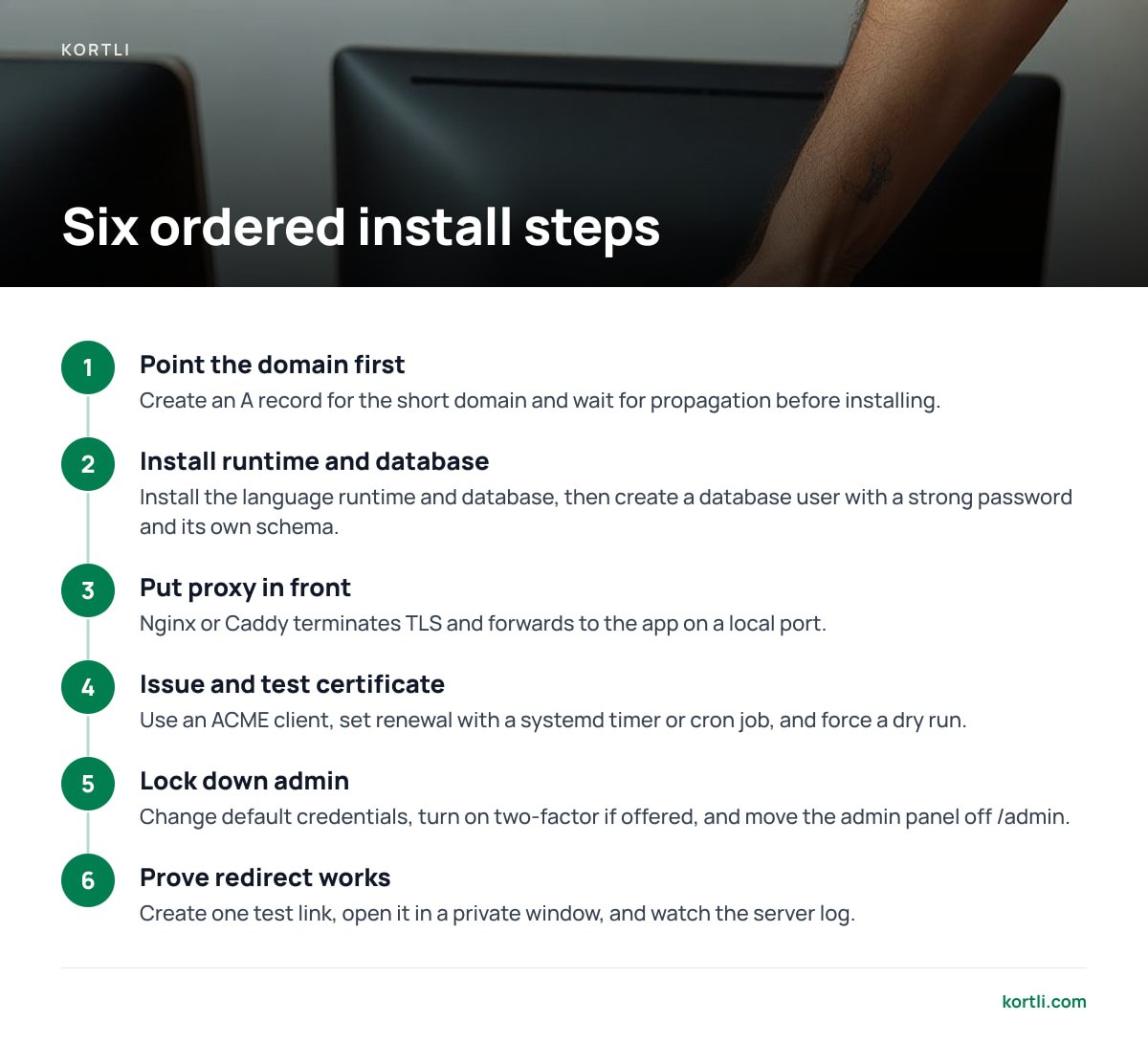
How to Run a URL Shortener on Your Own Server: The Install Sequence

Order matters here. DNS first, then the runtime, then TLS, then the application.
1. Point the domain before you install anything
Create an A record for the short domain (for example, go.example.com) aimed at the server's IP, then wait for propagation. Certificate issuance fails if DNS has not resolved yet, and it fails in a way that looks like a server problem rather than a DNS one.
2. Install the runtime and the database
Whichever shortener you choose, it needs a language runtime and a database. On Debian or Ubuntu that is typically one apt line for the runtime, one for the database, then a database user with a strong password and its own schema. Do not let the app run as root.
3. Put a reverse proxy in front
Nginx or Caddy terminates TLS and forwards to the app on a local port. NGINX's documentation covers the proxy_pass and header directives you need. The proxy is also where you add HSTS and set request rate limits so a bot cannot hammer the redirect endpoint.
4. Issue the certificate and test the renewal
One command with an ACME client, then a systemd timer or cron job for renewal. Force a dry run on day one. The first unattended run is where an untested renewal job tends to fail.
5. Create the admin account and lock it down
Change the default credentials, turn on two-factor if the software offers it, and move the admin panel off /admin. Redirect traffic and admin traffic do not need to share a surface.
6. Prove the redirect works before you publish
Create one test link, open it in a private window, and watch the server log. You want to see the request hit the proxy, pass to the app, and return the redirect status you actually intended.
Pro Tip: Set the short domain's DNS TTL to 300 seconds before launch and leave it there for the first month. If you have to move servers, a 24-hour TTL means real users hitting a dead IP for a full day. The cost of a short TTL is slightly more DNS queries, which nobody notices.
Redirect Types Decide Whether You Can Ever Change a Link
Most guides skip this decision, and it is the one that bites later. RFC 9110 defines the redirect status codes, and the meaningful difference between them is caching behavior.
| Code | Name | Cached by browsers | Method preserved | Use it when |
|---|---|---|---|---|
| 301 | Moved Permanently | Yes, often indefinitely | No | The slug and its destination are truly permanent |
| 302 | Found | No, by default | No | Campaign links you may retarget |
| 307 | Temporary Redirect | No, by default | Yes | Temporary moves on POST requests |
| 308 | Permanent Redirect | Yes | Yes | Permanent moves that must keep the method |
For a link shortener, the practical rule is simple. Use 302 for anything a human might need to change later. Reserve 301 for slugs that will never move, because you cannot recall one once a browser has stored it.
Once a visitor's browser has cached a 301, your server cannot change where that link points for that visitor.
Anyone running a branded short domain for retail packaging, conference slides, or print advertising should default to 302. Print destinations are permanent; campaign destinations are not.
The Domain, the Certificate, and the 90-Day Clock
Two operational chores keep a shortener alive, and neither is exciting.
- Certificate renewal. Automate it and alert on failure. A monitoring check that fetches the short domain over HTTPS every five minutes catches expiry weeks before users do.
- Database backups. Daily dumps, stored off the server, restored into a scratch database once a quarter. An untested backup file is not a recovery plan.
Set an uptime check against one known slug. If that slug stops returning a redirect, something between DNS and the database broke, and you will know before a customer does.
Keeping Click Data Private, and What the Rules Require
Self-hosting moves click logs onto your disk, which changes who is responsible for them. If you are in the EU or you shorten links for EU visitors, the General Data Protection Regulation applies to the IP addresses and device identifiers you store, and Article 5 sets the principles: purpose limitation, data minimization, and storage limits.
Practically, that means:
- Decide what you actually need. Country-level geography is usually enough. Keeping full IP addresses in plain text for years is not.
- Write down a retention period. Ninety days for raw logs plus indefinite aggregates is a workable split.
- Keep the privacy policy current. If a hosted provider handled this before, it now falls to you.
This is the trade you are making. You gain control of the data and you take on the obligations that come with it. For most businesses that is still the better end of the deal, because click data becomes an asset on your own infrastructure instead of a feature you rent. Our breakdown of self-hosted analytics costs covers what storing it actually involves.
What It Costs, Line by Line
Recurring and one-time costs look very different over three years.
- VPS. $5 to $7 per month, roughly $216 over three years.
- Domain. $10 to $15 per year, about $40 over three years.
- TLS certificate. $0. Let's Encrypt does not charge.
- Software. Varies. Subscription shorteners bill monthly per seat or per click volume. A one-time license is a single payment.
A $6 VPS and a $12 domain come to roughly $260 over three years. That number does not move when your click volume does.
Infrastructure cost staying flat while volume grows is what makes self-hosting attractive for high-traffic campaigns. Hosted pricing scales with usage, and usage is the one thing you cannot forecast. If you are on a subscription shortener today, the math behind a one-time payment link shortener is worth running against your own click numbers.
Get a Link Shortener You Install Once and Own Forever
If the shape of this setup fits but you would rather not assemble a stack from five separate projects, Kortli is a self-hosted link shortener you install on your own Linux server and pay for once. It runs behind your existing reverse proxy, uses your own database, and has branded short domains with no per-domain fee, password-protected links, A/B split testing, styled QR codes with your logo, and click analytics with geographic tracking that stays on your machine. Because the license is a one-time payment, the bill does not change when a campaign goes viral.
One honest limit: Kortli is software you own, so the certificate renewal, the backups, and the uptime checks described above are still yours to run. If you want someone else handling that on their infrastructure, a hosted shortener is the better fit. Check the spec sheet, ours included, for the specific runtime and database versions before you buy.
Frequently Asked Questions
Can I run a URL shortener on shared hosting?
Usually not. Shorteners need server-level redirect rules and a database you can configure, and most shared plans block both. A $5 VPS gives you the access you need.
Is 301 or 302 better for a short link?
Use 302 unless the slug and its destination are permanent. Browsers cache 301s aggressively, and once a visitor's browser has stored one, changing the destination on your server has no effect for that visitor.
Do I need a separate domain for short links?
It helps. A short, memorable domain keeps your primary brand domain out of redirect logs and lets you relocate the shortener later without touching your main site's DNS.
How much does self-hosting a link shortener cost per year?
Roughly $70 to $100 per year for a small VPS plus a domain. Let's Encrypt certificates are free. Software is the only variable, and a one-time license removes it from the recurring column.
Is click data on my own server subject to GDPR?
Yes, if you process data about people in the EU. IP addresses and device identifiers count as personal data, and Article 5 requires a stated purpose, data minimization, and a retention limit.
What happens to my links if I stop paying a hosted shortener?
They typically stop resolving, because the redirect runs on the vendor's infrastructure. That is the main argument for owning the server the redirect runs on.
Sources
- RFC 9110: HTTP Semantics | IETF
- How It Works | Let's Encrypt
- Article 5: Principles relating to processing of personal data | GDPR.eu
- NGINX Documentation | NGINX
- Docker Documentation | Docker
Leave a Reply