
To stop paying monthly for a link shortener, you need to own the domain your links run on and the server that answers them, because canceling a hosted plan usually switches off every link on the vendor's side. Move the domain first, then export your links, then cancel. Do it in the opposite order and you pay for months of service and still lose your printed QR codes.
TL;DR:
- Canceling a hosted shortener rarely deletes your links on day one. It downgrades the account, and links on a custom domain or past a free-tier cap are what stop working.
- The order that protects you: confirm you control the domain, export every link, rebuild the redirects on your own server, then cancel.
- Free works for a few dozen links with no analytics needs. Past that, a one-time-license self-hosted tool beats both free tiers and subscriptions.
- A short URL stays permanent only while someone keeps the redirect running and the domain registered. Whoever controls those two things controls the link.
- On Android, deleting the app does not cancel anything. Cancel in Play Store subscriptions or on the vendor's own billing page, depending on where you signed up.
Table of Contents
- What You Are Actually Renting When You Pay for a Link Shortener
- How to Stop Paying Monthly for a Link Shortener Without Breaking Links
- Is a Short URL Permanent? It Depends on Who Holds Three Things
- Does Google Still Have a Link Shortener?
- How to Make a URL Shortener for Free, and Where Free Stops Working
- Four Ways to Stop the Bill, Compared
- Canceling on Android, and Other Places the Bill Hides
- Get a Link Shortener You Pay for Once and Run on Your Own Domain
- Frequently Asked Questions
- Sources
What You Are Actually Renting When You Pay for a Link Shortener
A short link is a tiny database row: a short code on one side, a destination URL on the other. A server looks up the code and sends the visitor on with an HTTP redirect. That is the whole product. The rest of the pricing page is layers on top: analytics dashboards, QR code generation, team seats, and a cap on how many links or clicks you get.
You rent three separate things, and they matter differently when you cancel:
- The redirect server. The machine that answers when someone taps your link. If you stop paying, the vendor decides whether it keeps answering.
- The domain. Either the vendor's shared domain, or your own branded domain pointed at their servers. Only your own domain can go with you.
- The click data. Historical analytics live in the vendor's database. Exports are often limited by plan, so ask for yours before you downgrade.
Links die quietly. A Pew Research Center analysis found that 38% of webpages that existed in 2013 were no longer accessible by 2023. A link on a subscription you stopped paying for is one more way to join that statistic, and you are the one who printed it on 5,000 flyers.
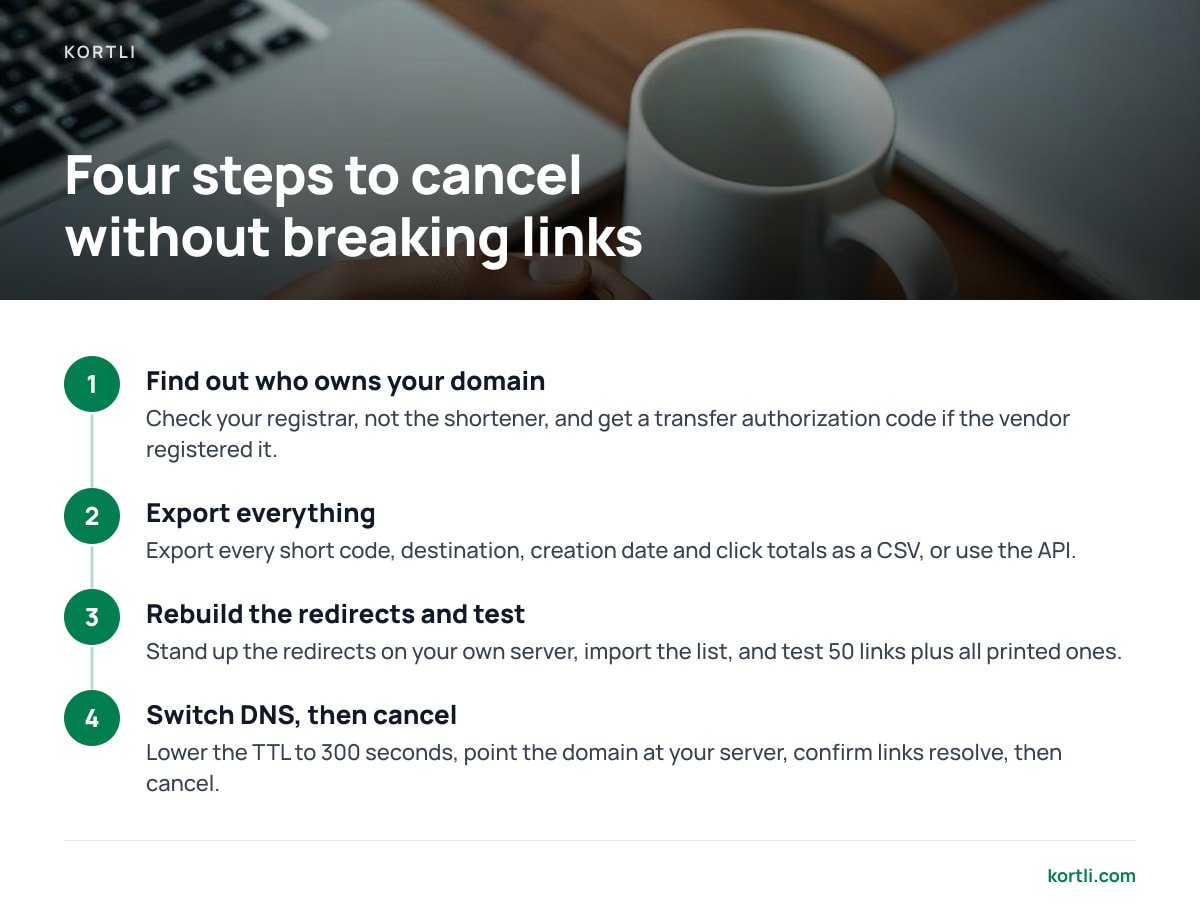
How to Stop Paying Monthly for a Link Shortener Without Breaking Links
Order matters more than anything else in this process. Here is the sequence I would follow.
Step 1: Find out who owns your domain
Log into your domain registrar, not the shortener, and check whether your branded short domain (say, go.yourbrand.com) is registered under your account. If the vendor registered it for you, ask them for a transfer authorization code before you do anything else. Domain transfers can take days, and newly registered or recently transferred domains are typically locked against transfer for 60 days under ICANN's transfer policy.
Step 2: Export everything
Export every short code, destination, creation date and, if the plan allows it, historical click totals. A CSV is enough. If your plan blocks bulk export, the API usually does not, and a 20-line script can page through it.
Step 3: Rebuild the redirects and test
Stand up the redirect service on infrastructure you control (options are in the comparison below) and import the list. Then test a sample of 50 links, plus every link that appears on printed material, before touching DNS.
Step 4: Switch DNS, then cancel
Lower the DNS TTL to 300 seconds a day ahead, so the cutover propagates in minutes instead of hours. Point the domain at your server, confirm links resolve, and only then cancel.
The cancellation button is step four of four. Anyone who presses it first is testing what happens to their QR codes in production.
So how do you "unsubscribe from a link"?
You cannot. A link is not a subscription. The account behind it is. To unsubscribe, cancel the plan that generated the link. If you meant "stop a link someone sent me from tracking me," that is a different problem: strip the tracking parameters (everything after the ?) before opening it.
Is a Short URL Permanent? It Depends on Who Holds Three Things
A short URL is permanent only while three things stay alive: the domain registration, the server answering requests, and the mapping between code and destination. Lose any one and the link breaks. The table shows who controls each under a typical hosted plan versus your own setup.
| What the link depends on | Hosted plan, vendor's domain | Hosted plan, your domain | Self-hosted, your domain |
|---|---|---|---|
| Domain registration | Vendor | You | You |
| Redirect server | Vendor | Vendor | You |
| Code-to-URL mapping | Vendor | Vendor | You |
| Survives cancellation? | Depends on vendor policy | Only if you move DNS first | Yes |
| Survives vendor shutdown? | No | Only if you have an export | Yes |
One technical detail affects permanence more than people expect. The HTTP standard, RFC 9110, defines 301 as "Moved Permanently" and 302 as "Found" (a temporary redirect). Browsers and search engines are allowed to cache a 301 aggressively. If you may change a destination later or want every click to reach your server for counting, use 302 or 307. A 301 sent from the wrong server can follow visitors around long after you fix it.
The vendor's shared domain is the riskiest setup of all. You cannot move it, because it was never yours.
Does Google Still Have a Link Shortener?
Not one you can create new links with. Google stopped letting new users create goo.gl links in 2018, and the product was formally retired. The related Firebase Dynamic Links service was shut down on August 25, 2025. Google's own developer blog announcement covers the goo.gl wind-down, including which existing links keep resolving, so check it before assuming any old goo.gl link is safe.
This applies to any shortener you do not run. goo.gl was free, widely used and backed by one of the biggest companies in the world, and it still did not last. If a link matters to you for more than a year, the redirect needs to live on a domain you own.
How to Make a URL Shortener for Free, and Where Free Stops Working
The cheapest real shortener is a redirect rule on a server you already pay for. With nginx, a map in the http block and a small server block are enough:
map $uri $target {
    default "";
    /promo  "https://example.com/spring-sale";
    /menu   "https://example.com/menu.pdf";
}

server {
    listen 443 ssl;
    server_name go.example.com;
    if ($target) { return 302 $target; }
    return 404;
}
Point a subdomain at that server, get a certificate from Let's Encrypt, which issues them at no charge, and you have a working shortener at zero marginal cost. Static hosts and edge platforms also support redirect rule files, and a spreadsheet plus a redirect file is a legitimate system for 30 links.
Free stops working in four places:
- No click counts. Your access log records requests, but turning those into unique visitors, countries and devices is your job.
- No editing interface. Every change is a config edit and a reload. That is fine for you and miserable for a marketing team.
- No QR codes or split testing. You would add those with separate tools.
- No password protection or expiry. Both require application logic.
Free hosted tiers have their own limits: link caps, expiry, branded domains locked behind payment, and the same cancellation problem as paid plans. My pick: use plain redirect rules if you have fewer than roughly 50 links and nobody on your team needs a dashboard. Past that point, you want a real application.
Four Ways to Stop the Bill, Compared
| Option | Upfront cost | Ongoing cost | You control the domain | You control the click data | Best for |
|---|---|---|---|---|---|
| Keep the hosted plan | None | Monthly, rises with tier | Only if custom domain | No | Teams who never want to touch a server |
| Free hosted tier | None | None, with caps | Rarely | No | A handful of casual links |
| DIY redirect rules | Your time | Server cost you already pay | Yes | Raw logs only | Developers with under ~50 links |
| Self-hosted app, one-time license | One payment | Your server | Yes | Yes | Anyone with branded links, QR codes and analytics needs |
Run the math on your own invoice. A plan that costs $35 per month comes to $420 a year and $2,100 over five years, before any price increases or overage charges. That figure is an illustration, not a quote, so replace it with your actual bill. For real tier-by-tier totals, see the five-year cost breakdown for hosted plans.
My position: if you manage branded links, QR codes or analytics for a business, self-hosting with a one-time license is the right default. The hosted model charges you every month for something that costs almost nothing to run, and it holds your links as leverage. The exception is a team with no one willing to maintain a Linux box. A server that goes down takes every link with it, and a subscription is a reasonable price for not owning that problem. If you are in between, the guide to hosting your own shortener walks through what you take on.
Pro Tip: Check how your QR codes were generated before you plan the move. Many hosted tools encode the vendor's redirect URL in the code, even when your branded domain is shown elsewhere. If so, that QR code is tied to the vendor forever, and the only fix is reprinting. Scan each printed QR code with a phone and read the URL it shows before you assume it uses your domain.
Canceling on Android, and Other Places the Bill Hides
Searching for how to stop paying monthly for a link shortener on Android usually means one of two situations. Either you subscribed inside a mobile app, or you manage links from your phone and want out.
In the first case, deleting the app cancels nothing. Open the Google Play Store, tap your profile icon, choose Payments & subscriptions, then Subscriptions, select the plan and tap Cancel subscription. If you signed up on the vendor's website, Play will show nothing and you have to cancel in the account's billing settings. Check both places, because duplicate subscriptions are common.
In the second case, a self-hosted dashboard is just a website, so it works in any mobile browser. Add it to your home screen and it behaves like an app, with no store billing involved.
Whichever path you take, check three other places the charge can persist: a separate add-on for a custom domain, a QR code subscription billed independently, and an annual renewal date that falls months after you "canceled" the monthly plan. If you move analytics in-house, read what to collect and what to skip in private link analytics first, since IP addresses can count as personal data under the EU's GDPR.
Get a Link Shortener You Pay for Once and Run on Your Own Domain

Kortli is a self-hosted link shortener you install on your own Linux server with a one-time license, so the monthly invoice goes away and the links stay on infrastructure you control. You can attach as many branded domains as you like with no per-domain fee. It has password-protected links, A/B split testing, styled QR codes with your logo embedded, and click analytics with geographic tracking stored on your own server.
The caveat is that you run the machine. Updates, backups and uptime are yours, and if the server goes down your links go with it. If you have never administered a Linux server, read the Docker setup notes first to see what the work involves. Check the current license price on kortli.com, and compare the spec sheet to your needs, ours included, before buying anything.
Frequently Asked Questions
How do I stop paying monthly for a link shortener without losing my links?
Confirm you control your branded domain, export all links, rebuild the redirects on a server you run, point DNS at it, and cancel last. Testing printed QR codes before the DNS change is the step most people skip.
How do I unsubscribe from a link?
A link itself cannot be unsubscribed from. You cancel the account or plan that created it, in the billing settings of the vendor or in Google Play subscriptions if you bought through an Android app. To stop a received link from tracking you, remove the tracking parameters after the question mark.
Is a short URL permanent?
Only as long as the domain stays registered, a server keeps answering, and the code-to-destination mapping still exists. On a vendor's shared domain, the vendor controls all three. On your own domain with your own server, you control them.
Does Google still have a link shortener?
Google no longer lets new users create goo.gl links, and the Firebase Dynamic Links service ended on August 25, 2025. Google's developer blog explains the status of existing goo.gl links, so check it before relying on one.
How can I make a URL shortener for free?
Add redirect rules to a web server you already have, such as an nginx map that returns a 302 for each short path, and secure it with a free Let's Encrypt certificate. It works well for a few dozen links, but gives you no dashboard, QR codes or click analytics.
Sources
- When Online Content Disappears | Pew Research Center
- RFC 9110: HTTP Semantics | IETF
- Google URL Shortener links will no longer be available | Google Developers Blog
- Let's Encrypt Documentation | Internet Security Research Group
- Regulation (EU) 2016/679 (GDPR) | EUR-Lex, European Union
Leave a Reply