

To split test landing pages with a link shortener, you point one short link at two or more destination URLs and let the shortener assign each click to a variant through a temporary (302) redirect. The shortener only divides traffic. It cannot name the winner, because click counts on a fair split are equal by design. You need conversions tracked on each landing page and tagged with a variant label.
TL;DR:
- A split-testing short link is one URL that redirects each click to a different landing page. It is the simplest way to test pages built in different tools or hosted on different domains.
- Use a 302 (temporary) redirect, never a 301. A 301 is cacheable by default, so a browser can lock a visitor onto one variant.
- The short link's click counts show your traffic split, not your results. Tag each destination with a UTM parameter and compare conversions in your analytics.
- At a 5% baseline conversion rate, detecting a 20% relative lift takes roughly 8,100 visitors per variant. Most small campaigns never reach that, so decide the sample size before you launch.
- Bot traffic, cached redirects, ad platform delivery bias and returning visitors are the four ways link-level tests go wrong, and each has a specific fix.
Table of Contents
- How to Split Test Landing Pages With a Link Shortener, Start to Finish
- What the Redirect Does, and Why It Has to Be a 302
- Why the Short Link's Click Count Cannot Pick Your Winner
- How Many Visitors You Need Before You Call a Winner
- Four Ways a Link-Level Split Test Gets Quietly Corrupted
- Link-Level Testing or On-Page Testing Tools: Which One to Pick
- Run Split Tests on Links You Own, With No Per-Test Fee
- Frequently Asked Questions
- Sources
How to Split Test Landing Pages With a Link Shortener, Start to Finish
A link-level split test has three moving parts: one public short link, two or more destination pages, and a rule that decides which visitor goes where. Everything else is bookkeeping. Here is the sequence that keeps the data usable.
- Write down one hypothesis and one metric. "A shorter form raises demo requests" is testable. "See which page is better" is not. Pick the single conversion event you will judge on before any traffic arrives.
- Build the variants so they differ in one thing. Change the headline, or the offer, or the form length. If you change all three and page B wins, you learned nothing you can reuse.
- Tag every destination. Add the same
utm_sourceandutm_campaignto both URLs, and give each a differentutm_contentsuch asform-shortandform-long. Google Analytics documents these campaign parameters and reports them automatically. - Create the short link with both destinations. Set the split weights. Use 50/50 unless you have a reason not to.
- Test the link yourself. Click it ten times from a private window and confirm both variants appear and both fire your conversion tracking.
- Publish the short link everywhere the campaign runs. Ads, email, social posts and printed QR codes should all use the same short link, so every channel feeds the same experiment.
- Stop at the sample size you chose in step 1. Do not stop when the dashboard first looks decisive.
If the pages live in different builders or on different domains, this method is often the only clean way to compare them, because no script has to be installed on either page.
What the Redirect Does, and Why It Has to Be a 302

When someone clicks the short link, your server answers with a redirect status code and a Location header naming the chosen variant. The code you choose matters more than most guides admit.
Google Search Central's guidance on website testing says to use a 302 redirect, not a 301, when you send visitors to test variants, because the redirect is temporary. The HTTP standard agrees. In RFC 9110, 301 means the move is permanent, and responses with that code are cacheable by default. A 302 is not cached unless the response says so.
| Status code | Meaning | Cached by default | Use for split tests |
|---|---|---|---|
| 301 | Moved permanently | Yes | No. Browsers can pin a visitor to one variant. |
| 302 | Found (temporary) | No | Yes. This is the standard choice. |
| 307 | Temporary, method preserved | No | Works, but only matters for non-GET requests. |
A 301 redirect is cacheable by default under RFC 9110, so one visitor can be silently served variant A on every return visit, whatever your split weights say.
The failure is quiet. Nothing errors. Your 50/50 test just drifts, and returning visitors, who often convert at a different rate than new ones, contaminate one arm.
Why the Short Link's Click Count Cannot Pick Your Winner
Most guides tell you to open the link's analytics and compare the two destinations. That report contains clicks per variant. If your split is 50/50, those numbers will be nearly equal, which means the redirect is working correctly. A test where variant B receives 10% fewer clicks than A usually points to a broken setup, such as caching or bot filtering, and says nothing about B's performance.
The winning page is decided after the click. Visitors land, some fill in the form or buy, and only your landing page analytics can see that. This is why step 3 above matters. Without a distinct utm_content per variant, both arms merge into one row in your conversion report and the test produces nothing.
Both arms of a fair 50/50 test get roughly the same number of clicks. The short link measures the split, and your landing page analytics measure the result.
One exception: if the variants differ before the click, such as a link preview or QR code placement, click-through can differ. That is a different test, and it needs its own design.
Pro Tip: Run an A/A test first. Point the short link at two copies of the same page, tagged a1 and a2, and send a few hundred visitors. If the two copies show a meaningful conversion gap, your tracking, bot filtering or caching is broken, and you have found that out before it cost you a real experiment. Most teams skip this and then trust a result the setup itself manufactured.
How Many Visitors You Need Before You Call a Winner
Small campaigns are where this goes wrong. You send 400 visitors, page B converts at 6.5% against 5.0%, and you declare victory. At that volume, the gap is within ordinary random variation.
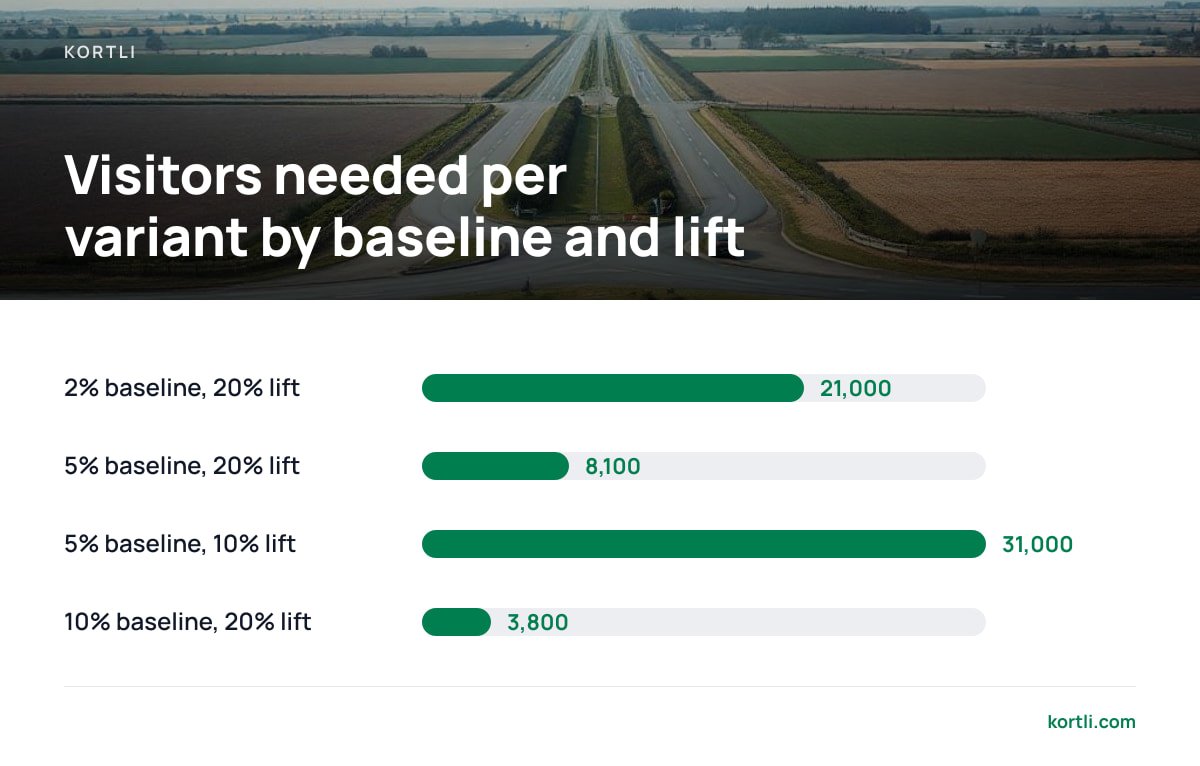
The standard two-proportion calculation, at 95% confidence and 80% power, gives these approximate requirements per variant. A tool such as Evan Miller's sample size calculator will give you exact figures for your own inputs.
| Baseline conversion | Lift you want to detect | Approx. visitors per variant |
|---|---|---|
| 2% | 20% relative (2.0% to 2.4%) | 21,000 |
| 5% | 20% relative (5.0% to 6.0%) | 8,100 |
| 5% | 10% relative (5.0% to 5.5%) | 31,000 |
| 10% | 20% relative (10% to 12%) | 3,800 |
At a 5% baseline, detecting a 20% relative lift takes about 8,100 visitors per variant. Detecting a 10% lift takes nearly four times as many.
Low-traffic pages should therefore test big changes, like a different offer, because small tweaks need volume you do not have. And fix the stopping point in advance. Checking daily and stopping at the first good-looking number inflates false positives well past the 5% you think you are accepting.
Four Ways a Link-Level Split Test Gets Quietly Corrupted
Redirect-based tests fail in predictable places. Check each one before you trust a result.
- Bot and preview traffic. Chat apps fetch link previews, email gateways scan every URL, and crawlers follow anything public. Those hits get assigned a variant and inflate visits for one arm without ever converting. Judge conversion rate against human sessions in your landing page analytics, not against raw short link clicks.
- Cached redirects. A 301, or a CDN rule that caches your redirect endpoint, will pin visitors. Check the response headers with
curl -Iand confirm the code is 302 and no longCache-Controlis set. - Returning visitors. Someone who clicks your link twice should see the same page twice. If the shortener assigns randomly on every click, one person sees both variants and your data blends. Prefer a sticky assignment, even a hashed identifier that you do not store as a cookie.
- Ad platform delivery bias. If you run two ads, each pointing at a different page, the platform optimizes delivery toward whichever ad gets early clicks, so the two pages see different audiences. One ad pointing at one short link that splits afterward avoids this, because the audience is identical until the redirect fires.
If your pages are also indexed by search engines, keep the organic version as the canonical one and follow the Google Search Central testing guidance on rel="canonical" for variants. Do not show crawlers something different from what users see.
Link-Level Testing or On-Page Testing Tools: Which One to Pick
I would pick link-level testing whenever the traffic comes from somewhere you control the link: paid ads, email sends, social posts, printed QR codes. It needs no script on the page, works across different page builders, and lets you test an entirely different page, not just a headline swap. The price is one extra redirect hop, which adds a network round trip before the page begins loading, and the need to wire up your own conversion tracking.
On-page testing tools win in a narrower case: a single high-traffic page where you are changing one element and want the variant rendered without a redirect. If the page gets 50,000 visits a month and you are testing a button label, that is the better fit.
For everyone else, the decision is cost. Many hosted shorteners put testing and custom domains behind higher tiers, which is worth checking against what those plans add up to over five years. If you would rather own the infrastructure, hosting your own shortener removes the per-feature gating, and a Linux install with Docker, Nginx and TLS takes an afternoon for someone comfortable on a command line.
A short link on your own domain also outlives any single test. When the test ends, point the link at the winner. Printed QR codes keep working, and you never reprint a flyer.
Run Split Tests on Links You Own, With No Per-Test Fee
Kortli is a self-hosted link shortener you install on your own Linux server for a one-time payment. It has A/B split testing on links, branded domains with no per-domain fee, and click analytics and geographic tracking stored on your server. Test data about your visitors never passes through a third party, and a canceled subscription cannot take down a link printed on 10,000 packages. QR codes can carry your logo and style, and links can be password protected.
The limit to know about: a split-testing link tells you how traffic was divided, and you still need analytics on the landing pages to see which variant converted. Kortli also runs on a server you maintain, so uptime and backups are yours. Before you rely on it for a high-stakes test, check the spec sheet for the redirect status code and weighting options, then run the A/A test described above.
Frequently Asked Questions
Can I split test landing pages with a regular link shortener?
Only if it supports multiple destinations on a single short link. Most basic shorteners map one short URL to one destination. You need a shortener with rotating or weighted redirects, or you need to run the split yourself on a server you control.
Does a redirect-based split test hurt SEO?
Not if you follow Google's testing guidance. Use a 302 redirect for variants, keep the original page as the canonical URL, and show crawlers the same content users get. Short links used in ads, email and QR codes are rarely indexed anyway.
How long should I run a landing page split test?
Run it until each variant reaches the sample size you calculated in advance, and cover at least one full week so weekday and weekend behavior are both included. At a 5% baseline conversion rate and a 20% target lift, that is about 8,100 visitors per variant.
Should I use a 301 or 302 redirect for split testing?
Use a 302. A 301 signals a permanent move and is cacheable by default under the HTTP standard, so browsers can send returning visitors to the same variant indefinitely and distort your split.
How do I know which landing page variant won?
Compare conversions in your landing page analytics, segmented by a variant label such as utm_content. The short link's own click report only shows how traffic was divided, which should be close to equal in a 50/50 test.
Sources
- Website testing and Google Search | Google Search Central
- RFC 9110: HTTP Semantics | IETF
- Collect campaign data with custom URLs | Google Analytics Help
- A/B Test Sample Size Calculator | Evan Miller
Leave a Reply