
The cost of Bitly over 5 years runs from about $480 on the cheapest paid plan billed annually to about $18,000 on the top self-serve tier billed monthly, at list prices. The billing cycle and the link limits matter more than the plan, because they decide when you get pushed up a tier. Your real total is the monthly price times 60, plus whatever a price rise or forced upgrade adds.
TL;DR:
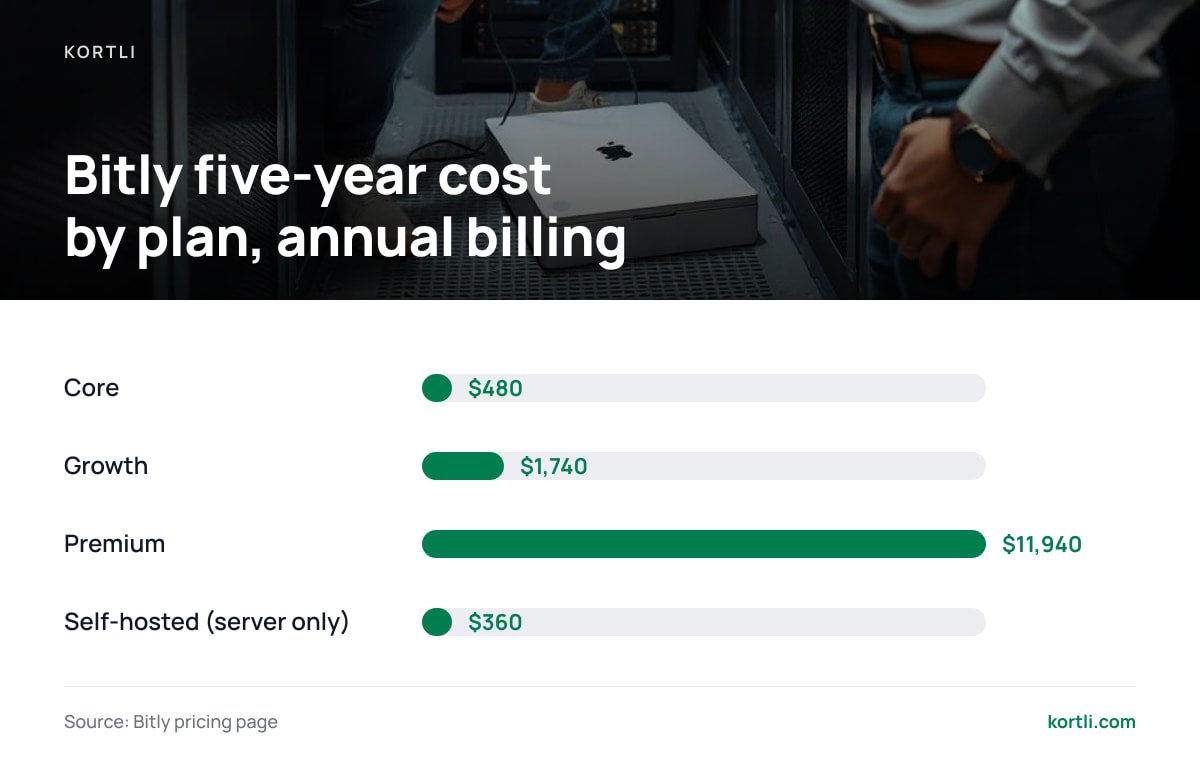
- At list prices, five years of Bitly costs roughly $480 to $600 on Core, $1,740 to $2,100 on Growth, and $11,940 to $18,000 on Premium, depending on annual or monthly billing.
- A 10% yearly price rise on a $29 plan adds about $385 over five years, so the sticker price understates the bill.
- Short links on the free tier generally keep redirecting, but branded-domain links and paid features depend on an active plan, so check the terms before you print anything.
- On the lowest paid tier, staying put is often cheaper than self-hosting. From the middle tier up, owning the server wins on cost.
- Bitly is privately held and publishes no audited revenue, so treat any revenue figure you see online as a third-party estimate.
Table of Contents
- What Bitly Is, and Why a 5-Year View Changes the Math
- The Cost of Bitly Over 5 Years, Plan by Plan
- Three Ways the Five-Year Number Grows Past the Sticker Price
- How Long a Bitly Link Lasts, and What Happens When You Stop Paying
- Which Is Better: Bitly or a Free Link Shortener?
- Bitly's Revenue, and Why It Matters to Your Price
- When Staying on Bitly Is the Cheaper Move
- What Self-Hosting Costs Over the Same 5 Years
- Get a Five-Year Link Bill You Can Predict With Kortli
- Frequently Asked Questions
- Sources
What Bitly Is, and Why a 5-Year View Changes the Math
Bitly is a hosted link shortener launched in 2008. You paste a long URL, it gives you a short one on its own domain (or on your branded domain if you pay), and it counts clicks. It also makes QR codes and has a link-in-bio page. Most people meet it through the free tier and stay because every link they ever shared now points through Bitly.
That is why five years is the right window. A monthly price of $29 looks small. The same price is $1,740 after 60 months, and by then you cannot easily leave, because the short links are printed on packaging, buried in old emails and embedded in QR codes. Monthly pricing is easy to approve. The decision actually gets made on the cumulative price.
The Cost of Bitly Over 5 Years, Plan by Plan
The table below multiplies the list prices on Bitly's pricing page by 60 months. Prices change, so check the current page before you rely on any figure here. The self-hosted row assumes a $6 per month small server, which is an assumption and not a quote.
| Plan | Monthly price (annual billing) | 5-year total | Monthly billing price | 5-year total |
|---|---|---|---|---|
| Free | $0 | $0 | $0 | $0 |
| Core | $8 | $480 | $10 | $600 |
| Growth | $29 | $1,740 | $35 | $2,100 |
| Premium | $199 | $11,940 | $300 | $18,000 |
| Enterprise | Custom quote | Not published | Custom quote | Not published |
| Self-hosted (server only) | $6 | $360 plus a one-time license | n/a | n/a |
Two details matter here. Monthly billing on Growth costs $360 more over five years than annual billing, for the same product. And Premium costs 6.9 times as much as Growth, the steepest step in the whole ladder for any team that outgrows Growth.
Premium billed monthly comes to $18,000 over five years, and what you receive for it is a service that answers a browser with an HTTP redirect.
That redirect is defined in RFC 9110, the IETF's HTTP semantics standard, and a basic version takes a few lines of server configuration. The price pays for the analytics, the team features and the support.
Three Ways the Five-Year Number Grows Past the Sticker Price
The table is the floor. Real bills tend to land higher for three reasons.
- Price increases. Hosted tools raise prices, and you have no leverage once your links are embedded. Take a hypothetical 10% rise each year on a $29 plan: you pay $348, $383, $421, $463 and $510, for a total of about $2,125. That is $385 more than the flat table figure. Bitly may never do this, but you should budget for the possibility.
- Tier pressure. Each plan caps monthly links, tracked clicks, QR codes or custom domains. If you launch a second brand or a campaign-heavy quarter, you hit a ceiling and move up a tier. Growth to Premium is the expensive jump.
- Billing cycle. Choosing monthly billing for flexibility costs 20% to 25% more on the plans above. If you are sure you will still be using the tool in a year, annual billing is cheaper.
Per-domain pricing deserves its own mention. If you manage several brands, check how many custom domains each plan includes, because adding brands is where a modest plan quietly becomes an expensive one.
How Long a Bitly Link Lasts, and What Happens When You Stop Paying
A link on a hosted shortener lasts as long as the provider keeps the redirect running. Bitly's terms of service govern what happens to your links and account, and the company says that links on its own short domain do not expire by default. The risk sits with paid features. Links on a branded domain, custom back-halves and analytics are tied to a plan, and downgrading can change whether they keep working.
We cover the cancellation case in detail in What Happens to Bitly Links If You Cancel?. The short version: read the current terms before you cancel, and export your link list first.
The larger cost of this dependency is the reprinting bill if a link stops resolving. A static QR code is just an encoded URL, and the QR Code standard's creator, Denso Wave, describes it as a pattern that holds the data itself. So a printed code pointing at a domain you do not control is only as durable as that provider's redirect.
Which Is Better: Bitly or a Free Link Shortener?
Searchers often frame this as Bitly against one of the oldest free shorteners. The answer depends on what you are doing.
- One-off sharing. A free, no-account shortener is fine. You shorten a link for a text message, it works, and you never think about it again. Paying anything here is waste.
- Tracking and branding. Free shorteners typically give you little analytics and no branded domain. If you need to know which channel sent the click, or you want links on your own domain, Bitly's paid tiers do that and the free ones do not.
- Long-lived printed material. Neither is a good home. Both put your links on someone else's domain and someone else's roadmap.
My pick for a business that cares about click data is Bitly over the free option, as long as you accept the lock-in. For a business with printed links and more than a few hundred codes in circulation, I would pick neither and use a domain I own, as we explain in How to Host Your Own Bitly.
Bitly's Revenue, and Why It Matters to Your Price
Bitly is privately held and does not publish audited financials, so there is no official revenue number to quote. Any figure on a data-aggregator site is an estimate, and those estimates vary widely. I would not build a purchasing decision on one.
You can observe the model, though. Revenue comes from subscriptions that scale with link volume, domains, seats and QR codes. A company funded that way has an incentive to move you to a higher tier as you grow, and to price in your switching cost. Knowing that helps you negotiate and helps you plan for the upward drift described earlier.
When Staying on Bitly Is the Cheaper Move
Self-hosting does not always win. On Core, the five-year total is $480 on annual billing. A $6 server is $360 over the same period, and then you add the license and your own setup time. The saving is small or negative.
Stay put if all of the following apply:
- You use one domain and fewer links than your plan's monthly cap.
- Nobody on your team wants to maintain a server. Patching and backups are real work, and an unpatched server costs more than a subscription.
- Your links are short-lived. Campaign links that die in 90 days do not need ownership.
Move when you are on Growth or above, when you manage many branded domains, or when printed material makes outliving a vendor worth money. At $1,740 to $2,100 over five years for Growth, a one-time license plus a small server clears the break-even point fast.
Pro Tip: Before you decide, export your full link list with creation dates and click counts, then sort by clicks in the last 90 days. In most accounts, a small fraction of links carries nearly all the traffic. If the live links number a few dozen, you can move them in an afternoon and let the dormant ones lapse, so leaving costs much less than it feels.
What Self-Hosting Costs Over the Same 5 Years

Running your own shortener costs a server, a domain, TLS and your time. A small virtual server commonly runs $5 to $12 per month, which is $300 to $720 over five years. You already pay for the domain with any provider. TLS certificates are free through Let's Encrypt, which issues them at no charge and automates renewal.
People underestimate time. Plan on a few hours for the first install and an hour or two a quarter for updates and backup checks. If your hourly value is high, price that in honestly. Our guides on running a URL shortener on your own server and installing one on Linux with Docker, Nginx and TLS lay out the full task list so you can estimate it before you commit.
Get a Five-Year Link Bill You Can Predict With Kortli
The problem in this article is a bill that grows while your switching cost grows with it. Kortli removes the recurring part. You buy a self-hosted link shortener once, install it on your own Linux server, and run it on your own domains. There is no per-domain fee, so adding a brand costs nothing extra. Click analytics and geographic tracking sit on your server, and so do password-protected links, A/B split tests and styled QR codes with your logo. If you stop paying us, your links keep working, because the redirect is yours.
There is one caveat. You are the operator. Kortli does not host anything for you, so you handle server updates, backups and uptime, and if you will not do that, a hosted plan is the better buy. Check the current license price on the site and compare it to your own five-year Bitly number from the table above before you commit.
Frequently Asked Questions
What is Bitly?
Bitly is a hosted link shortener launched in 2008 that turns long URLs into short ones, tracks clicks and generates QR codes. It has a free tier and paid plans that add branded domains, more links and more analytics.
How long is a Bitly link good for?
Bitly says links on its own short domain do not expire by default. Features tied to a paid plan, such as branded-domain links and analytics, depend on your subscription status, so read the current terms before you cancel or downgrade.
What is Bitly's revenue?
Bitly is privately held and does not publish audited revenue. Any number you find online is a third-party estimate, and those estimates differ widely, so none should be treated as confirmed.
Which is better, a free shortener or Bitly?
For a one-off share, a free no-account shortener is enough and costs nothing. For click tracking, branded links and team use, Bitly's paid tiers do things free shorteners do not, at the price of lock-in to Bitly's domain and plans.
How much does Bitly cost over 5 years?
At list prices, Core costs about $480 to $600, Growth about $1,740 to $2,100, and Premium about $11,940 to $18,000, depending on annual or monthly billing. Price rises or plan upgrades during that time would add to these figures.
Sources
- Bitly Terms of Service | Bitly
- RFC 9110: HTTP Semantics | Internet Engineering Task Force
- Let's Encrypt | Internet Security Research Group
- About QR Codes | Denso Wave
Leave a Reply