

To run your own URL shortener, you need three things: a short domain you control, a small Linux server, and redirect software that maps slugs to destinations. The software matters less than who owns the domain your links live on. Links on a provider's domain can never be moved. Links on your own domain can be switched to any tool at any time without breaking a single printed QR code.
TL;DR:
- A self-hosted shortener has three parts: a domain you own, a server you control, and software that looks up a slug and returns a redirect.
- Domain ownership is the decision that protects your links. If the domain lapses, every QR code you ever printed points wherever the next owner wants.
- Use 302 or 307 redirects for links you measure. Browsers can cache 301s, so repeat clicks may never reach your server.
- Lock link creation behind a login on day one. An open shortener on your domain will get used for phishing.
- Self-hosting moves the work to you: patching, backups, and privacy compliance for the click data you collect.
Table of Contents
- What Running Your Own Shortener Actually Involves: Three Moving Parts
- The Real Cost: Monthly Rent vs. Server Bills
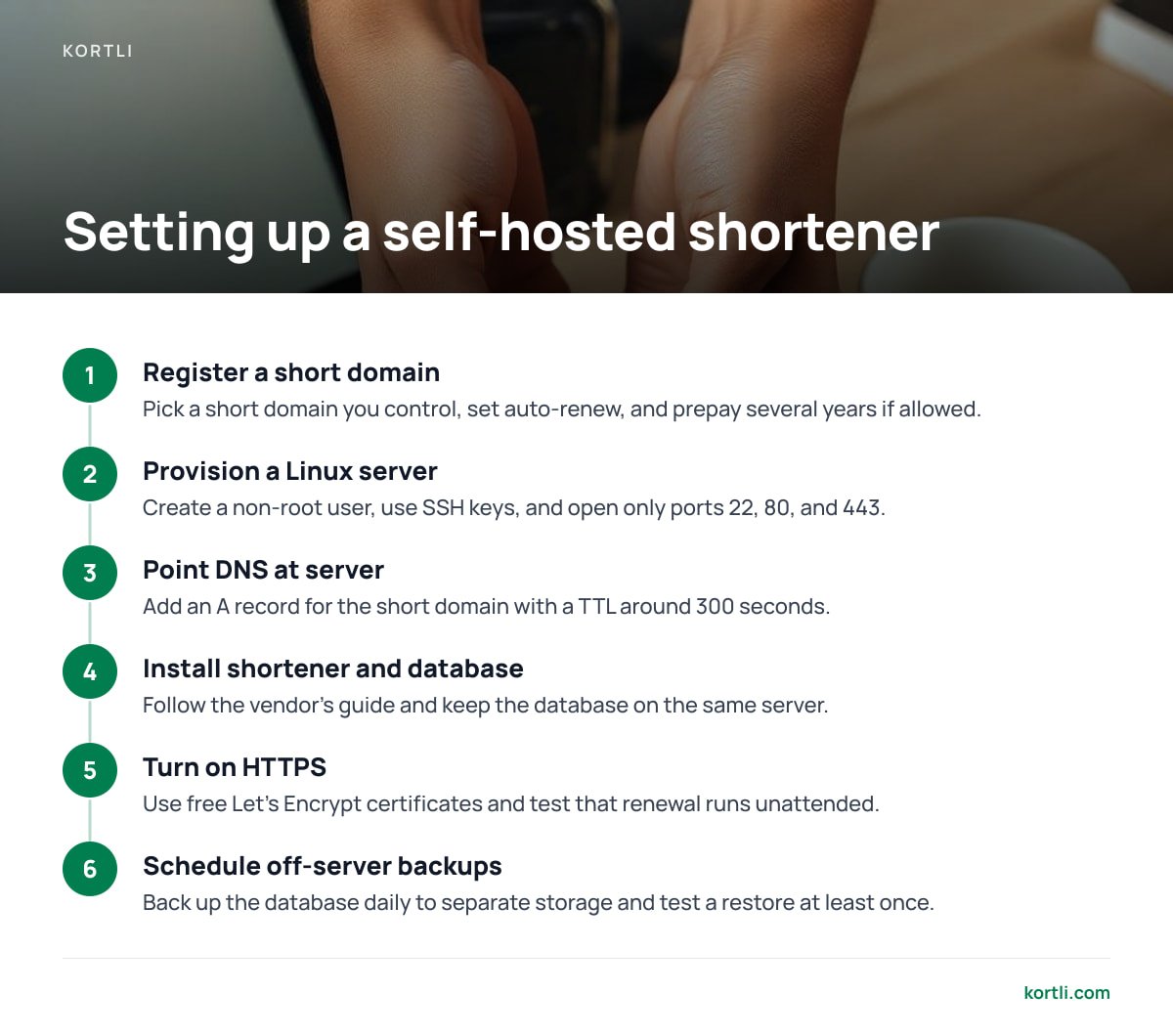
- How to Run Your Own URL Shortener in Seven Steps
- 301 or 302: The Redirect Choice That Decides Your Analytics
- Lock It Down Before Someone Else Uses It
- Privacy and Click Data: What Owning the Server Changes
- Moving Existing Links Without Breaking Anything
- Which Option I'd Pick, and When You Shouldn't Self-Host
- Own Every Short Link and QR Code for One Payment, Not a Monthly Bill
- Frequently Asked Questions
- Sources
What Running Your Own Shortener Actually Involves: Three Moving Parts
Hosted link services make shortening look like magic. Under the hood, it is three ordinary components. Once you see them separately, it becomes clear which ones you need to own and which ones you can swap.
The domain: the part that cannot change
Your short domain (something like go.yourbrand.com or a short standalone domain) is the address printed on business cards, packaging, and QR codes. Everything else in the stack can be replaced. The domain cannot, because every link you have ever distributed depends on it resolving to a server you control. If you take one idea from this article, take this one: register the domain in your own name, at a registrar you have the login for, with auto-renew switched on.
The server: a small Linux box is enough
A redirect is a cheap operation. The server reads the slug from the request, looks it up in a database, and sends back a short HTTP response with a Location header. A modest virtual private server with 1 to 2 GB of RAM comfortably handles the traffic most businesses generate. You need a server you can reach over SSH, a firewall, and a web server or reverse proxy in front of the application to handle HTTPS.
The software: the part you can swap
The application stores slugs, destinations, and click records, and gives you an admin interface to manage them. This layer is where products differ: analytics depth, QR generation, password protection, split testing, multi-domain support. Because you own the domain and the database, you can migrate from one application to another later. You cannot do that when someone else owns the domain.
The Real Cost: Monthly Rent vs. Server Bills

People usually start looking at self-hosting because of the subscription line on the card statement. That is a fair reason, but compare the full picture, not just the license fee. If you want the full breakdown of what a recurring plan does and doesn't include, we covered it in what a hosted subscription actually buys you.
| Hosted subscription | Self-hosted, open source | Self-hosted, paid license | |
|---|---|---|---|
| Software cost | Recurring monthly or annual fee | Free | One-time or recurring license |
| Infrastructure | Included | Your server, typically a few dollars to about $10/month for a small VPS | Same as open source |
| Domain | Often extra per branded domain on many plans | Your registration fee, usually renewed yearly | Same |
| Who holds click data | The provider | You | You |
| What happens if you stop paying | Features or links can be restricted | Nothing; you never paid | Nothing; the software keeps running |
| Maintenance | None for you | All of it, including the app code | Server upkeep; vendor ships updates |
| Support | Vendor support | Community forums, issue trackers | Vendor support, scope varies |
The hosted column is the only one where you pay forever for something you never own. The open-source column looks free, but your time is the price. You assemble the features, patch the app, and debug it alone. We break that trade-off down in what free really costs when you self-host.
How to Run Your Own URL Shortener in Seven Steps
The exact commands depend on the software you pick, but the sequence below is the same for almost any self-hosted shortener.
- Register a short domain you control. Shorter is better for print and QR density. Set auto-renew, and if your registrar allows it, prepay several years.
- Provision a Linux server. Create a non-root user, disable password SSH logins in favor of keys, and open only ports 22, 80, and 443.
- Point DNS at the server. Add an A record (and AAAA if you use IPv6) for the short domain. Use a TTL of around 300 seconds while you are setting up, so mistakes correct quickly.
- Install the shortener and its database. Follow the vendor's install guide. Keep the database on the same server unless you have a reason not to; latency matters on every redirect.
- Turn on HTTPS. Let's Encrypt issues free, automatically renewable certificates, and the EFF's Certbot tool handles renewal for common web servers. Test that renewal runs unattended. An expired certificate breaks every link at once with a browser warning.
- Choose your default redirect code. This choice affects your analytics more than anything else in the stack, so it gets its own section below.
- Schedule off-server backups. Your database is the only record of which slug goes where. Back it up daily to storage that is not on the same machine, and test a restore at least once.
Let the domain lapse and every QR code you ever printed starts sending your customers wherever the next registrant wants.
That is not a hypothetical edge case. Once an expired domain passes its registrar's grace and redemption periods, anyone can register it. The printed material is still out in the world, and you cannot recall it. For more on making printed codes durable, see how to create a branded QR code that won't break.
301 or 302: The Redirect Choice That Decides Your Analytics
Most guides tell you to use 301 redirects because they are "permanent" and "good for SEO." For a shortener whose clicks you want to count, that advice is backwards.
RFC 9110, the IETF standard that defines HTTP semantics, specifies that a 301 response is heuristically cacheable. A browser is allowed to remember the redirect and skip your server on later visits. A 302 or 307 is not cached by default, so every click passes through your server and gets logged.
Under RFC 9110, a 301 is heuristically cacheable. A browser that has seen your link once may never ask your server again, and those repeat clicks vanish from your analytics.
The SEO argument doesn't hold up for short links either. Google Search Central's guidance on redirects explains that permanent redirects signal that the target URL should be shown in search, while temporary redirects are a weaker signal. Your short links are not pages you want indexed. They are tracking hops in front of pages that already rank on their own.
My pick: default to 302 for everything you measure. Use 307 if you need POST requests preserved, which is rare for shorteners. Save 301 for one case only: a link you have permanently retired and want browsers to stop asking about.
Pro Tip: Before you ever move a short domain to a new server, lower its DNS TTL to 300 seconds at least a full day in advance, so the old, longer TTL has time to expire from resolvers worldwide. Then do the cutover with both servers running the same database snapshot. Visitors get answered by whichever server their resolver points to, and nobody hits a dead link during propagation.
Lock It Down Before Someone Else Uses It

A shortener is, by design, a machine for sending people somewhere they didn't type. That makes an unprotected one attractive to anyone running phishing campaigns, because your trusted domain hides their malicious destination.
The OWASP Cheat Sheet on Unvalidated Redirects and Forwards describes how attackers abuse redirects to lend a legitimate domain's credibility to a malicious target. On a shortener, you can't validate redirects away, because redirecting is the product. The defense is controlling who can create links.
- No public link creation. Require an authenticated account to create or edit links. If your software ships with an anonymous "shorten a URL" form, disable it.
- Two-factor authentication on admin accounts. One stolen password should not let someone repoint your highest-traffic QR code.
- Destination screening. Google's Safe Browsing service lets you check URLs against its lists of known unsafe sites. Run new destinations through a check like this if more than a handful of trusted people create links.
- Rate limits on the admin and API. This slows credential stuffing and limits the damage from a leaked API key.
- Unattended security updates. Enable automatic OS patching. Watch for application updates from your vendor or project, and apply them promptly.
If your domain does get flagged for hosting a malicious redirect, browsers may warn users on every link on that domain, including your legitimate ones. Prevention is far cheaper than getting delisted.
Privacy and Click Data: What Owning the Server Changes
Self-hosting means click logs stay on hardware you control instead of in a third party's analytics warehouse. That is a real privacy advantage. But it also means the compliance responsibility is now entirely yours.
The EU's General Data Protection Regulation states in Recital 30 that people can be identified through online identifiers such as internet protocol addresses. A shortener that logs raw IPs alongside timestamps and user agents is collecting personal data. If you have visitors in the EU, that comes with obligations.
Practical steps that keep useful analytics without hoarding data:
- Derive location, then drop the IP. Run geolocation lookups against a local database on your own server, store the country or city, and truncate or discard the full address.
- Set a retention period. Raw click events older than 12 or 24 months rarely inform a decision. Aggregate them into daily counts and delete the rows.
- Don't send click data to outside scripts. The privacy case for self-hosting falls apart if every redirect also fires a third-party tracking pixel.
- Document it. Add a line to your privacy policy covering short-link analytics, what you store, and for how long.
Moving Existing Links Without Breaking Anything

If you already have links on a hosted service, what you can migrate depends on which domain those links use.
Links on the provider's own short domain cannot be moved. That domain belongs to the provider, and only they decide where those slugs point. You can recreate the destinations on your new domain, but every copy of the old link already in circulation stays tied to the provider.
Links on your own branded domain can be moved cleanly. Export your slugs and destinations, import them into the new shortener with identical slugs, test a sample, then switch the DNS record. Visitors never notice. This is why connecting a custom domain matters even while you're still on a hosted plan. We cover that in owning the links, not just the name.
Check one thing before you cut over: whether your current links use any provider-specific features such as device targeting, expirations, or deep links. Make sure your new software supports them, or rebuild those links by hand.
Which Option I'd Pick, and When You Shouldn't Self-Host
If you manage branded short links or QR codes on printed material, and someone on your team can SSH into a server, self-host. You will be paying recurring fees for years to rent a redirect that costs almost nothing to run. Worse, the provider stays in control of links you can't easily reprint.
Between open source and a paid self-hosted license, the deciding factor is whose time you'd rather spend. If you enjoy maintaining software and only need basic redirects, open source is a reasonable choice. If you need QR styling, split testing, password protection, and multiple domains working together, assembling those yourself costs more in hours than a license does in dollars.
Don't self-host if no one on your team will own the server, or if you can't commit to applying updates and checking that backups run. An unpatched shortener on your domain is a bigger liability than a subscription.
Own Every Short Link and QR Code for One Payment, Not a Monthly Bill
Kortli is a self-hosted link shortener you install on your own Linux server for a one-time license fee. It addresses each problem described above. Your links live on your domains, with no per-domain fee for adding more. Click analytics and geographic tracking are stored on your server, not in someone else's database. And nothing stops working if you stop paying, because there is no subscription to stop.
It also ships the features you would otherwise assemble yourself: password-protected links, A/B split testing, and styled QR codes with your logo embedded. The honest caveat is that Kortli moves the server work to you. You are responsible for OS updates, off-server backups, and uptime, and you need to be comfortable on a Linux command line. Check the system requirements on the spec sheet before you buy, and check current pricing on the site.
Frequently Asked Questions
How much does it cost to run your own URL shortener?
The infrastructure is a small Linux server, typically a few dollars to about $10 a month, plus a yearly domain renewal. Open-source software is free but costs maintenance time, while paid self-hosted software adds a license fee. Over a few years, that is usually far less than a recurring hosted subscription.
Should a self-hosted URL shortener use 301 or 302 redirects?
Use 302 (or 307) for any link whose clicks you want to count. RFC 9110 makes 301 responses heuristically cacheable, so browsers may skip your server on repeat visits and those clicks never reach your analytics. Reserve 301 for links you have permanently retired.
Can I move my existing short links to a self-hosted shortener?
Only links that use your own custom domain can move without breaking. You export the slugs, import them with identical paths, and repoint DNS to your new server. Links on a hosted provider's own domain stay under that provider's control, and you cannot redirect them yourself.
Is a self-hosted URL shortener GDPR compliant?
It can be, but compliance is your responsibility once you host it. GDPR Recital 30 recognizes IP addresses as identifiers that can relate to individuals, so truncate IPs after deriving location, set a retention period, and disclose short-link analytics in your privacy policy.
What server do I need for a self-hosted link shortener?
A redirect is a lightweight database lookup, so a small virtual private server with 1 to 2 GB of RAM handles typical business traffic. You need SSH access, a firewall, HTTPS through a free certificate authority like Let's Encrypt, and off-server backups of the database.
How do I stop people from abusing my URL shortener for phishing?
Disable anonymous link creation and require logins with two-factor authentication for anyone who can create or edit links. Screen new destinations against a reputation service such as Google Safe Browsing, and rate-limit your admin and API endpoints.
Sources
- RFC 9110: HTTP Semantics | IETF / RFC Editor
- Redirects and Google Search | Google Search Central
- Unvalidated Redirects and Forwards Cheat Sheet | OWASP
- Regulation (EU) 2016/679 (General Data Protection Regulation) | EUR-Lex, European Union
- Let's Encrypt | Internet Security Research Group
- Google Safe Browsing | Google
Leave a Reply